
For Amazon booksellers

Decide at the shelf.Ship from the desk.

SpineFlip scans a book and answers BUY or REJECT in about a second, with the expected Amazon profit under your own rules. The web panel lists what you bought, walks the FBA shipment through to labels, and reprices on a schedule.

  • 1 month free
  • No credit card
  • Just connect your Amazon seller account
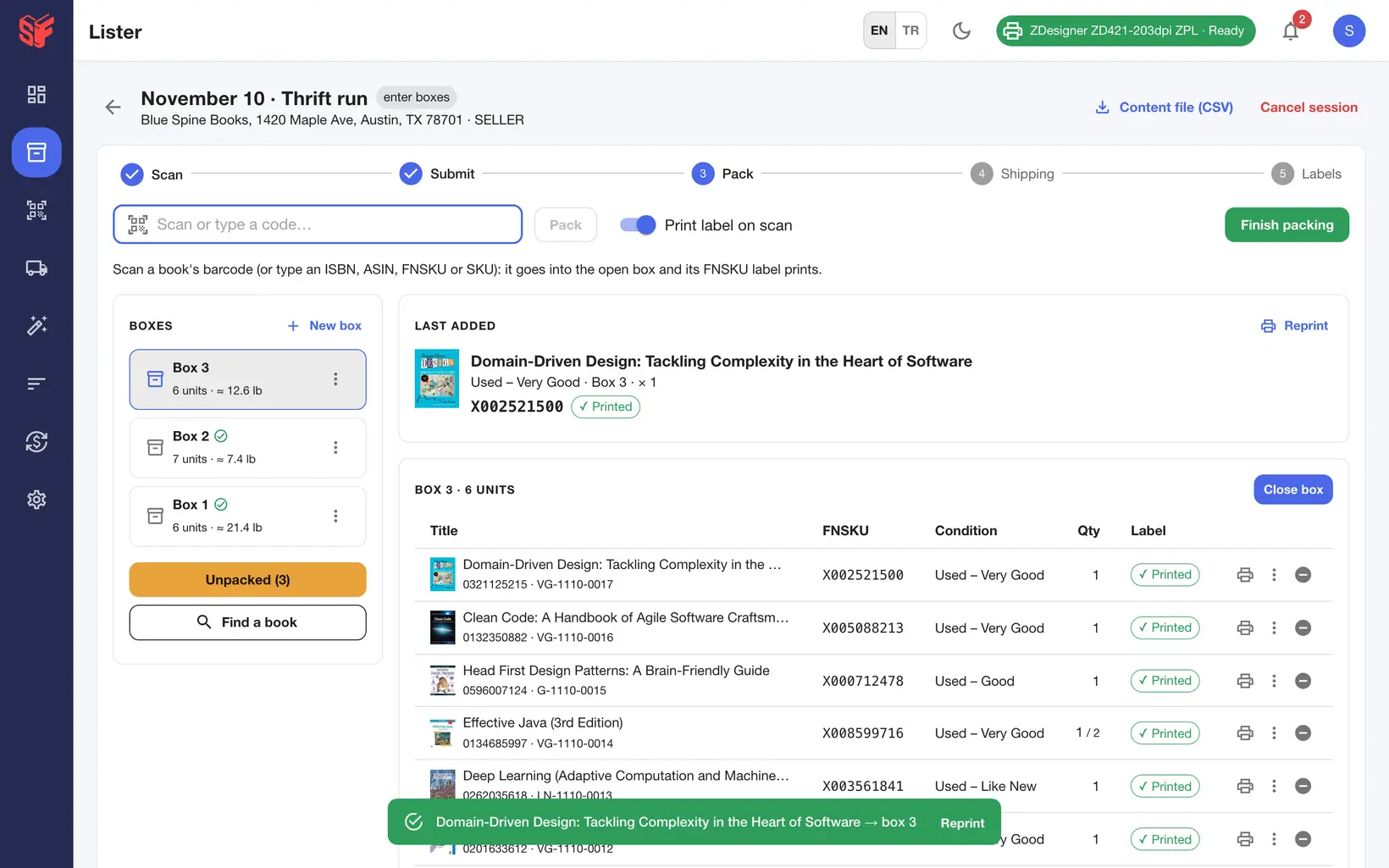
Scan each book into the open box; its FNSKU label prints silently. The newest box is at the top of the box list, the open box lists its latest books first, and box weights and the unpacked count are tracked.
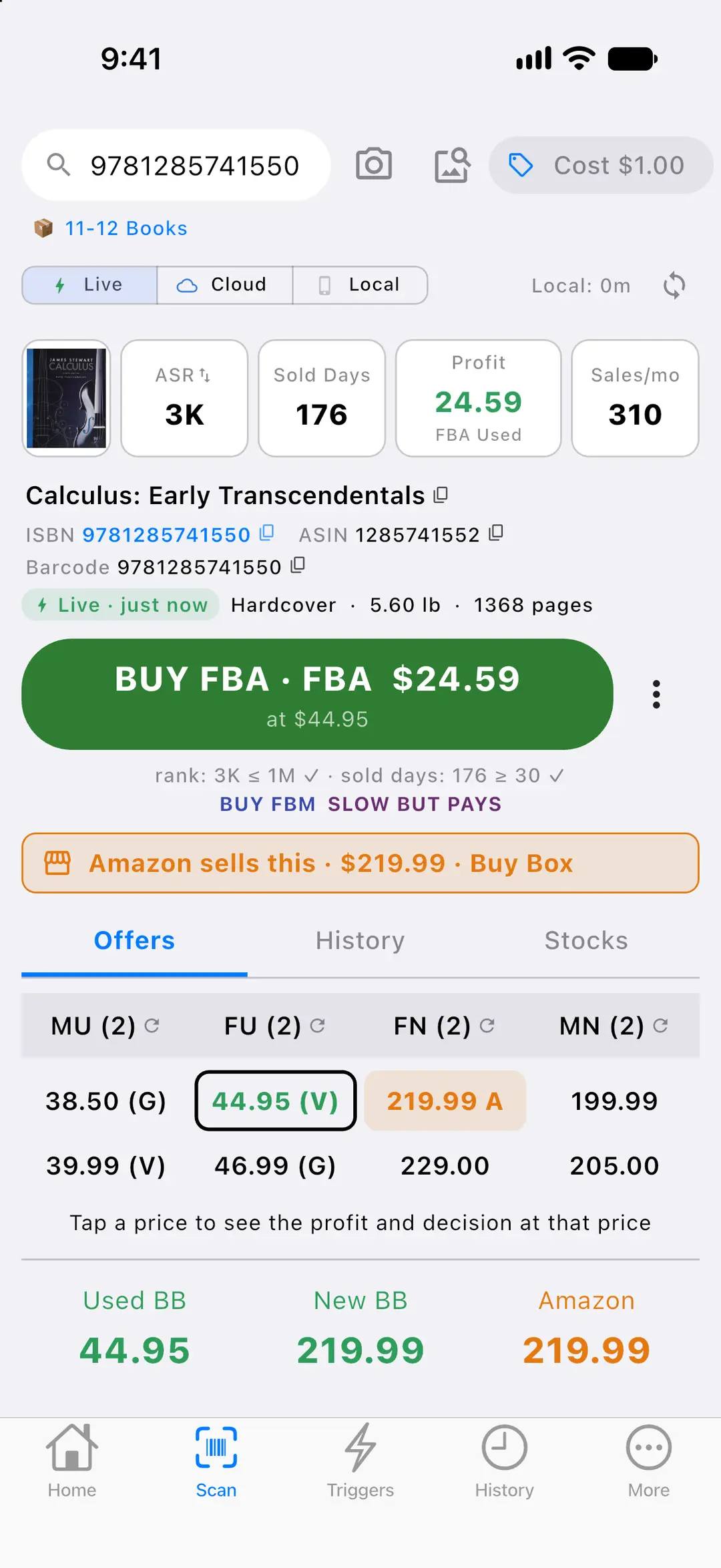
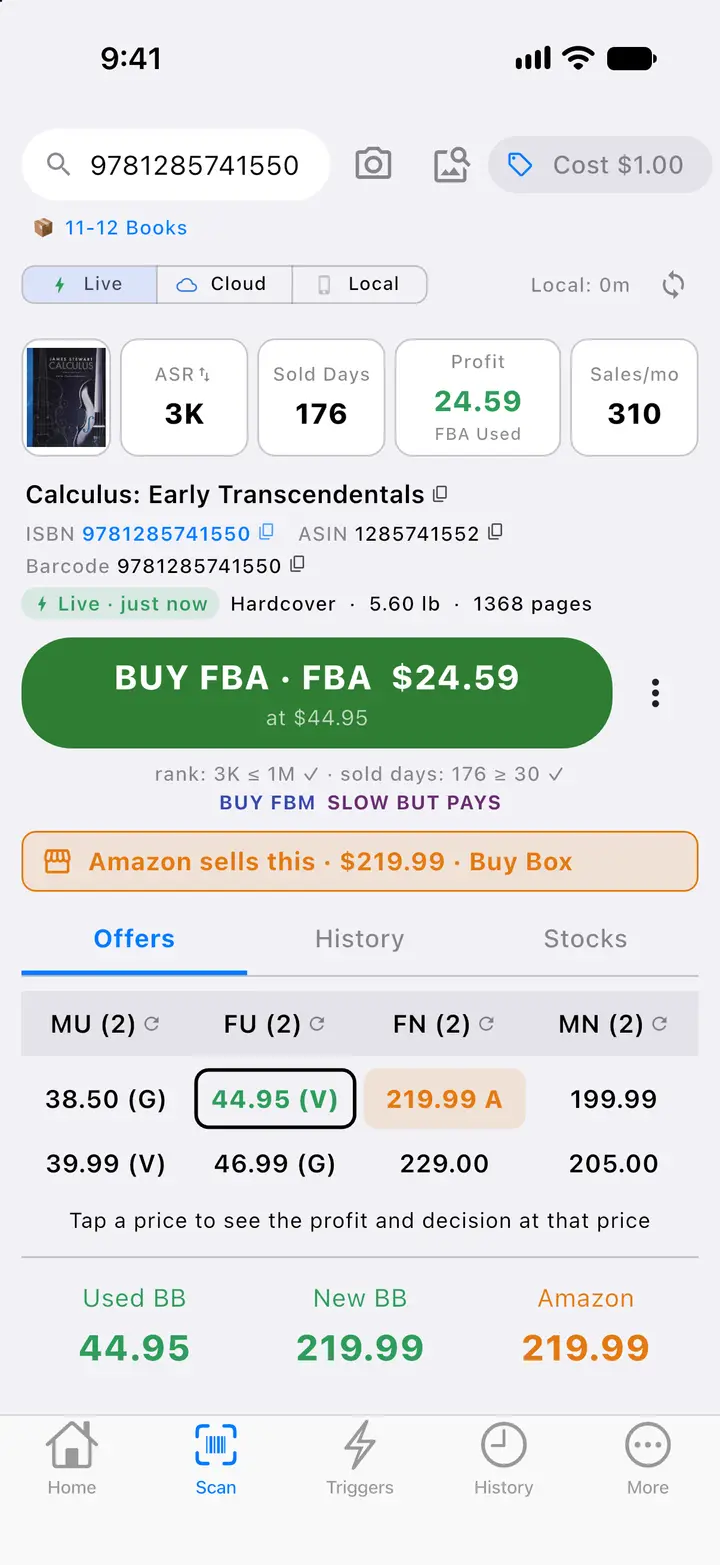
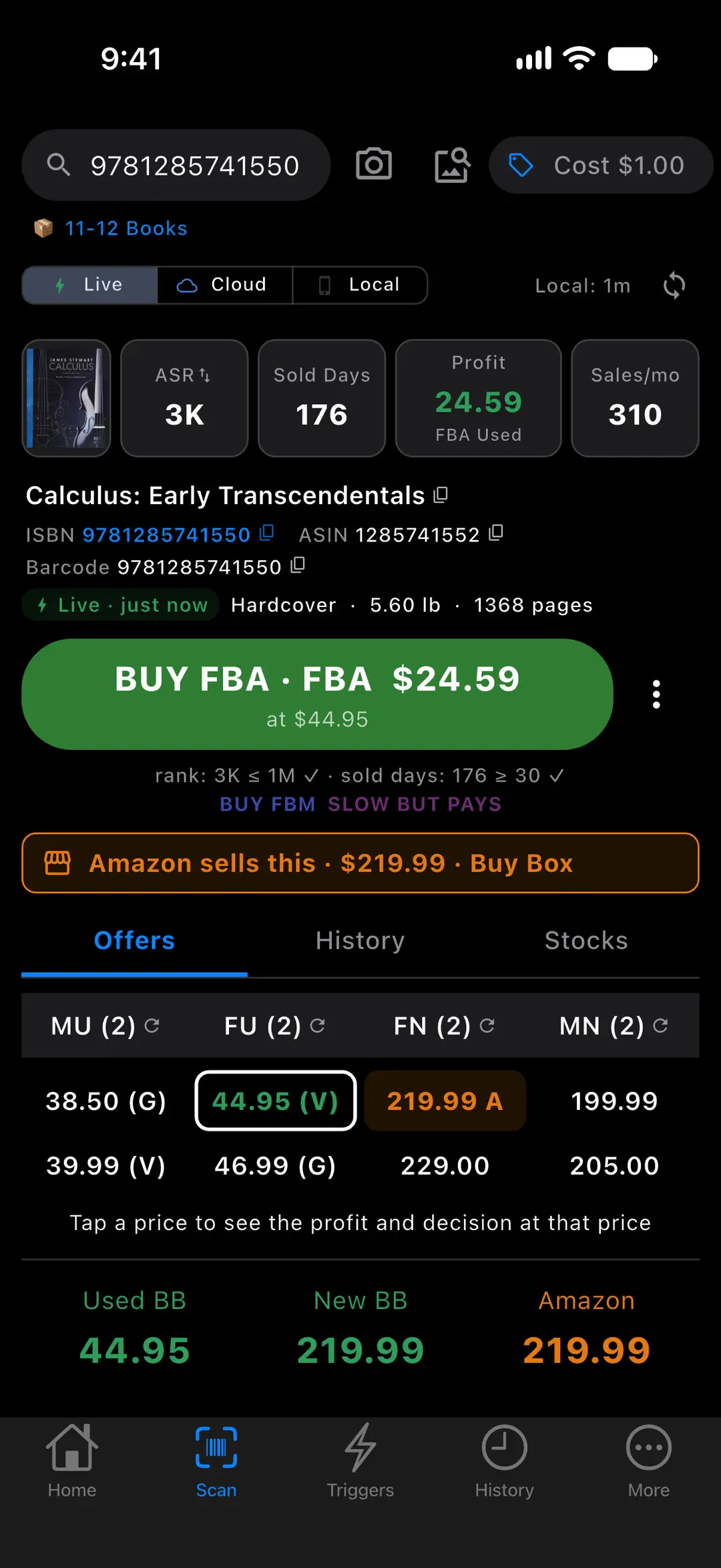
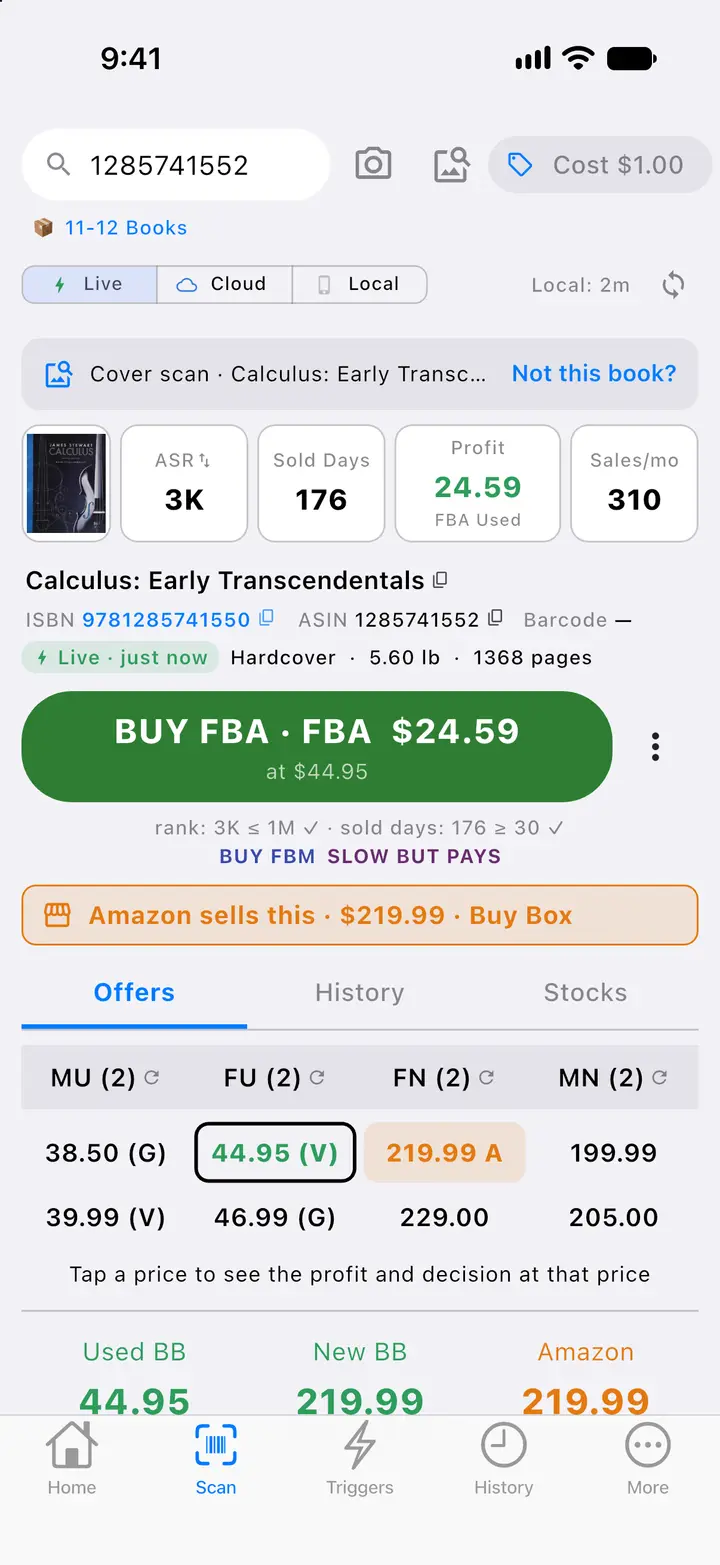
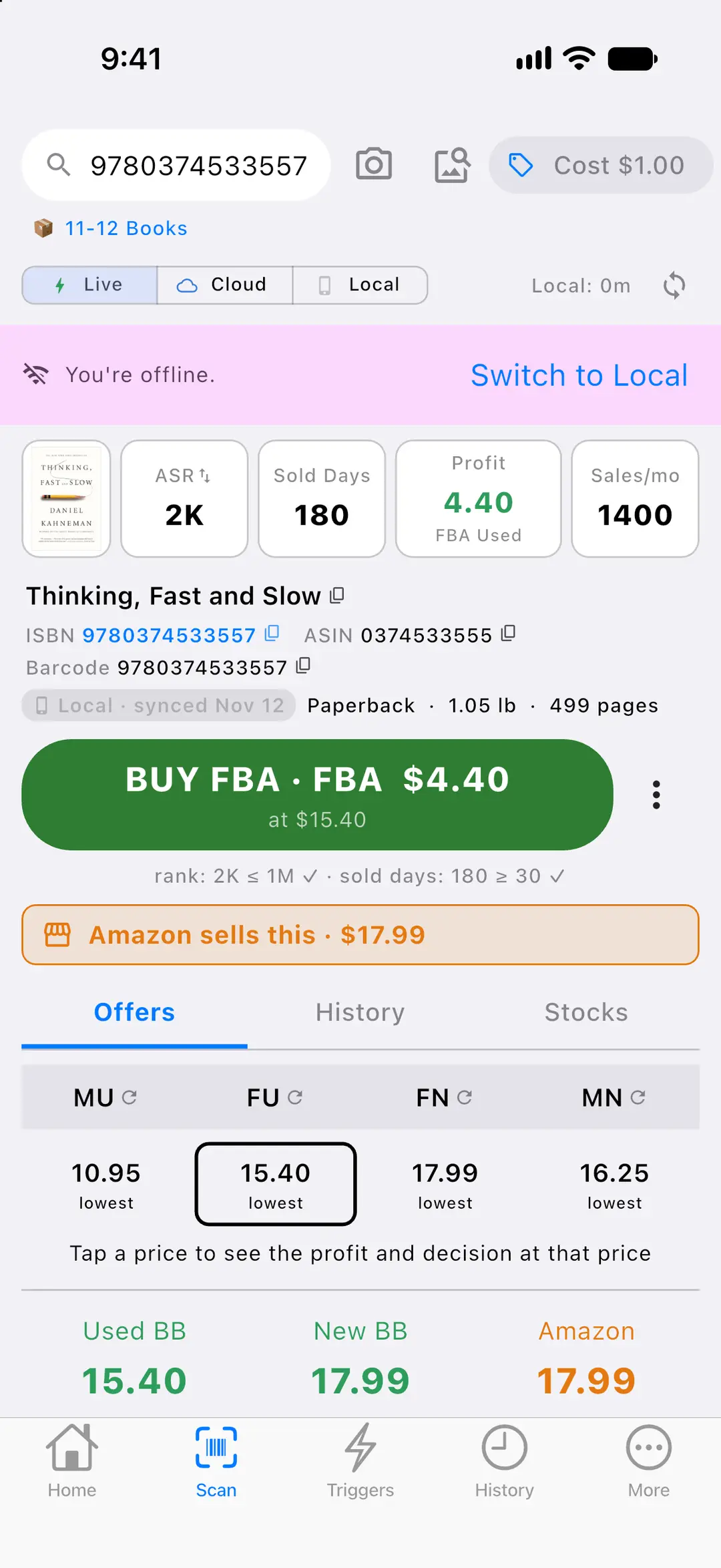
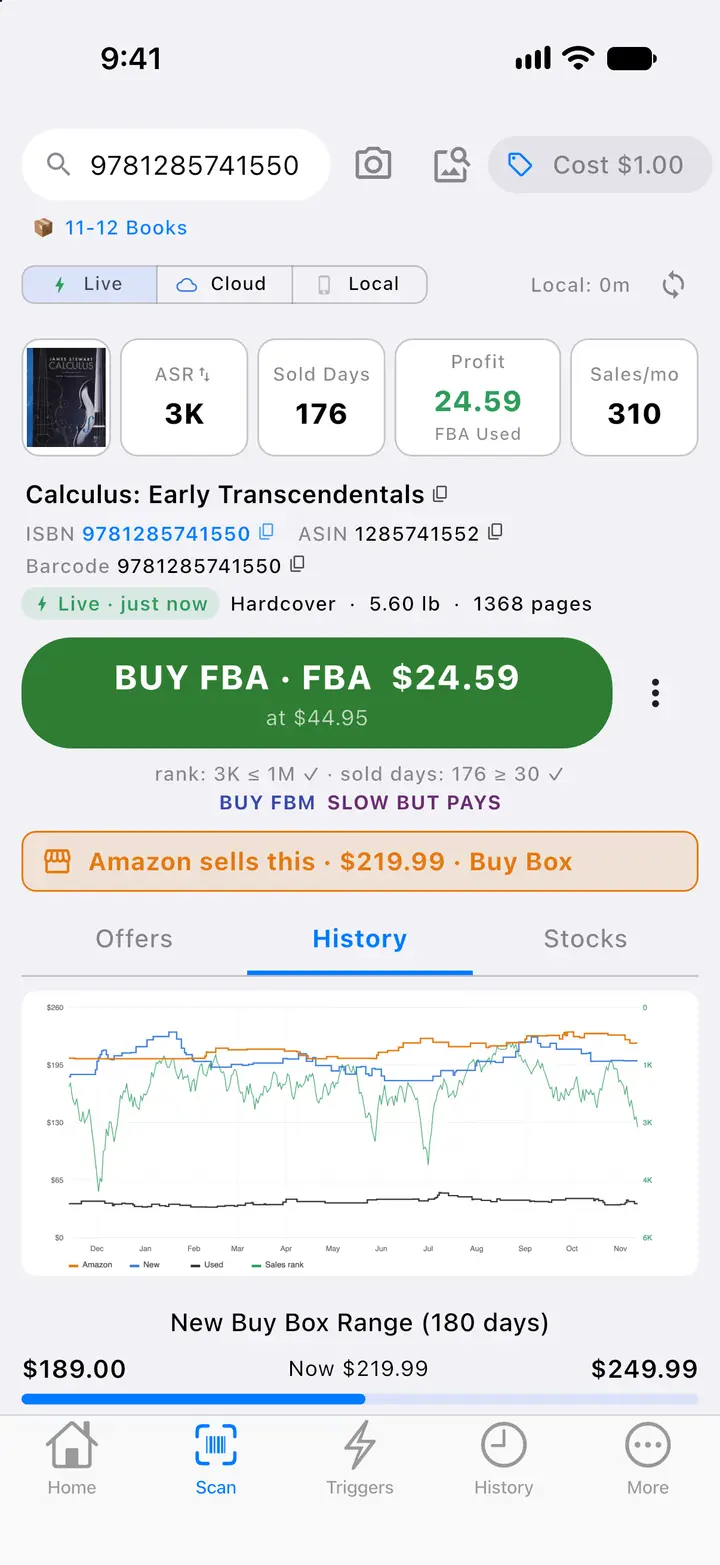
A live scan answers BUY with the matching trigger, the channel and the expected profit, above sales rank, sold days and monthly sales, the Amazon banner, the offers table and the Buy Box bar.
Fig. 1BUY decision from a live scanFig. 2FBA wizard, Pack — Actual SpineFlip screens. Sample data.Fig. 1BUY decision from a live scan — Actual SpineFlip screen. Sample data.

Shelf to warehouse

One pass from the barcode on the shelf to a labeled box bound for Amazon, then the repricing and the claims that follow.

  1. 01ScanPhone

    Point the camera at the barcode.

    EAN-13, UPC-A, EAN-8 and Code-128. The guide turns green and the phone ticks. No barcode? “Read ISBN” reads the number printed inside the book, on the phone, with no internet, and cover scan finds the book from its front cover when you are online. Bluetooth scanners work too.

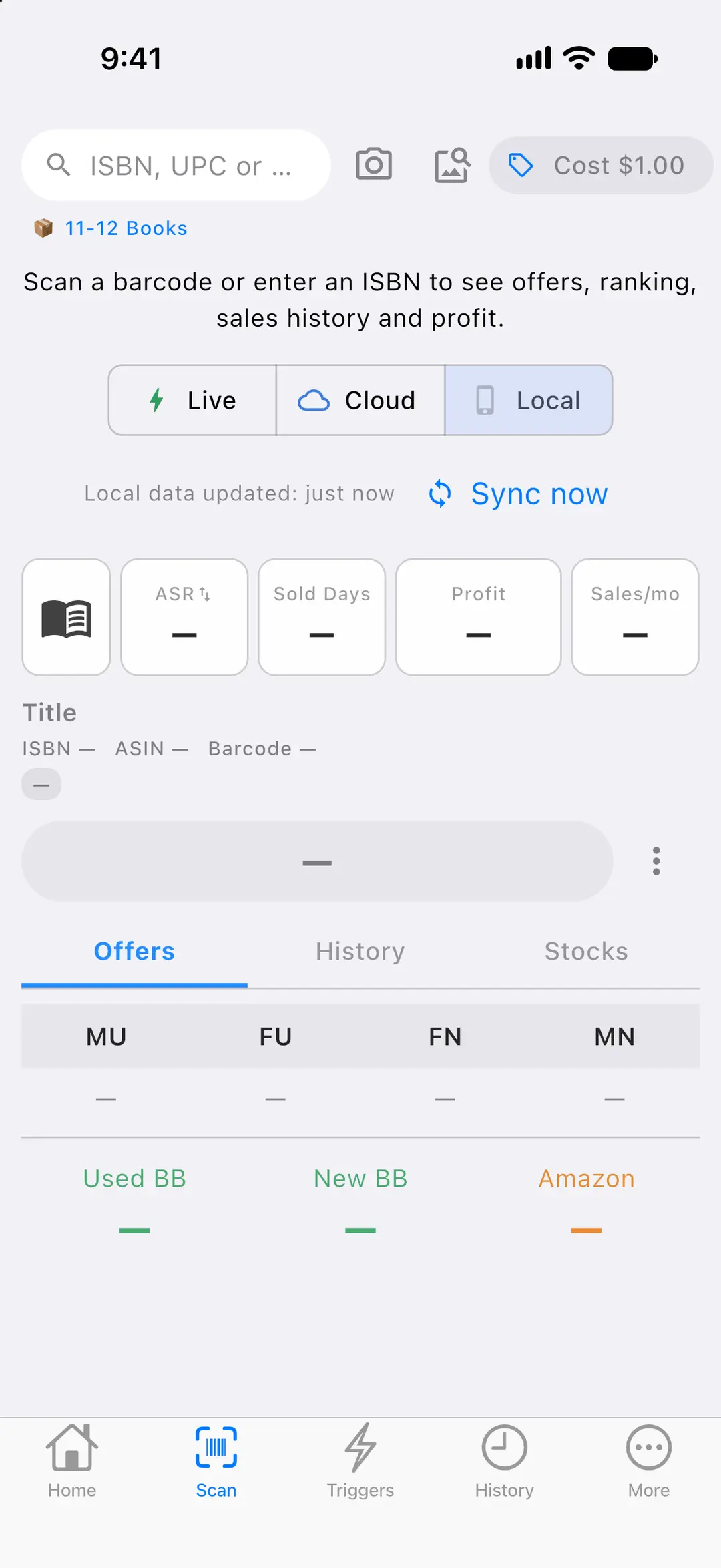
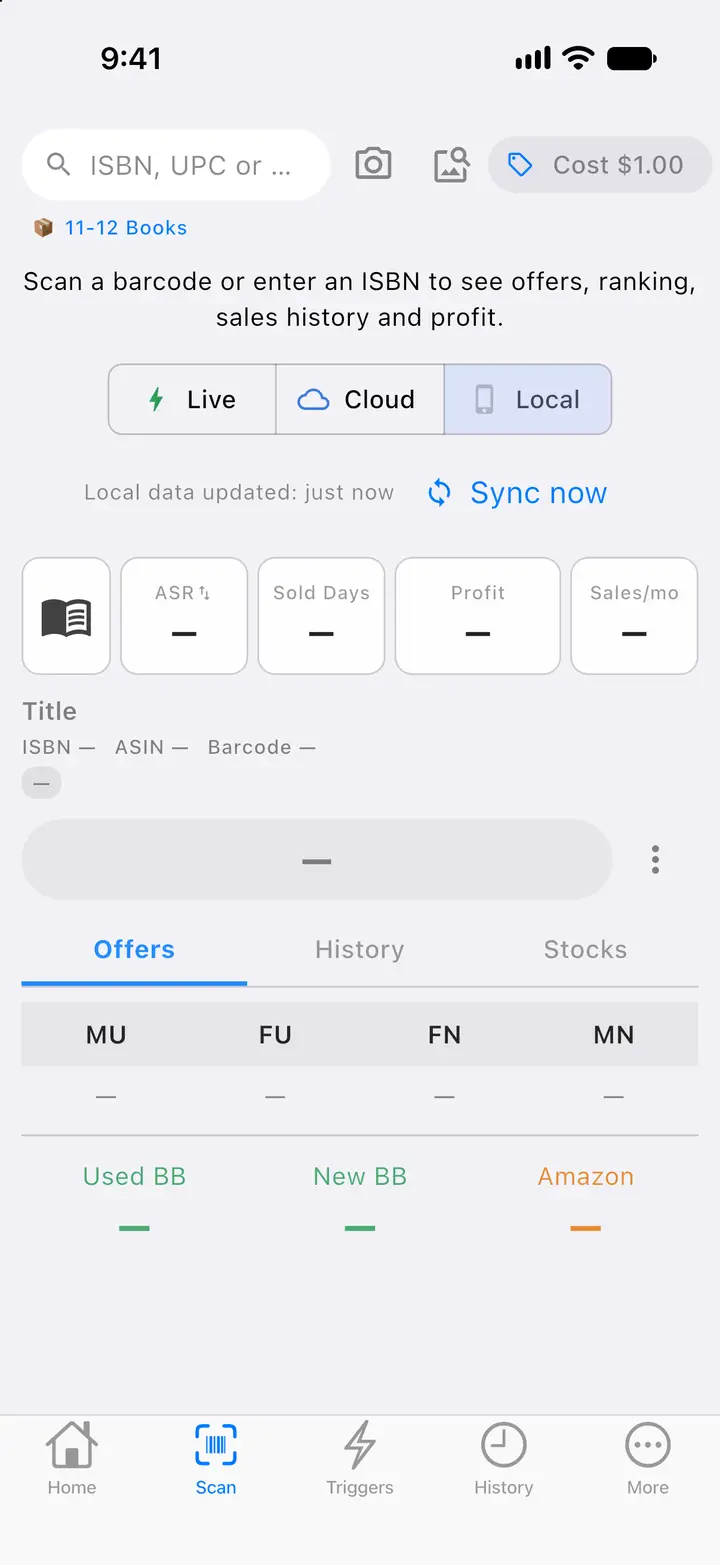
    Screen: the scan screen before a scan, with the Live, Cloud and Local data-source selector and the time the book data on the phone was last updated.

    Before the first scan: choose Live, Cloud or Local data and see when the book data on the phone was last updated. Next to the camera button, the cover button starts a cover scan for books without a barcode.
    Scan screen and data source — Actual SpineFlip screen. Sample data.
  2. 02EvaluatePhone

    See the real profit, not the price.

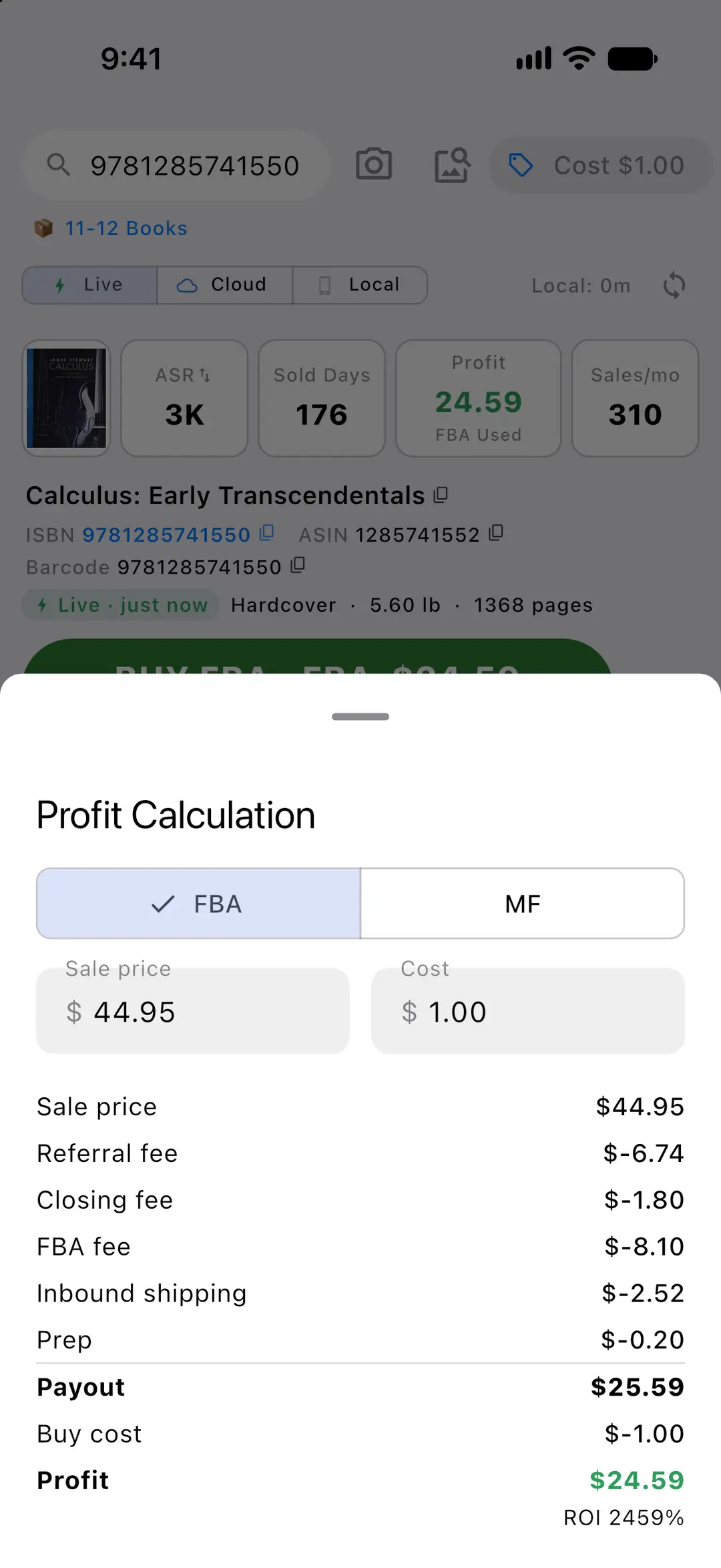
    Referral and closing fees, the FBA fee, inbound shipping, prep and your buy cost, on one sheet with ROI. Live scans use Amazon’s own fee estimate.

    Screen: the Profit Calculation sheet for a sample textbook sold at $44.95: fees, inbound shipping and prep leave a payout of $25.59, and the profit is $24.59 after a $1.00 buy cost.

    The profit sheet lists sale price, referral fee, closing fee, FBA fee, inbound shipping, prep, payout, buy cost, profit and ROI, for FBA or merchant-fulfilled.
    Sample scan · buy cost $1.00
    Profit calculation — Actual SpineFlip screen. Sample data.
  3. 03DecidePhone

    Your rules decide. In about a second.

    Triggers are tried top to bottom and the first match wins. You get BUY or REJECT with the trigger’s name, the channel and the expected profit, plus the reasons line by line.

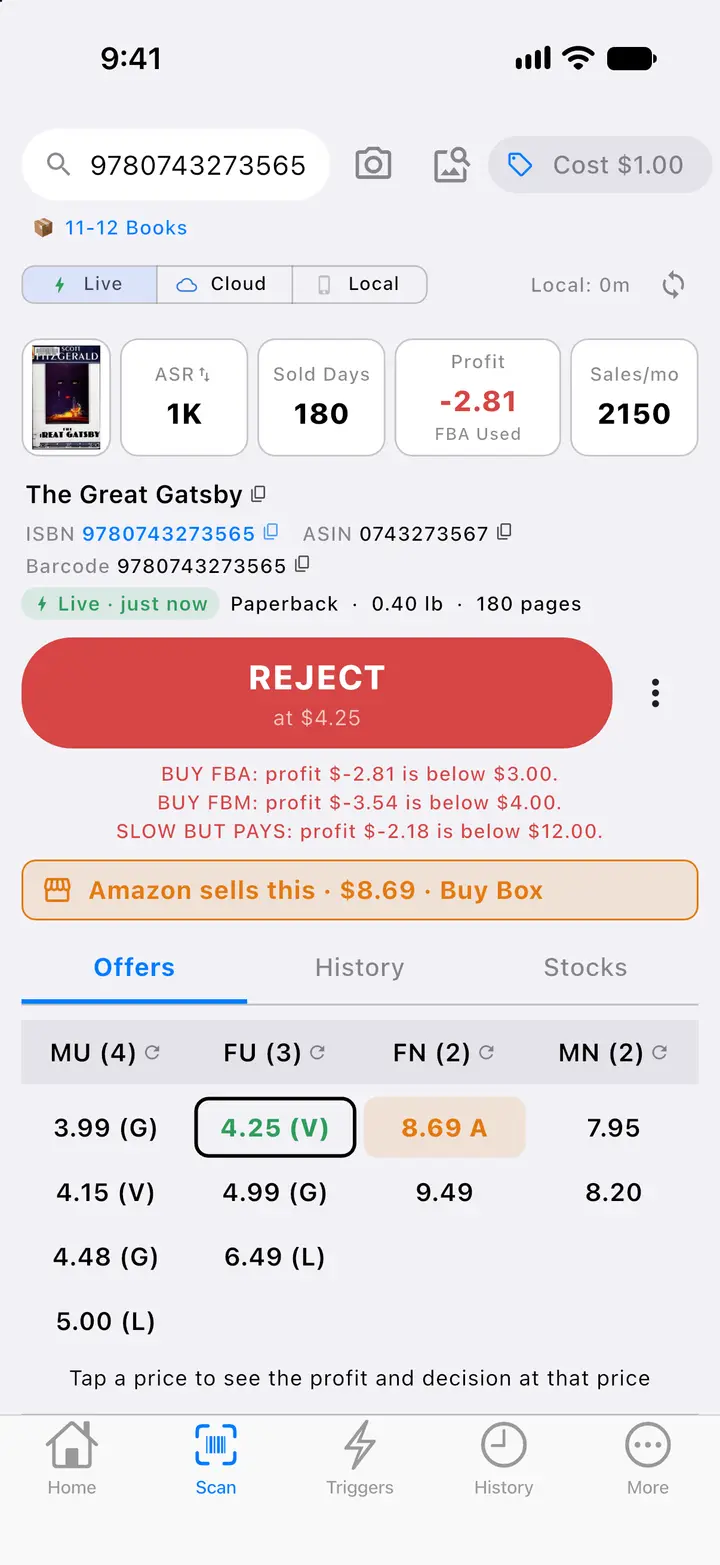
    Screen: scan result for the same sample textbook: BUY by the rule BUY FBA, FBA channel, $24.59 expected profit at $44.95, with the reason lines. Behind it, the next book: REJECT, with the reasons.

    A live scan answers BUY with the matching trigger, the channel and the expected profit, above sales rank, sold days and monthly sales, the Amazon banner, the offers table and the Buy Box bar.
    When no trigger matches, the result says REJECT and lists which trigger failed on which limit.
    BUY decision from a live scanREJECT with reasons — Actual SpineFlip screens. Sample data.BUY decision from a live scan — Actual SpineFlip screen. Sample data.
  4. 04ListPhone + Web

    Add it to a session. List it from the desk.

    Books go into a session from the phone or the web. SpineFlip lists each one on its existing Amazon page and builds the shipment plan, explaining Amazon’s delays as it goes.

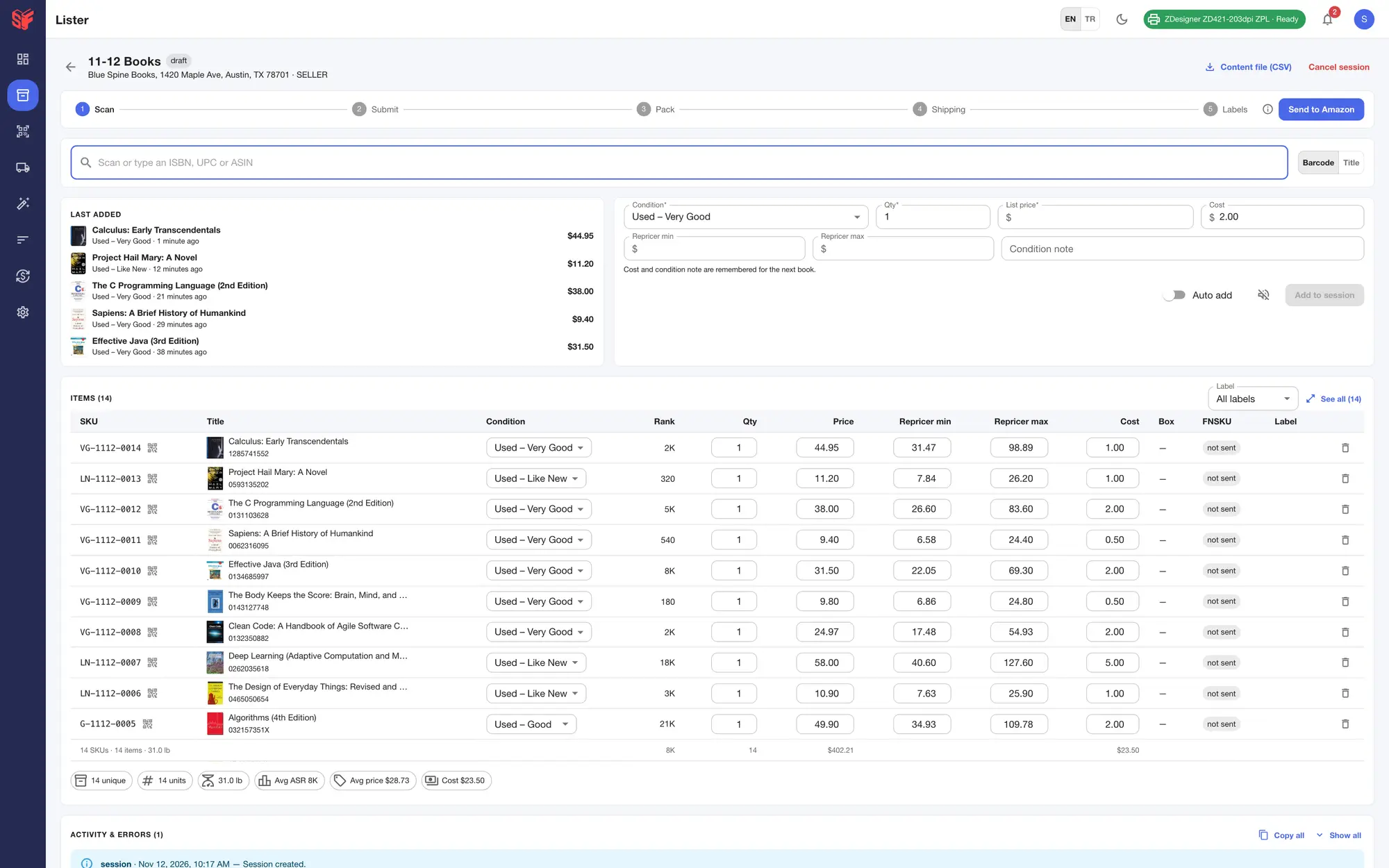
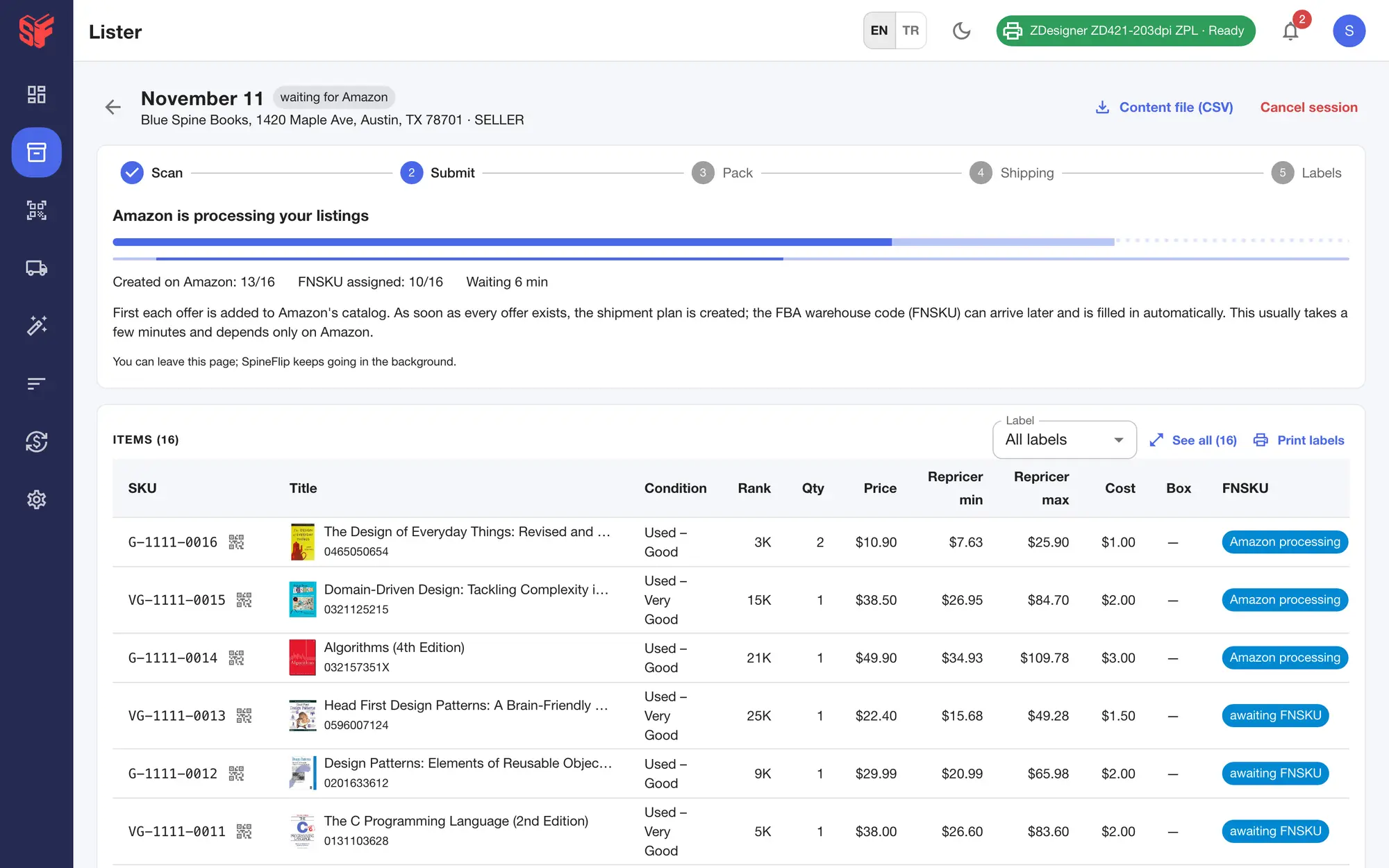
    Screens: the book added from the phone, at the top of the same session in the web panel, then the Submit step listing the session’s books on Amazon.

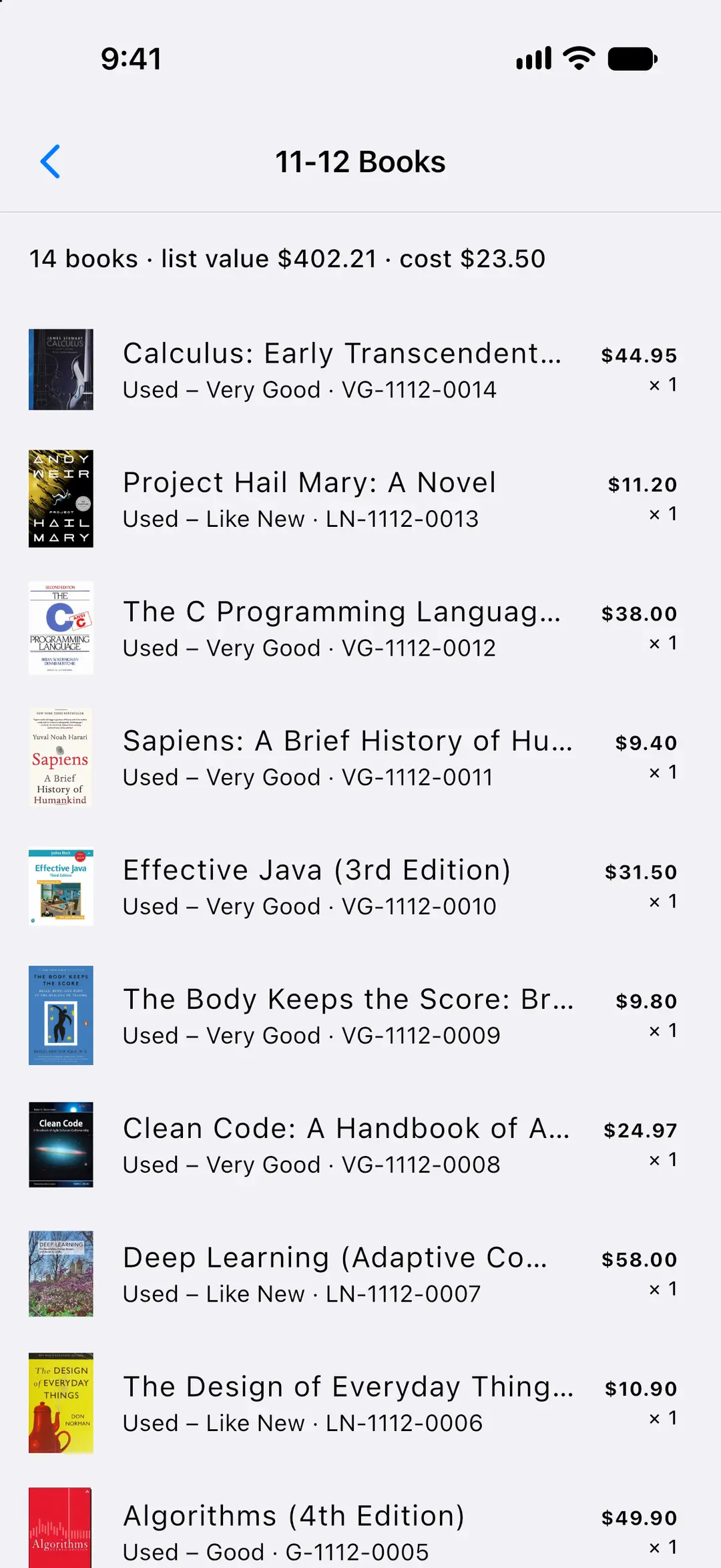
    The compact session screen: slim five-step bar with Send to Amazon, the last five books added beside the two-row add form, then the books, newest on top, with condition, rank, quantity, list price and repricer min / max; books added on the phone or in the panel land in the same list.
    Listings submitted to Amazon: progress of offers created and FNSKUs assigned, with plain-language notes while Amazon works.
    Session, itemsFBA wizard, Submit — Actual SpineFlip screens. Sample data.
  5. 05Pack & shipWeb

    Scan each book into the box. Compare every quote.

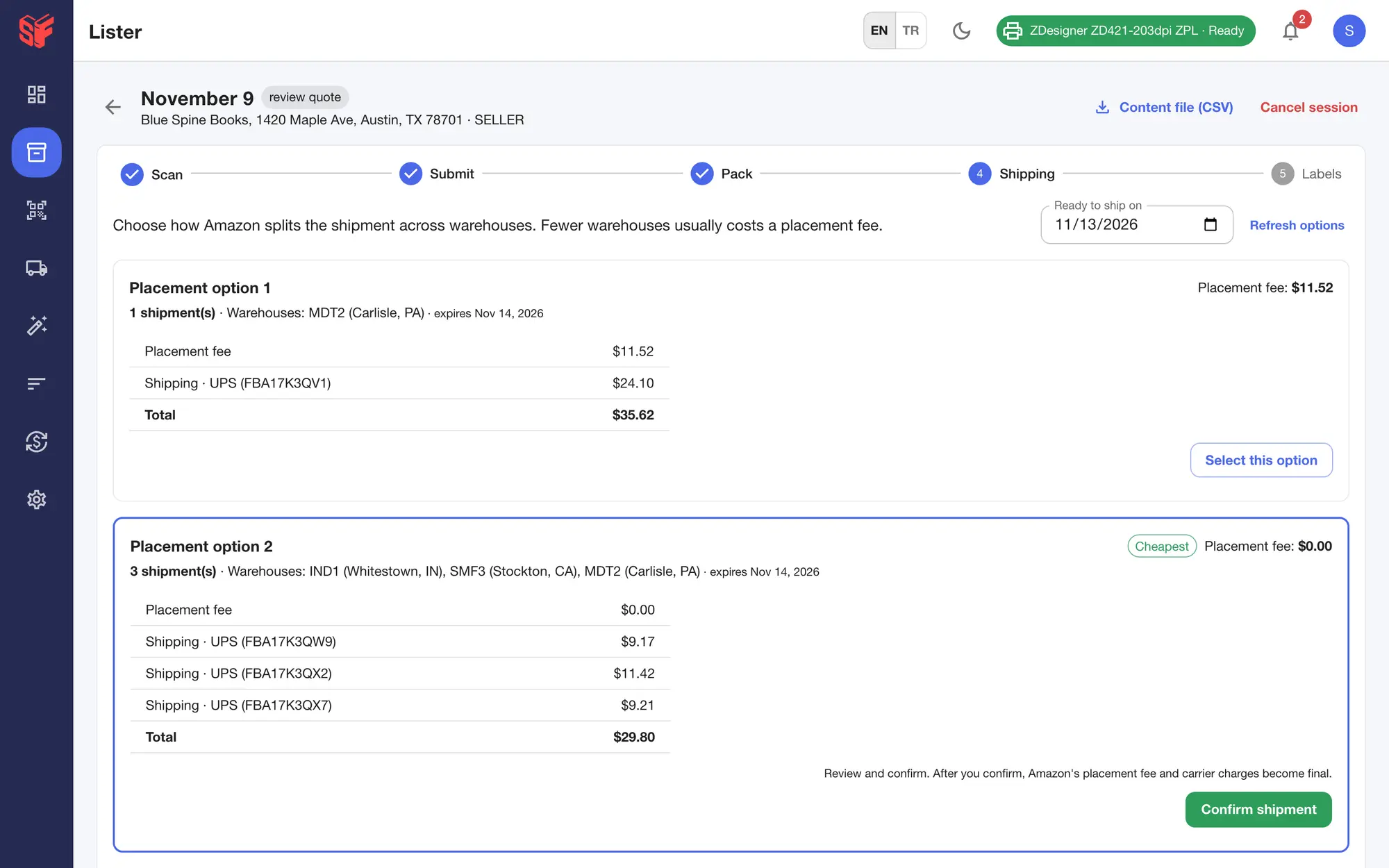
    Its FNSKU label prints as it goes in. Amazon’s placement options sit side by side with exact quotes, the cheapest one tagged, and box labels print on 4×6 thermal or Letter sheets.

    Screen: Amazon’s placement options side by side with exact quotes; the cheapest is tagged.

    Amazon's placement options side by side: placement fee, number of shipments, destination warehouses and exact UPS quotes; the cheapest is tagged.
    FBA wizard, Shipping — Actual SpineFlip screen. Sample data.
  6. 06Reprice & recoverWeb

    Reprice on a schedule. Recover what Amazon owes.

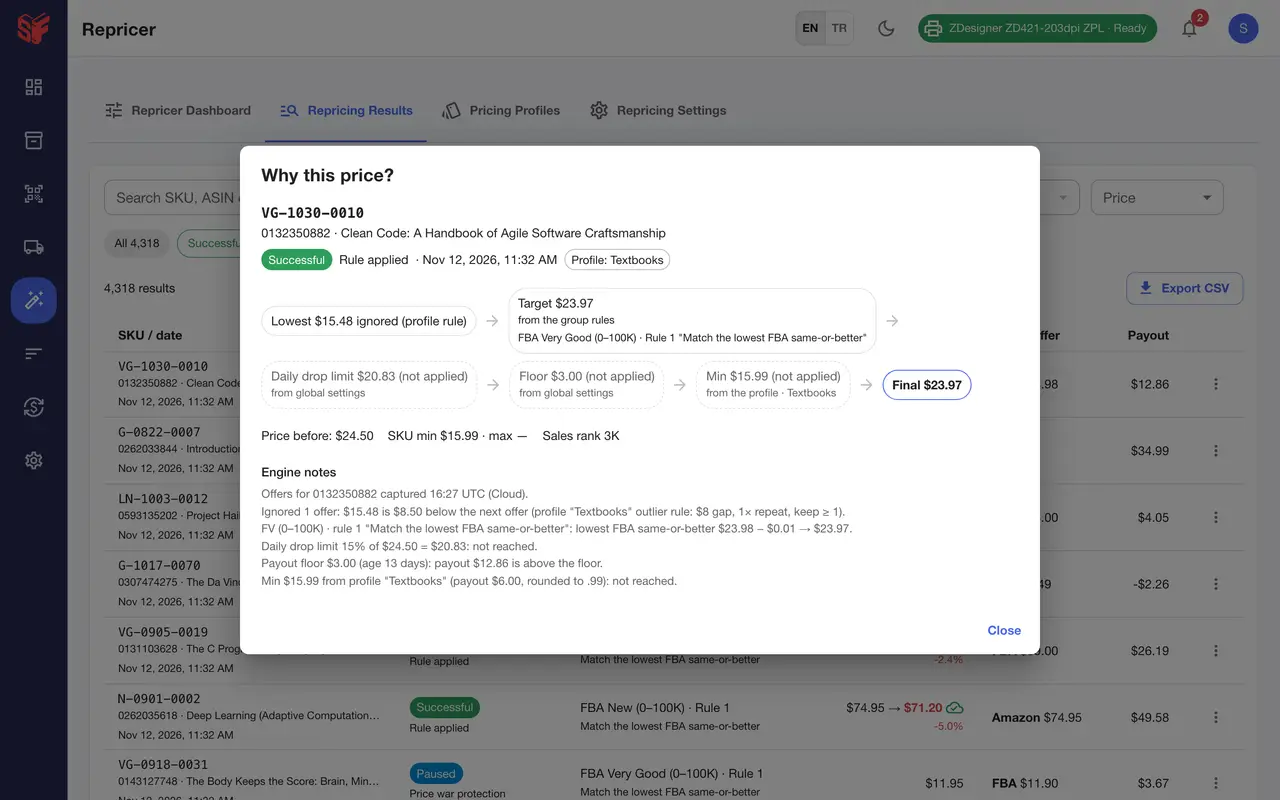
    Rules by sales-rank range, payout floors by inventory age, a dry run before saving and a “Why this price?” trace for every price. Lost and damaged inventory is found with deadlines and copy-ready claim text; you file it in Seller Central.

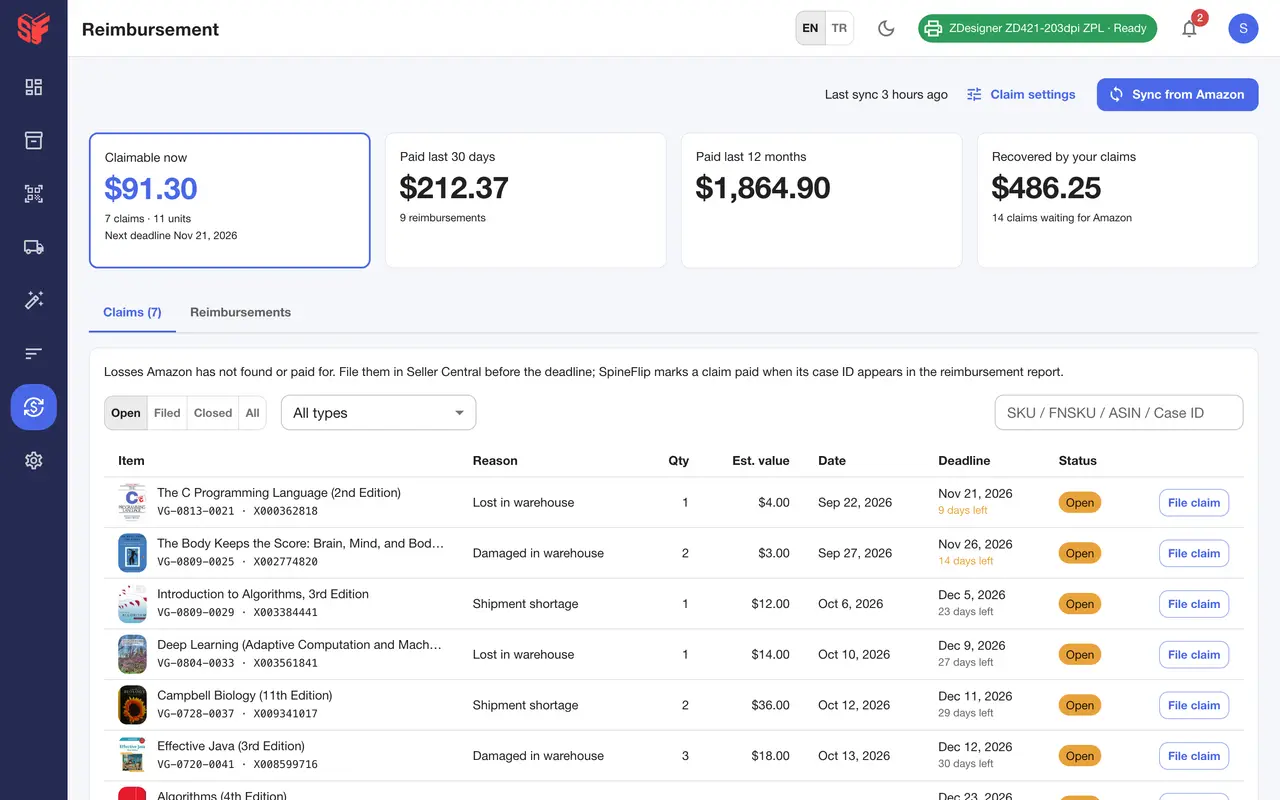
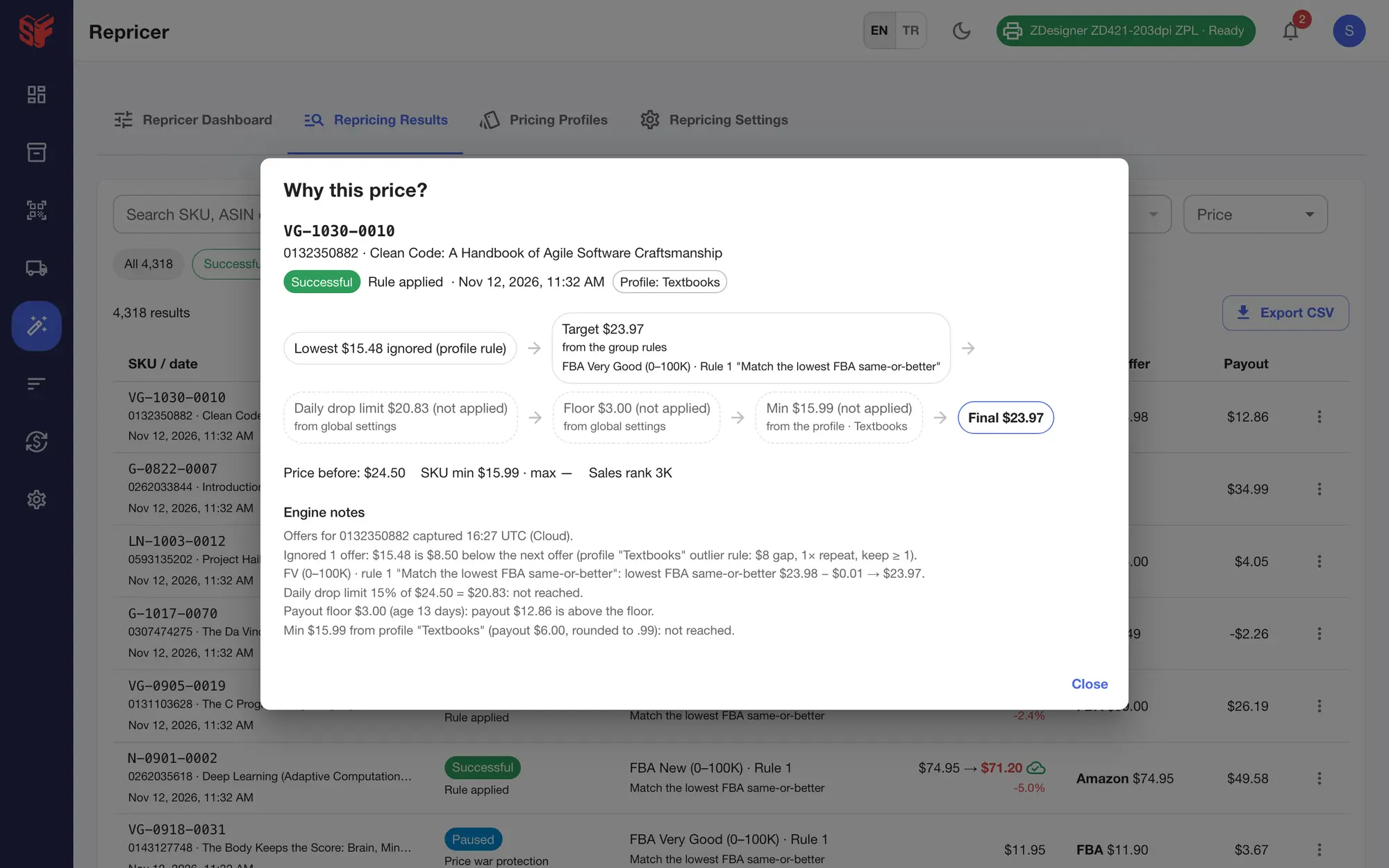
    Screens: the “Why this price?” trace for one SKU, and the reimbursement claims with deadlines.

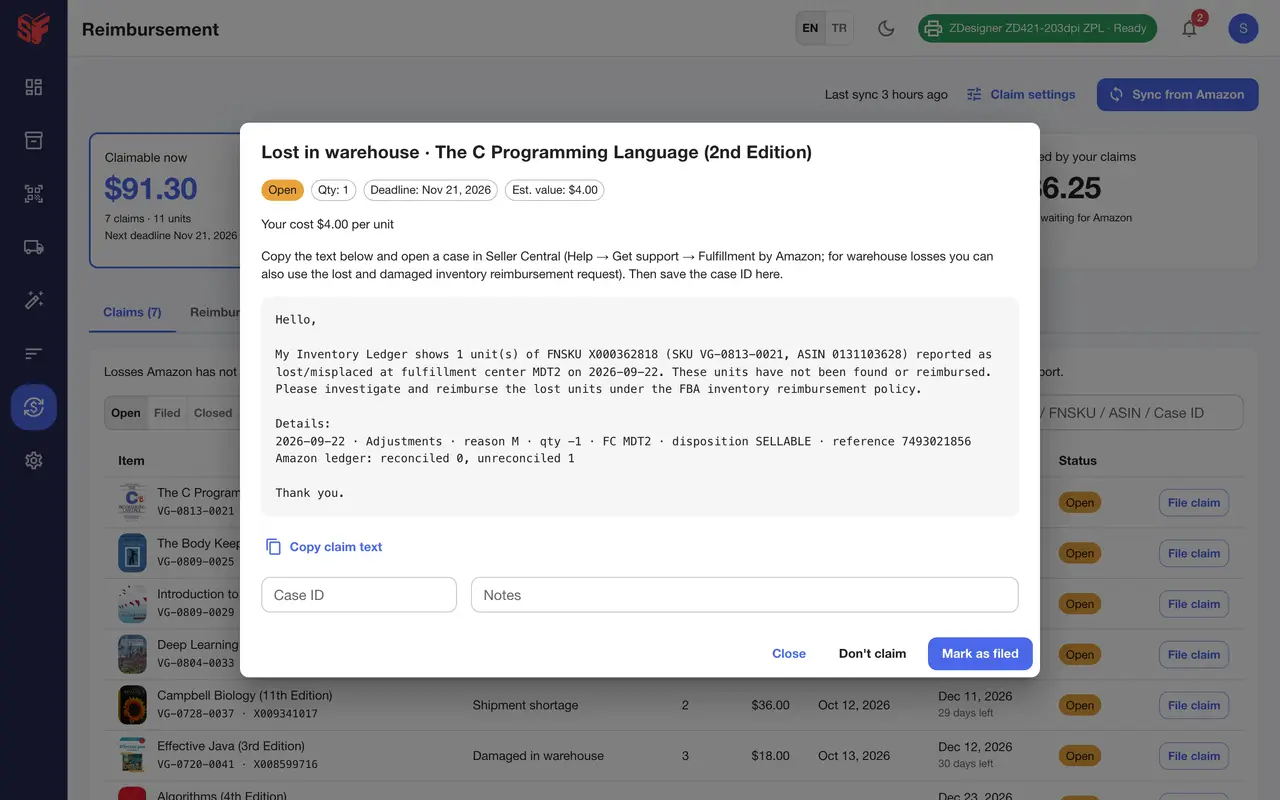
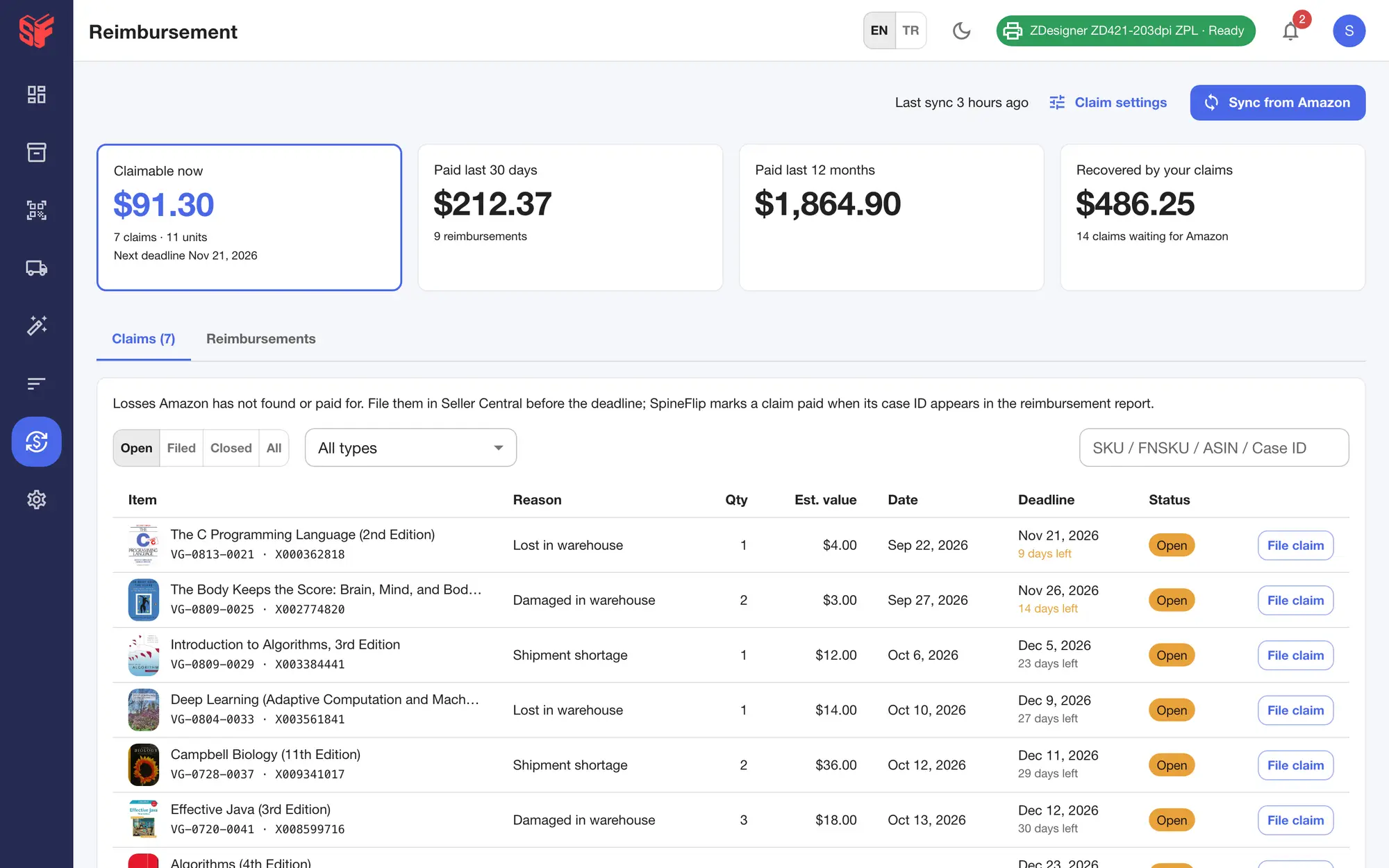
    Items lost or damaged in the warehouse, short-received shipments and under-reimbursements, valued at your buy cost, with deadline and days left.
    A step-by-step trace for one SKU: ignored outlier offer, rule target, daily-drop, payout-floor and profile-min checks, and the final price.
    Repricer, Why this price?Reimbursements, claims — Actual SpineFlip screens. Sample data.Repricer, Why this price? — Actual SpineFlip screen. Sample data.

Two surfaces, one account

Add a book on the phone and it is in the session on the web. Triggers are shared, with a prompt if the same one was edited in both places. Each phone that scans uses a seat; the web panel needs no seat.

The same session, on both

The book scanned at the shelf is the newest row of the session on the phone and in the web panel.

The books in a session with condition, SKU, list price and quantity, and the session’s list value and cost.
The compact session screen: slim five-step bar with Send to Amazon, the last five books added beside the two-row add form, then the books, newest on top, with condition, rank, quantity, list price and repricer min / max; books added on the phone or in the panel land in the same list.

Books in a sessionSession, items — Actual SpineFlip screens. Sample data.

The same rules, on both

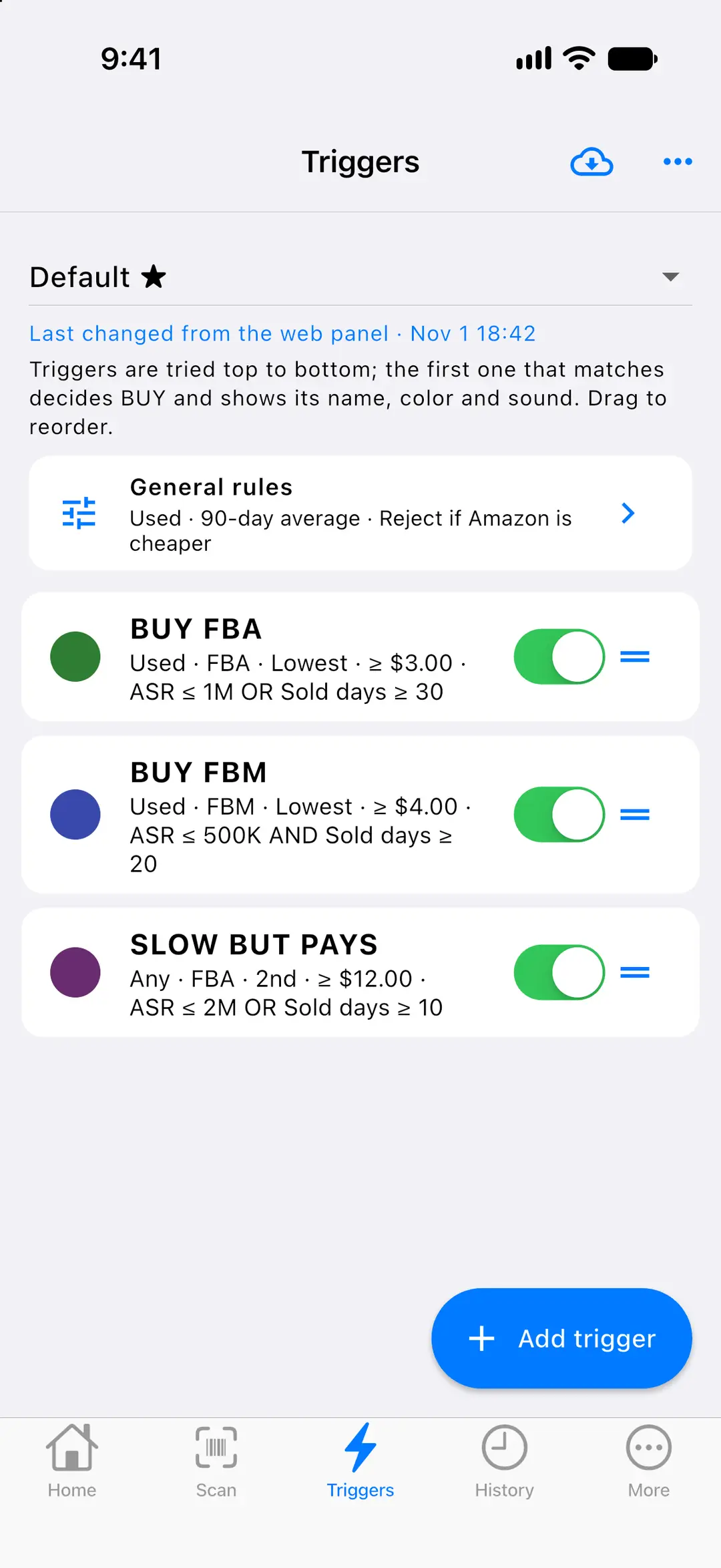
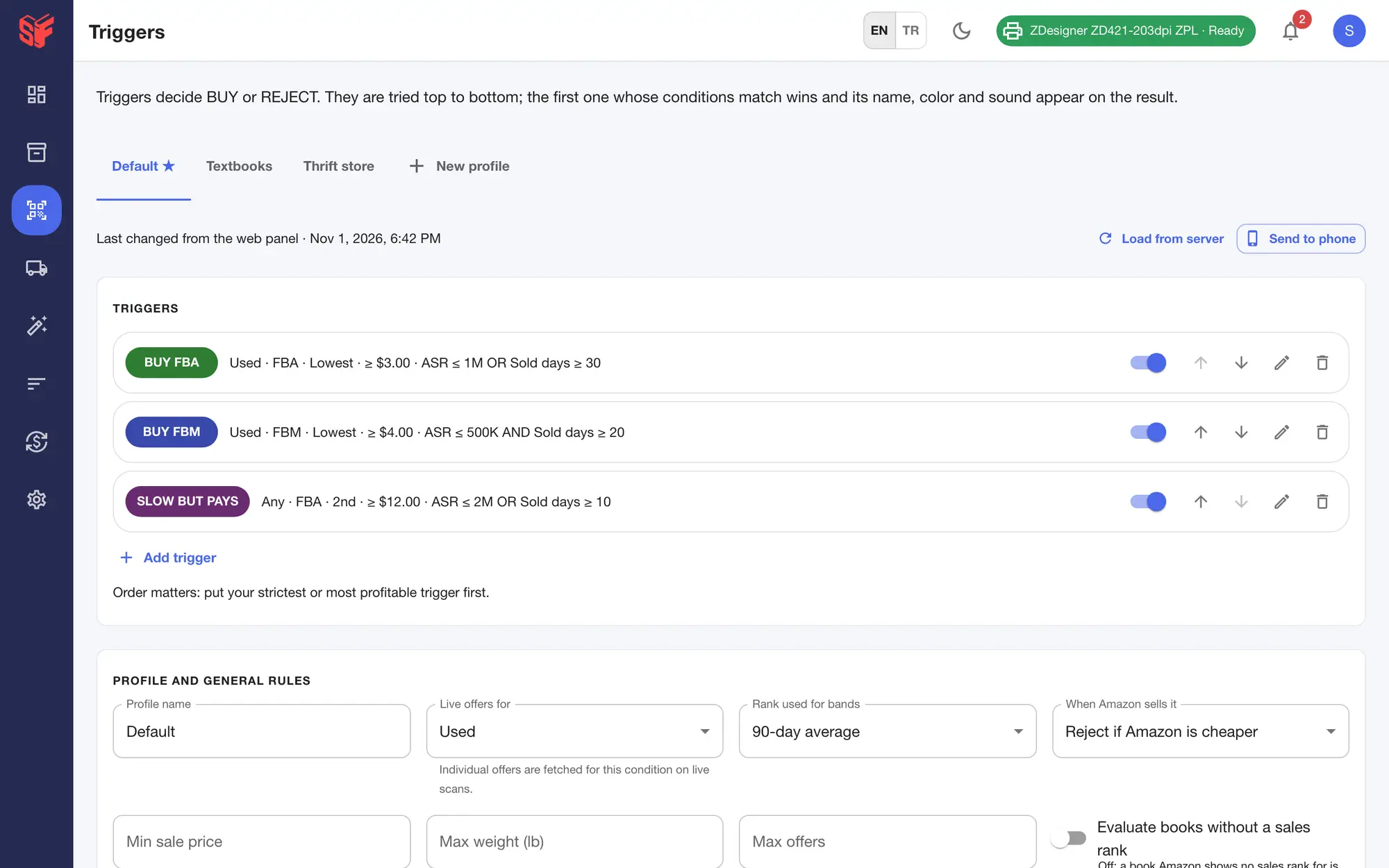
Edit a trigger on the phone or the web and both use it. If the same trigger was changed in both places, you choose which version to keep.

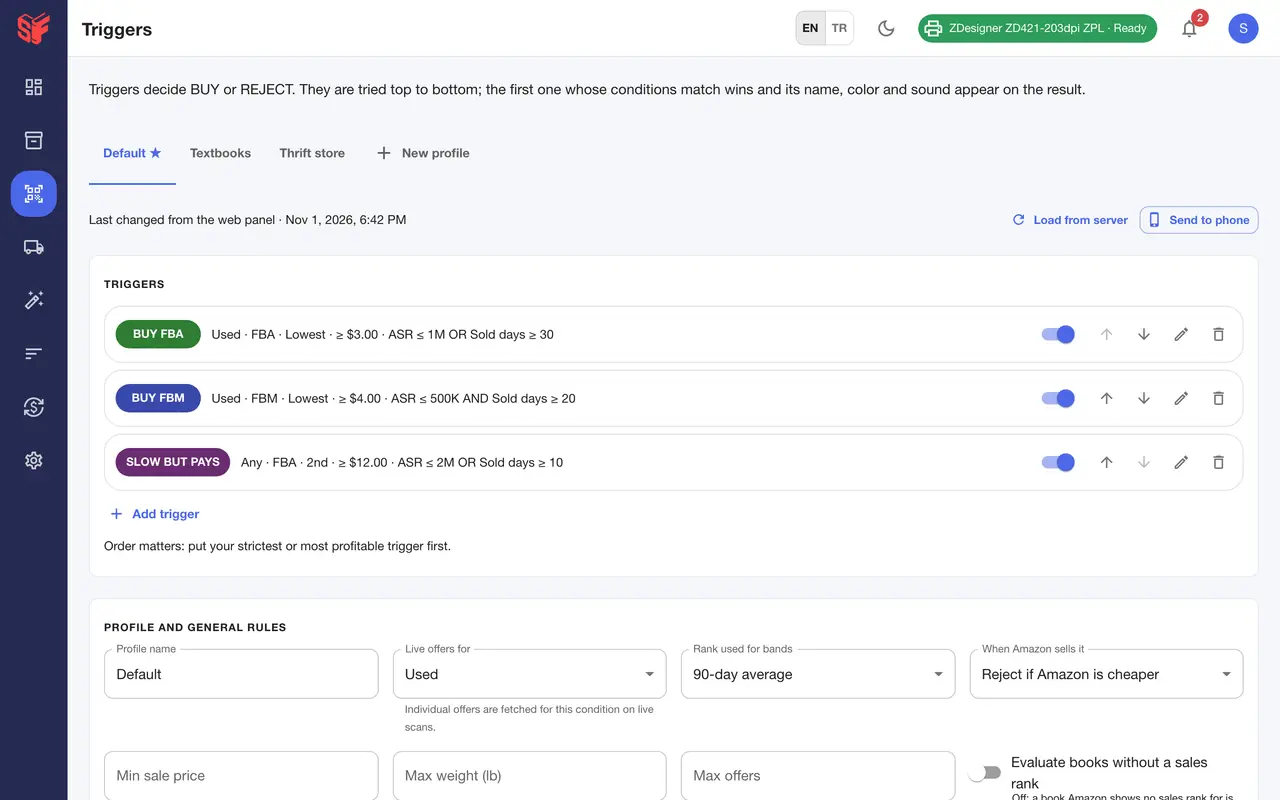
Buy rules are tried top to bottom and the first match decides; each trigger has its own name, color, sound and profit target.
Buy rules shared with the phone: triggers tried top to bottom with target price, profit and ROI floors, demand-check presets, sound and color.

TriggersTriggers — Actual SpineFlip screens. Sample data.

TriggersTriggersSettings, team — Actual SpineFlip screens. Sample data.

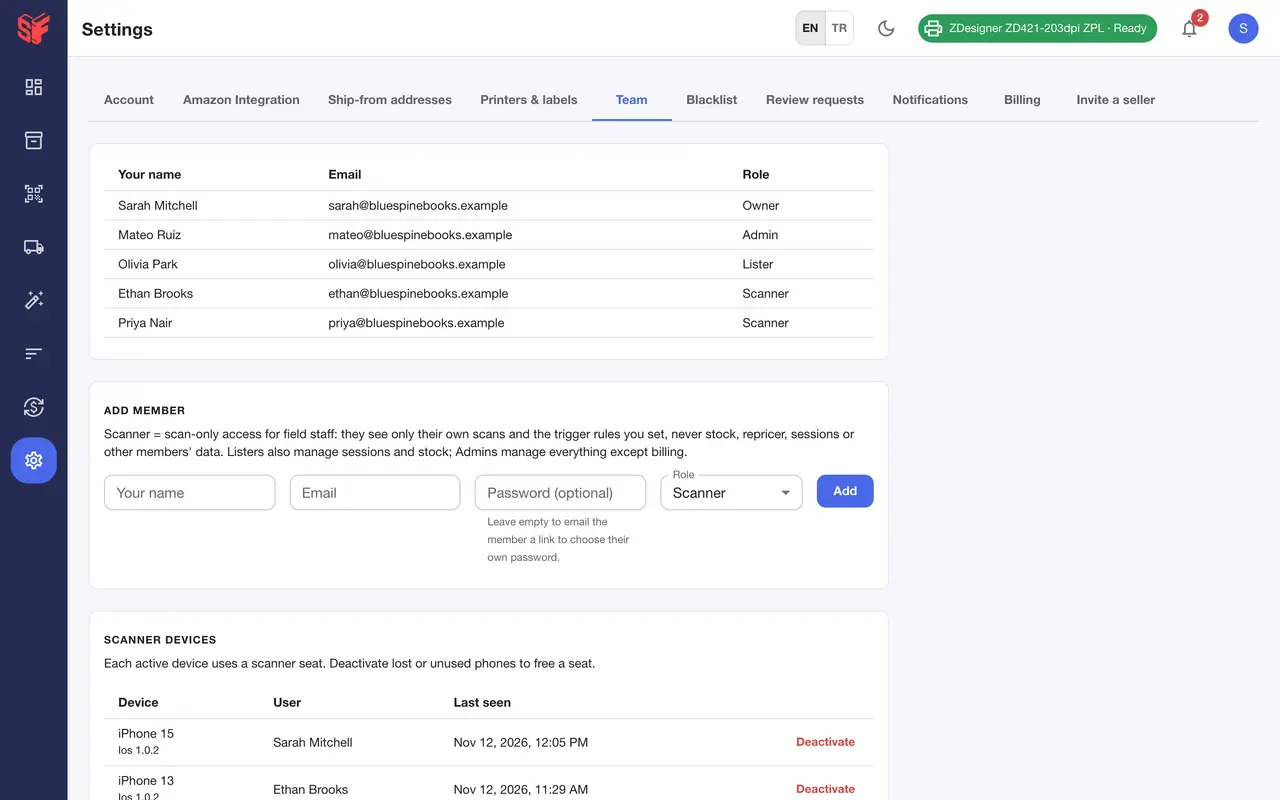
Each phone that scans uses a scanner seat, and owners can deactivate devices. The web panel needs no seat.

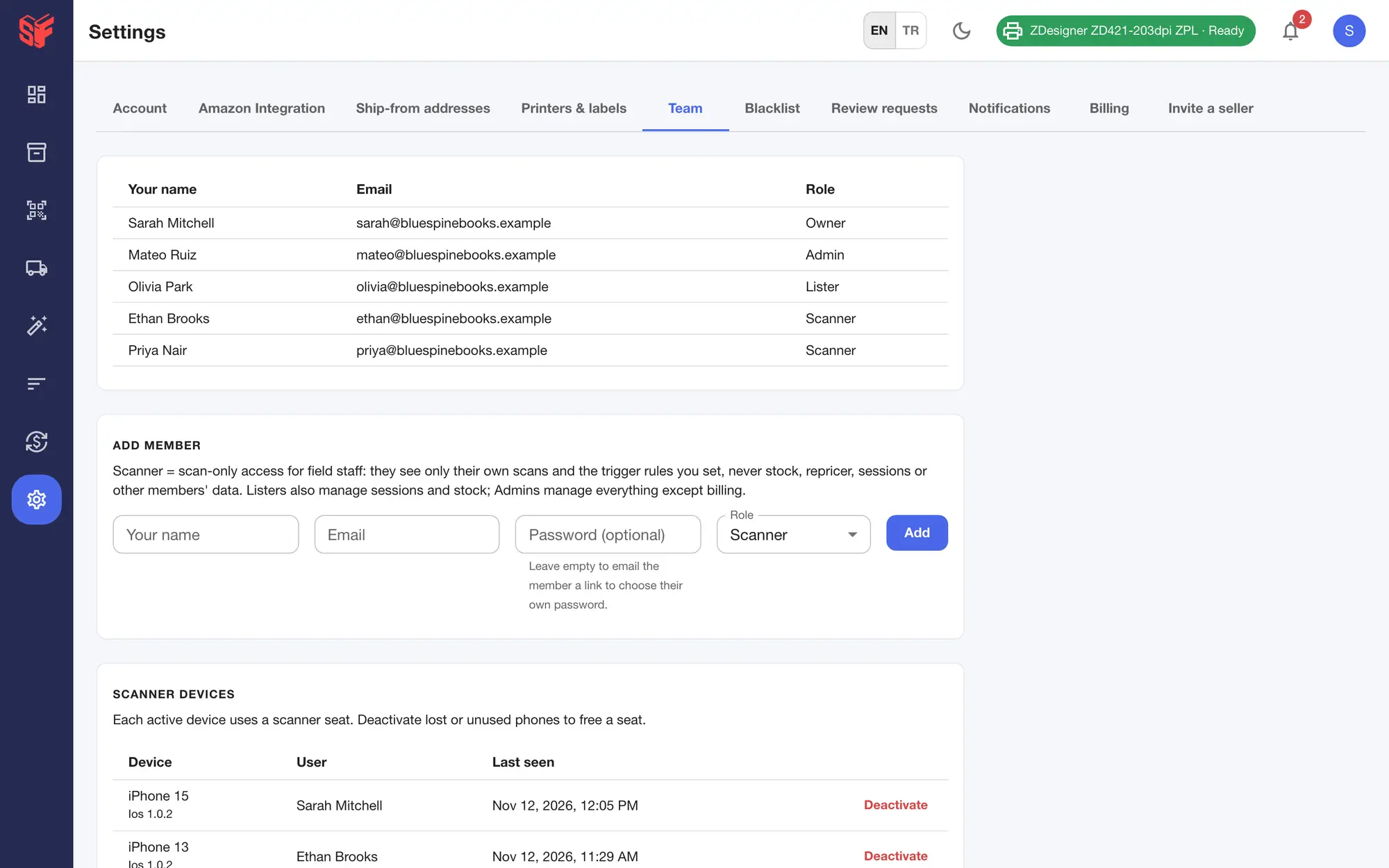
Owner, Admin, Lister and Scanner roles, invitations by email, and the phones that use scanner seats.
Settings, team — Actual SpineFlip screen. Sample data.

A decision in about a second.

Scan a book and the answer is on the screen: BUY or REJECT, the trigger that decided, the channel and the expected profit.

  • The same code read again within 3 seconds is ignored, and the screen stays awake while you scan.
  • Scan the same book twice in a row for live offers, or pull down on a result for live data.
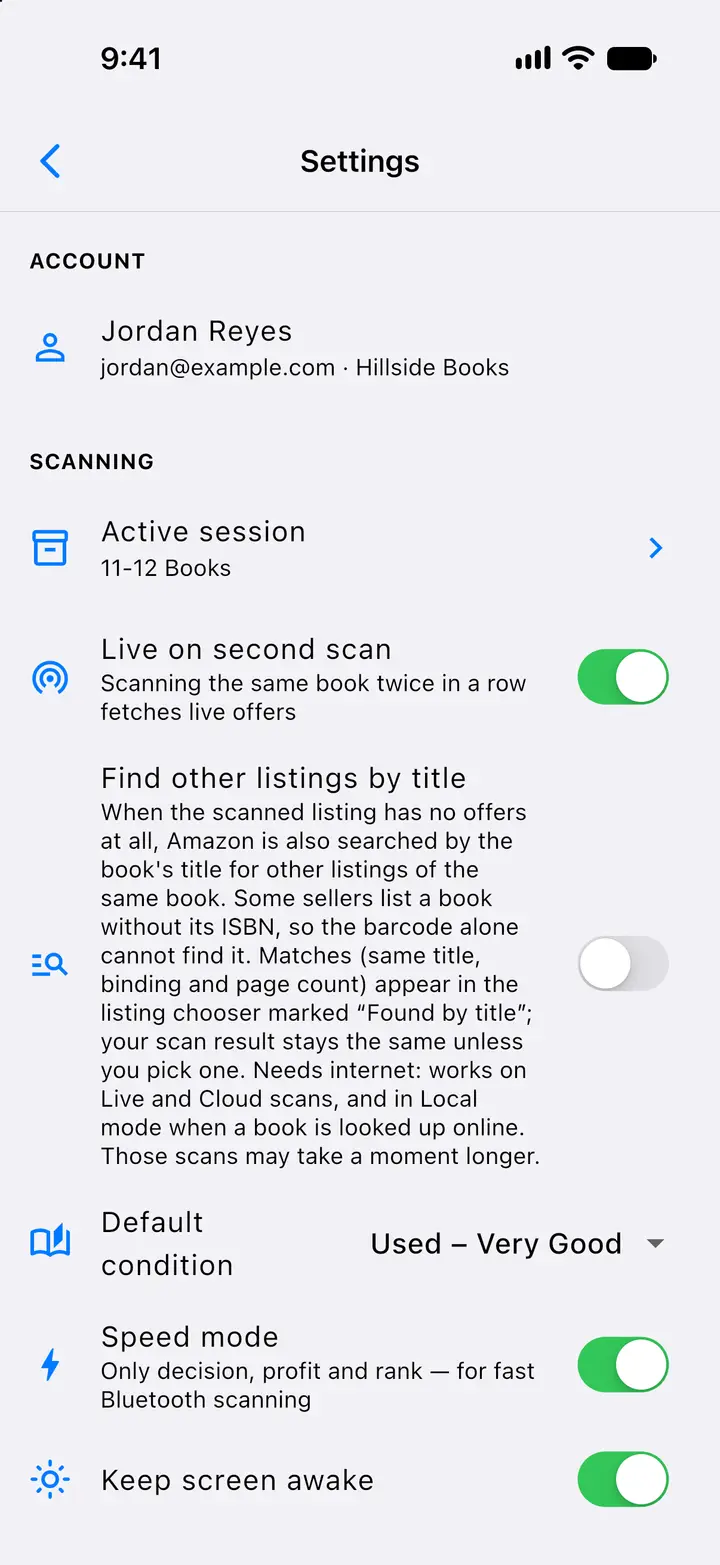
  • Speed mode shows only the decision, profit and rank, for fast Bluetooth scanning.
  • Each outcome can be set to sound, silent or vibrate.
A live scan answers BUY with the matching trigger, the channel and the expected profit, above sales rank, sold days and monthly sales, the Amazon banner, the offers table and the Buy Box bar.
When no trigger matches, the result says REJECT and lists which trigger failed on which limit.
Scanning settings such as the active session, live data on a second scan, the optional search for other listings by title, the default condition, Speed mode and keeping the screen awake.
Light and dark themes

BUY decision from a live scanREJECT with reasonsSettings: scanning — Actual SpineFlip screens. Sample data.BUY decision from a live scanSettings: scanning — Actual SpineFlip screens. Sample data.

No barcode? Scan the cover.

Older books, and books with a sticker over the barcode, can be found by their front cover.

  • Tap the cover button next to the camera button, or “Try cover scan” when the camera finds no barcode, and point the camera at the front cover.
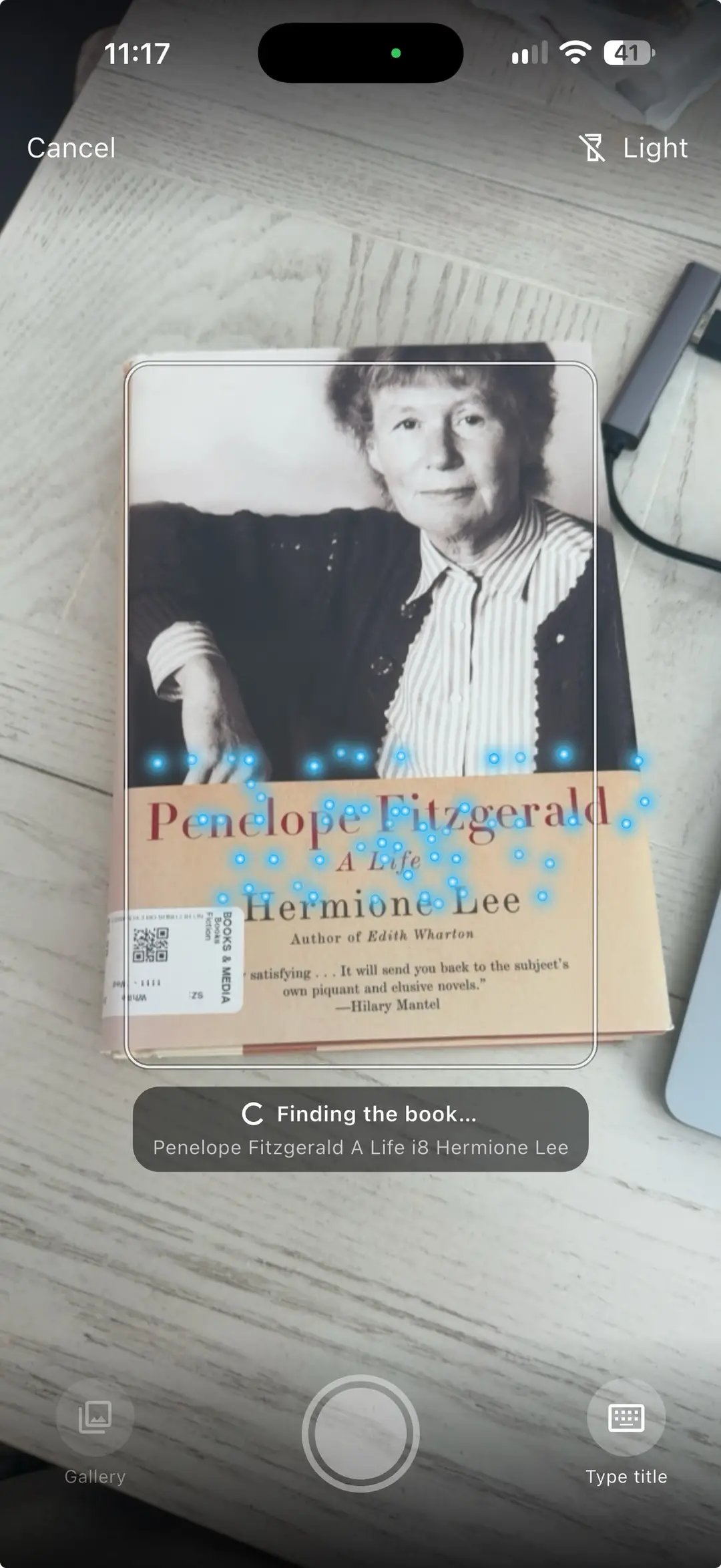
  • The phone reads the title and the author, SpineFlip finds the book on Amazon, and the usual result opens with your trigger’s decision.
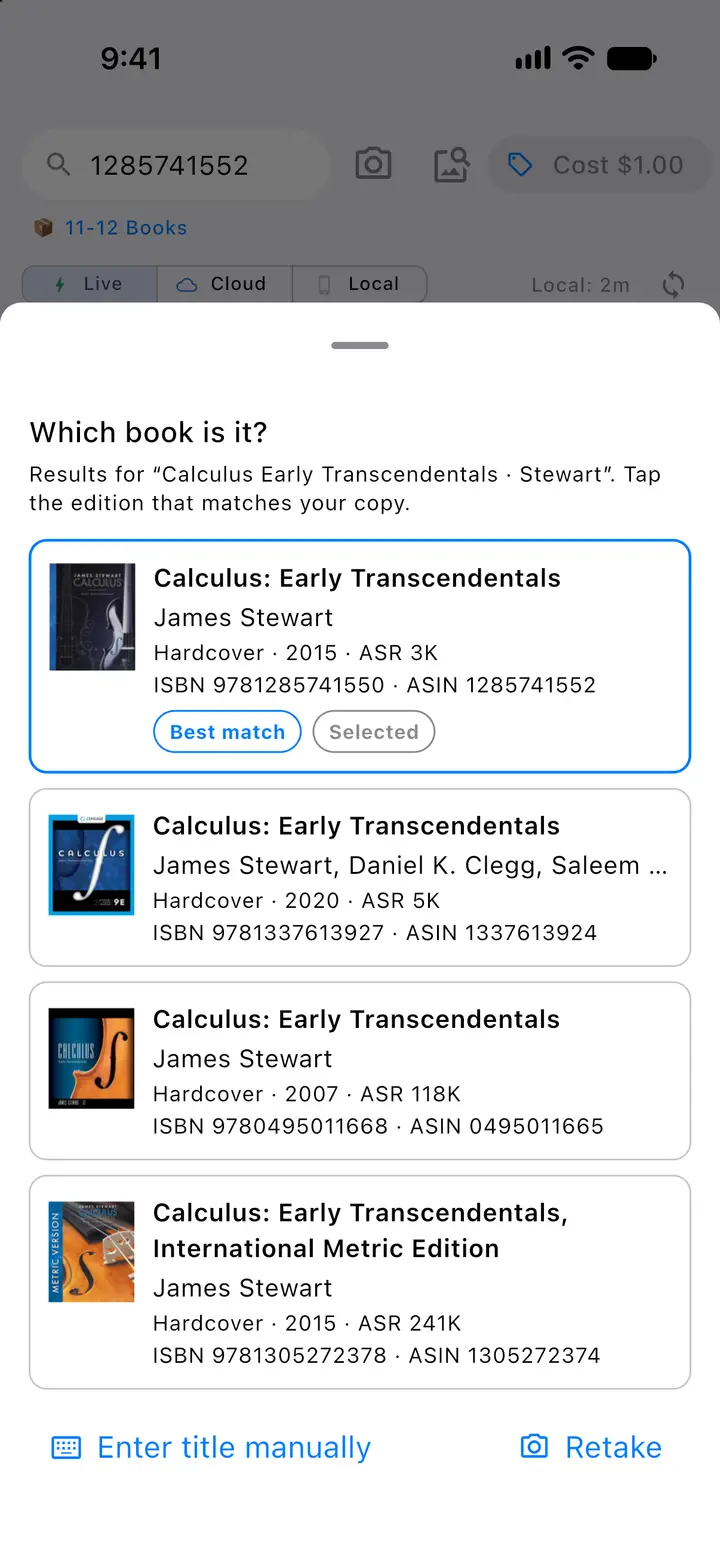
  • More than one edition? Pick yours from a short list with the cover, binding and year; the best match is marked.
  • Title hard to read? Type it, or choose a cover photo from the gallery.
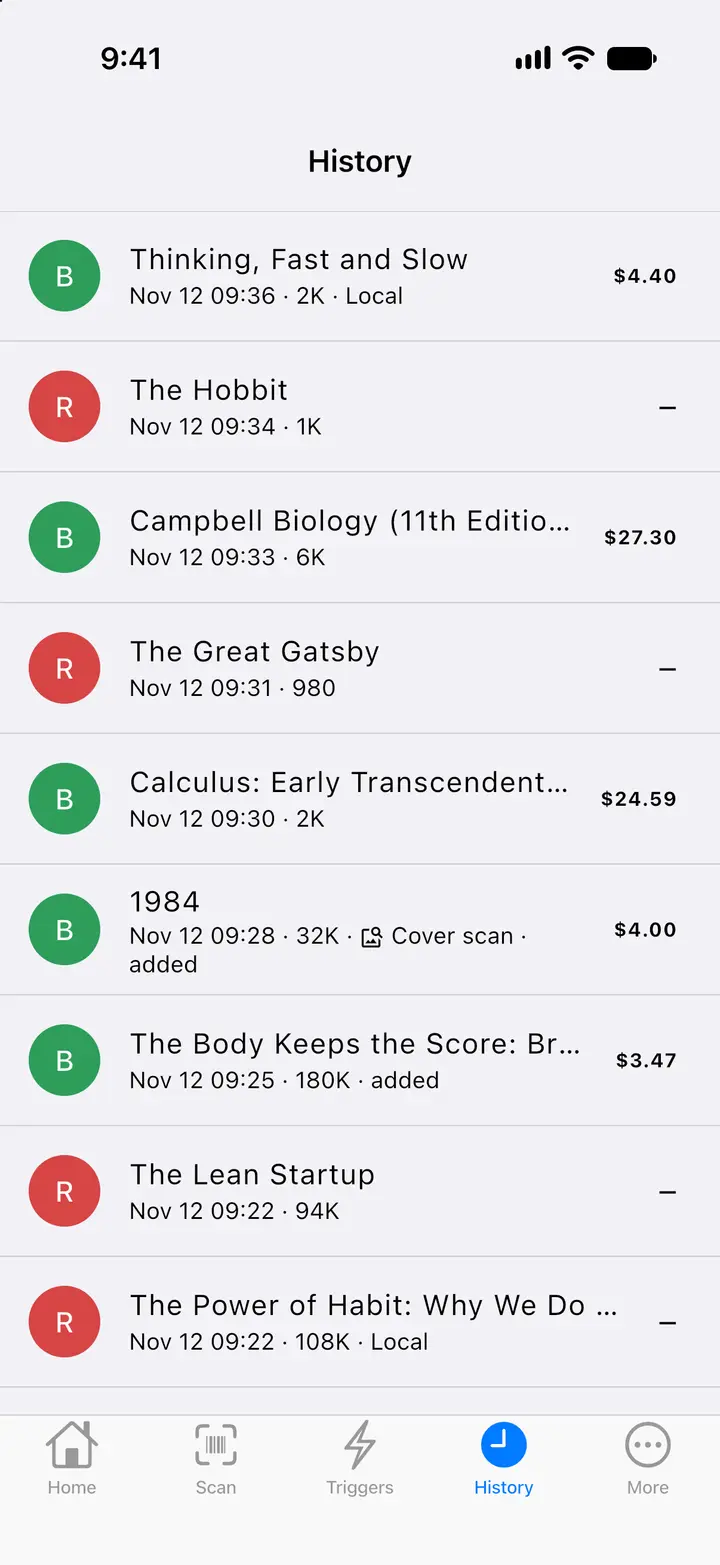
  • Finding a book by its cover needs an internet connection, also in Local mode. These scans are marked “Cover scan” in History, on the phone and in the web panel.
After a cover scan, “Which book is it?” lists the editions that match the title with cover, binding, year, sales rank, ISBN and ASIN; the best match is marked. Here the title was typed.
The cover scan camera pointed at the front cover of a real book, “Penelope Fitzgerald: A Life” by Hermione Lee. Cyan dots mark the title and the author it reads, and “Finding the book…” shows the text it read. Below are Gallery, the shutter and Type title.
A book found by its cover opens the usual result with the trigger’s decision, marked Cover scan, with a link to pick another edition.

Cover scan: the camera reads the coverCover scan: pick your editionBook found by its cover — Actual SpineFlip screens. Sample data.Cover scan: the camera reads the cover — Actual SpineFlip screen.

Your rules decide.

Triggers are your buy rules. They are tried from top to bottom, and the first match decides.

  • Up to 20 triggers per profile, and several profiles with one default.
  • Shared with the web panel.
  • New accounts start with ready-made rules named BUY FBA, BUY FBM and SLOW BUT PAYS that you can change.
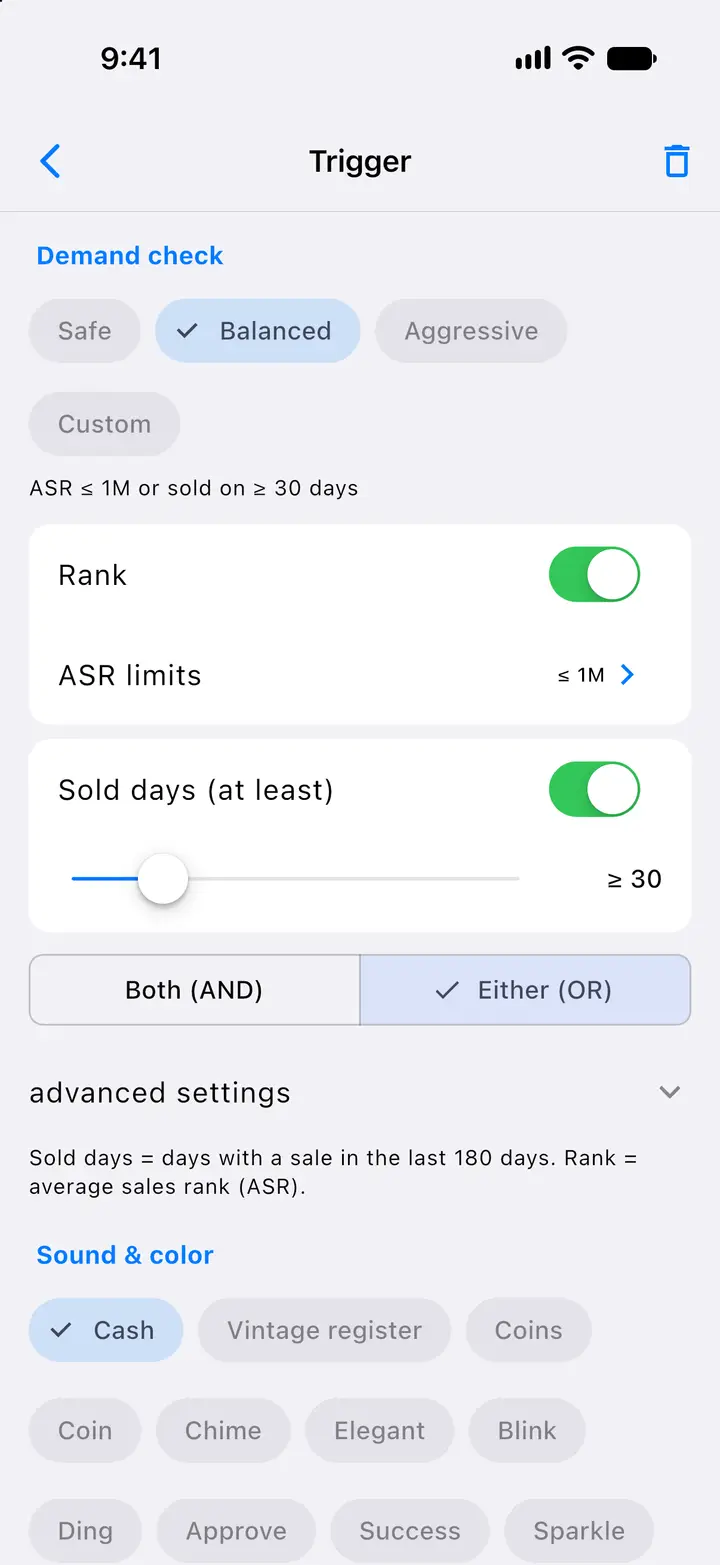
  • Each trigger has a target price, a target profit, a minimum ROI and a demand check, plus its own sound (11 to choose from) and color (8).
  • Profile rules set the rank basis, how to treat Amazon as a seller, a minimum sale price, a maximum weight and a maximum number of offers.

Demand check presets

  • Safe: ASR ≤ 500K and sold on ≥ 20 days
  • Balanced: ASR ≤ 1M or sold on ≥ 30 days
  • Aggressive: ASR ≤ 2M or sold on ≥ 10 days
Each trigger has a demand check with Safe, Balanced and Aggressive presets or custom sales-rank and sold-days rules.
Buy rules are tried top to bottom and the first match decides; each trigger has its own name, color, sound and profit target.

TriggersTrigger editor: demand check — Actual SpineFlip screens. Sample data.Triggers — Actual SpineFlip screen. Sample data.

The real profit.

See what a book pays after Amazon’s fees, before you buy it.

  • Live scans use Amazon’s own fee estimate; otherwise SpineFlip’s 2026 US fee table.
  • Your inbound shipping, prep cost and default weight feed every profit figure.
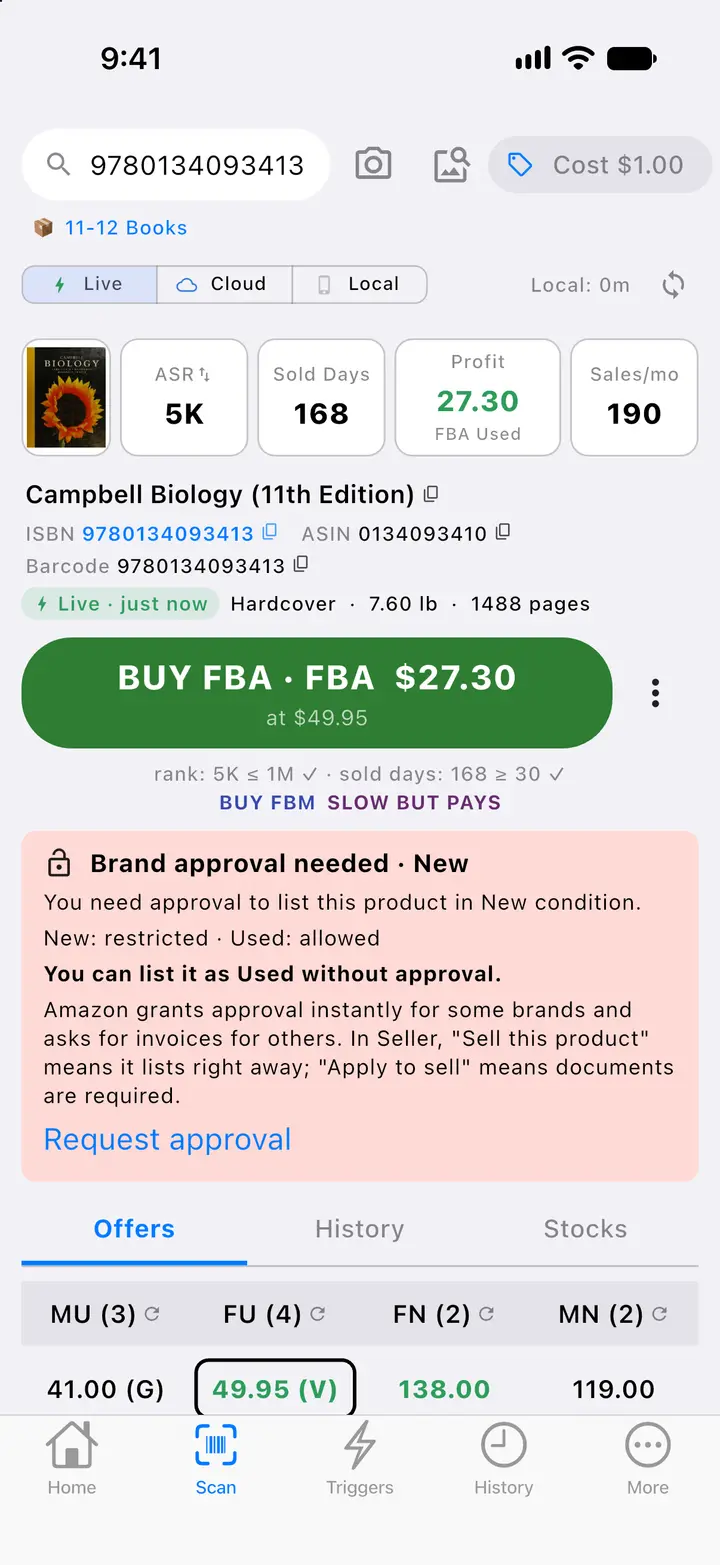
  • Selling restrictions per condition, with a “Request approval” link.
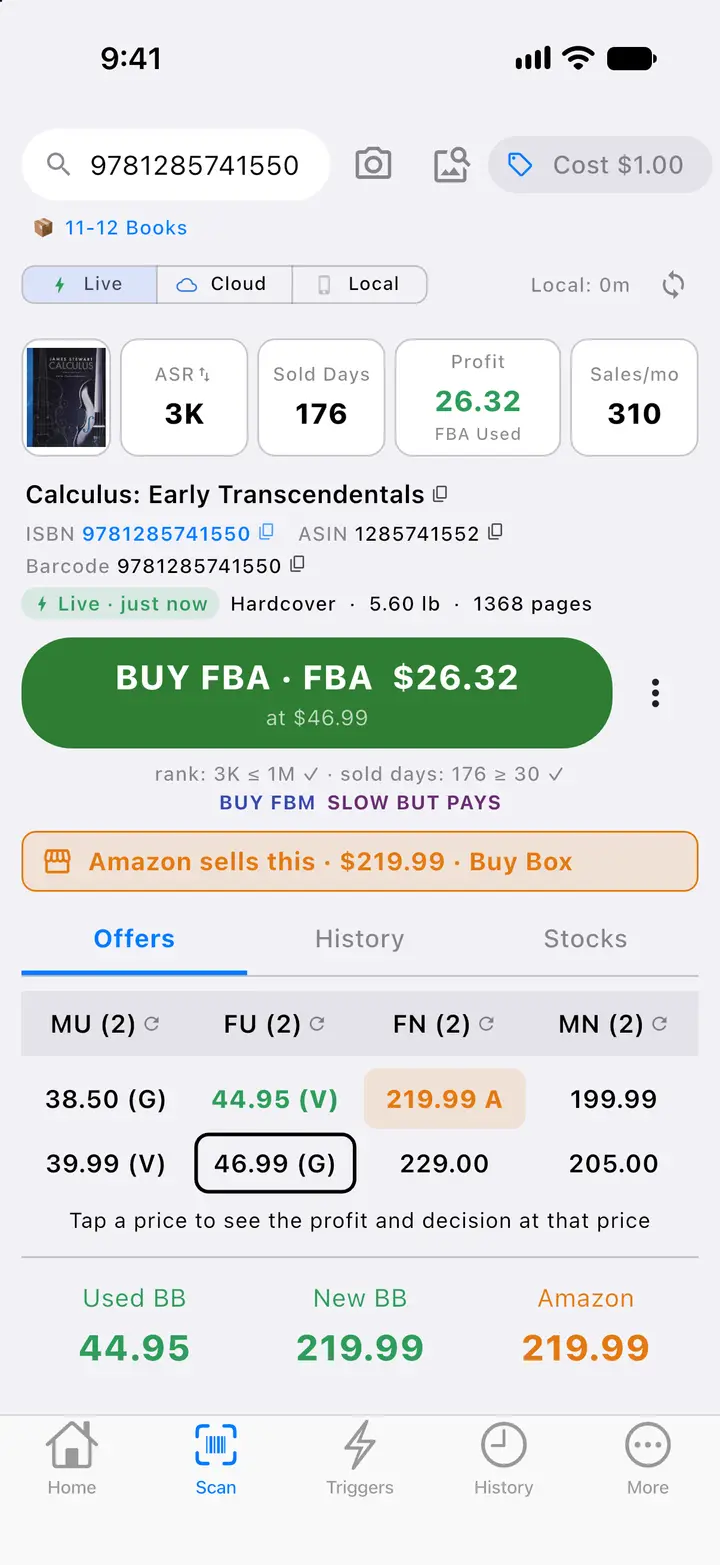
  • Tap any price to see the profit and the decision at that price.
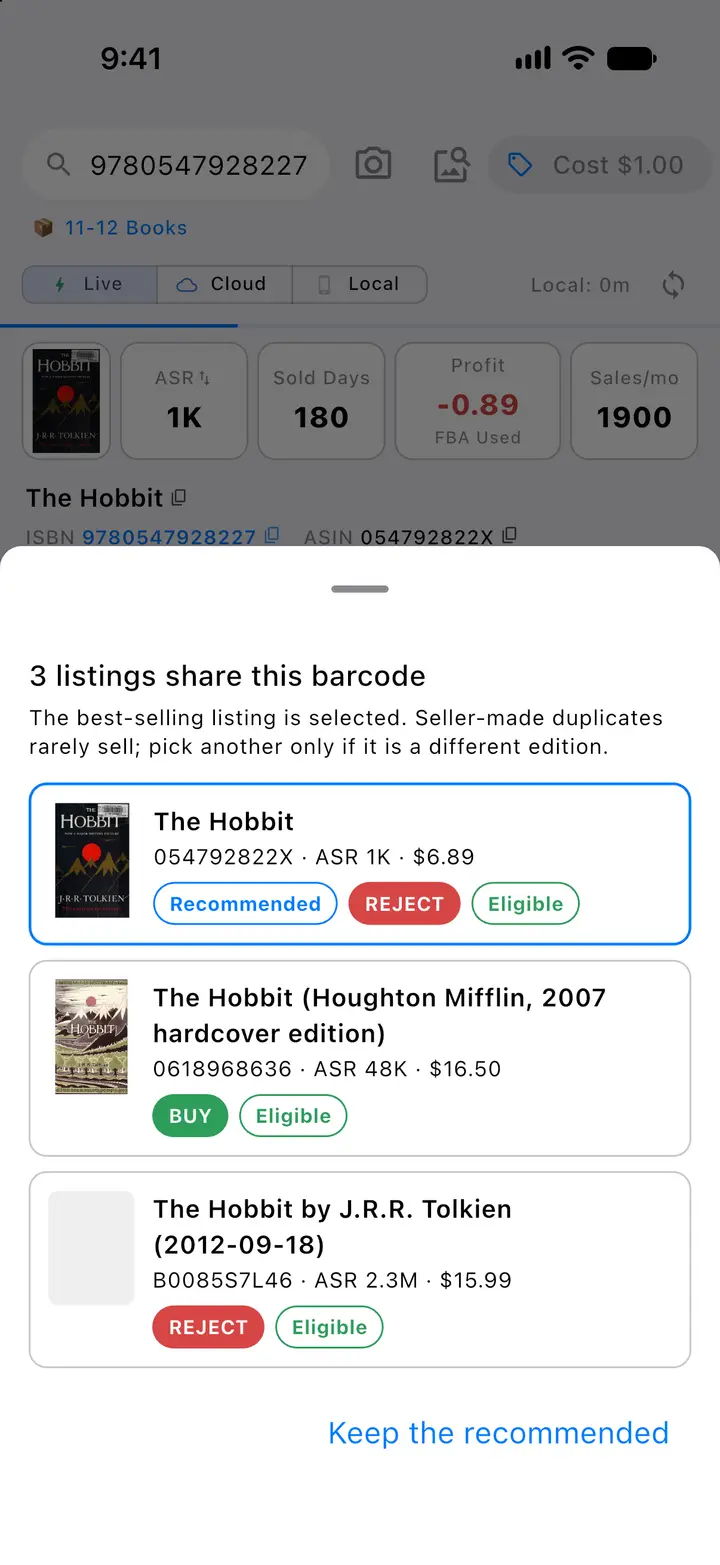
  • Several listings on one barcode? The best-selling one is picked.

From sale price to profit

Sample scan · buy cost $1.00
  1. Sale price$44.95
  2. Referral fee−$6.74
  3. Closing fee−$1.80
  4. FBA fee−$8.10
  5. Inbound shipping−$2.52
  6. Prep−$0.20
  7. Payout$25.59
  8. Buy cost−$1.00
  9. Profit$24.59
Tapping any price in the offers table shows the profit and the decision at that price.
The profit sheet lists sale price, referral fee, closing fee, FBA fee, inbound shipping, prep, payout, buy cost, profit and ROI, for FBA or merchant-fulfilled.
Live data shows selling restrictions per condition with Amazon’s message and a Request approval link; here New needs approval while Used can be listed.

Profit calculationProfit at a tapped priceSelling restrictions — Actual SpineFlip screens. Sample data.Profit calculation — Actual SpineFlip screen. Sample data.

No signal, no problem.

Local mode keeps book data on the phone, so you can scan with no internet.

  • The BUY or REJECT decision is made on the phone with your default trigger profile.
  • One download, then small daily update files; it updates itself on Wi-Fi when the data is older than 24 hours.
  • Offline scans queue and upload later.
  • Offline scanning keeps working for up to 72 hours after the app last connected.
  • A Local BUY is re-checked live in the background when you are online.
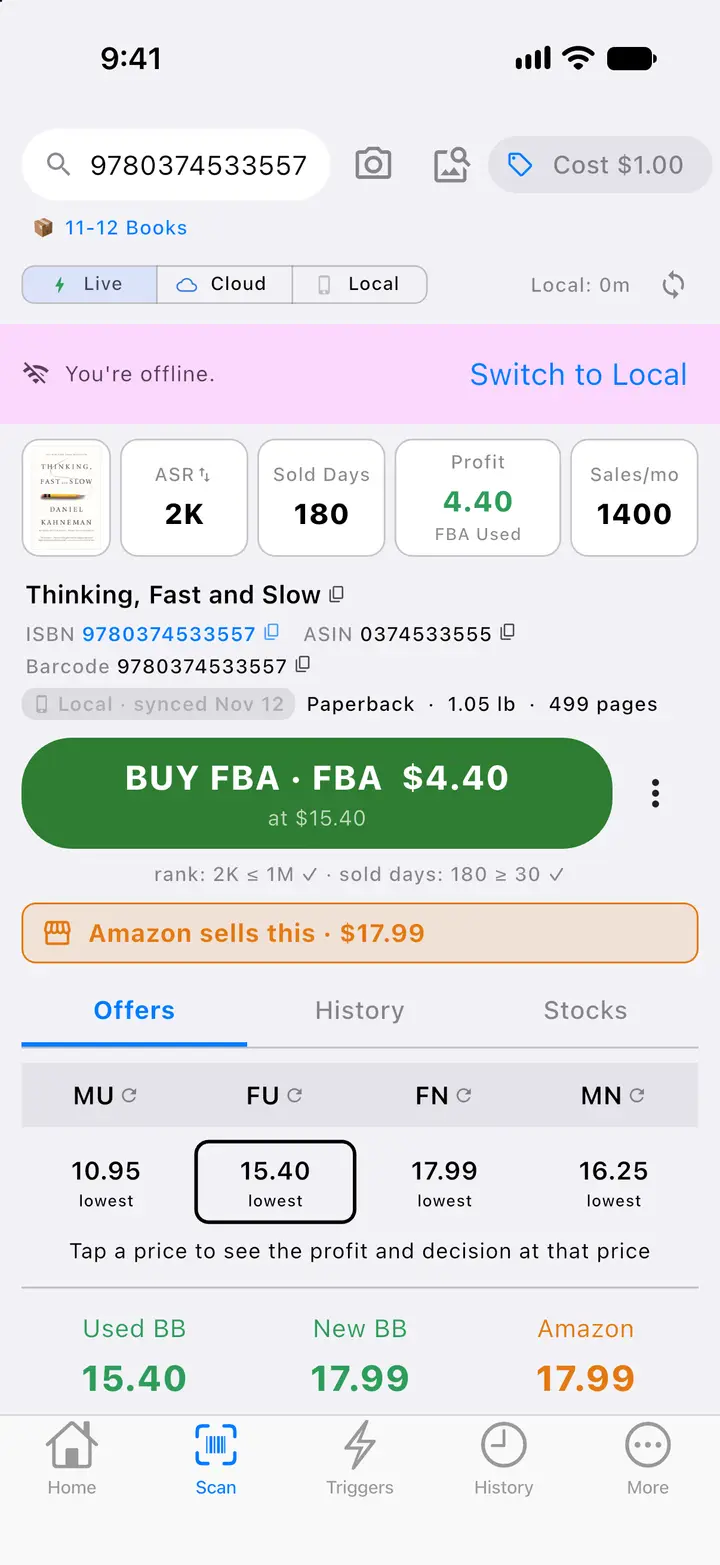
With no internet the answer comes from the book data stored on the phone, marked Local, under an offline banner that offers to switch to Local mode.
Before the first scan: choose Live, Cloud or Local data and see when the book data on the phone was last updated. Next to the camera button, the cover button starts a cover scan for books without a barcode.

Offline answer from Local dataScan screen and data source — Actual SpineFlip screens. Sample data.Offline answer from Local data — Actual SpineFlip screen. Sample data.

Also on the phone

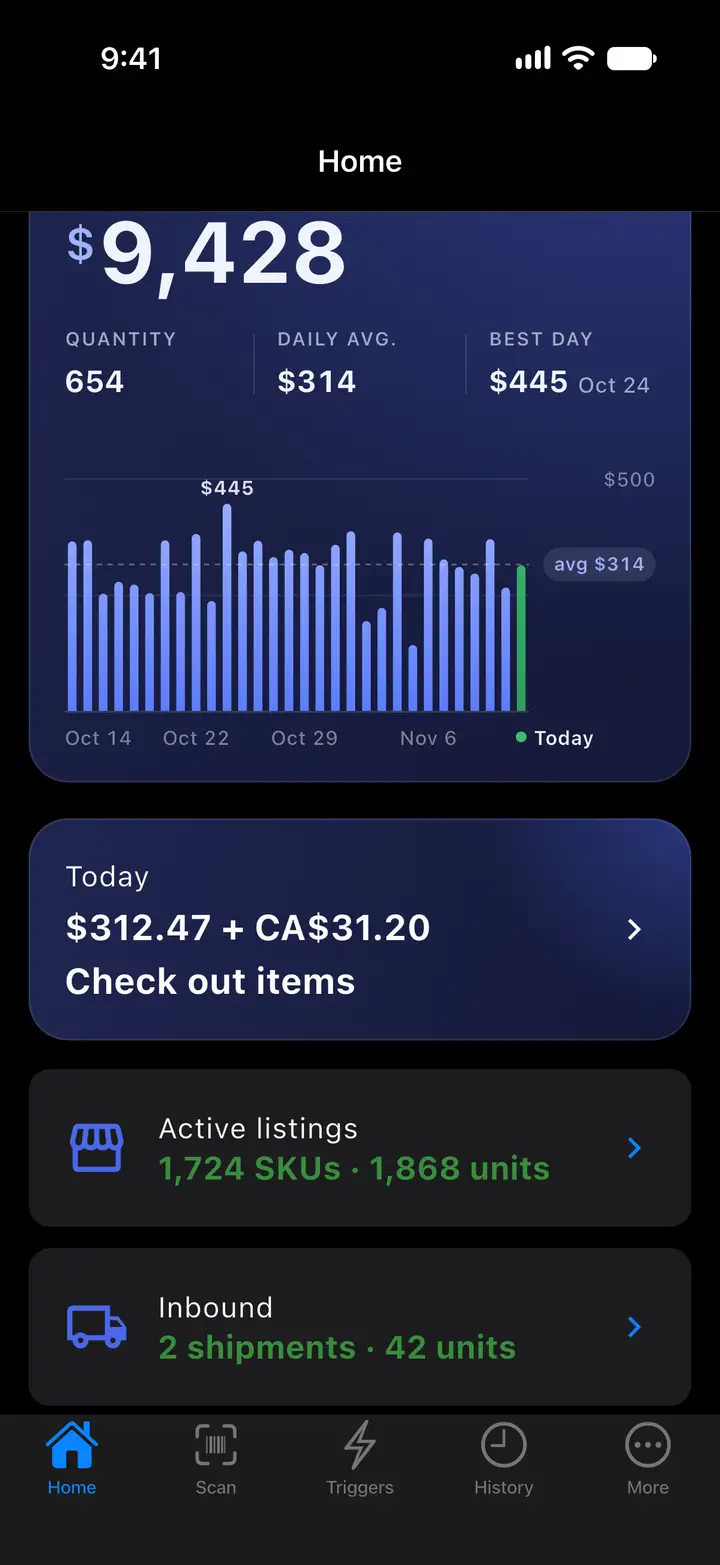
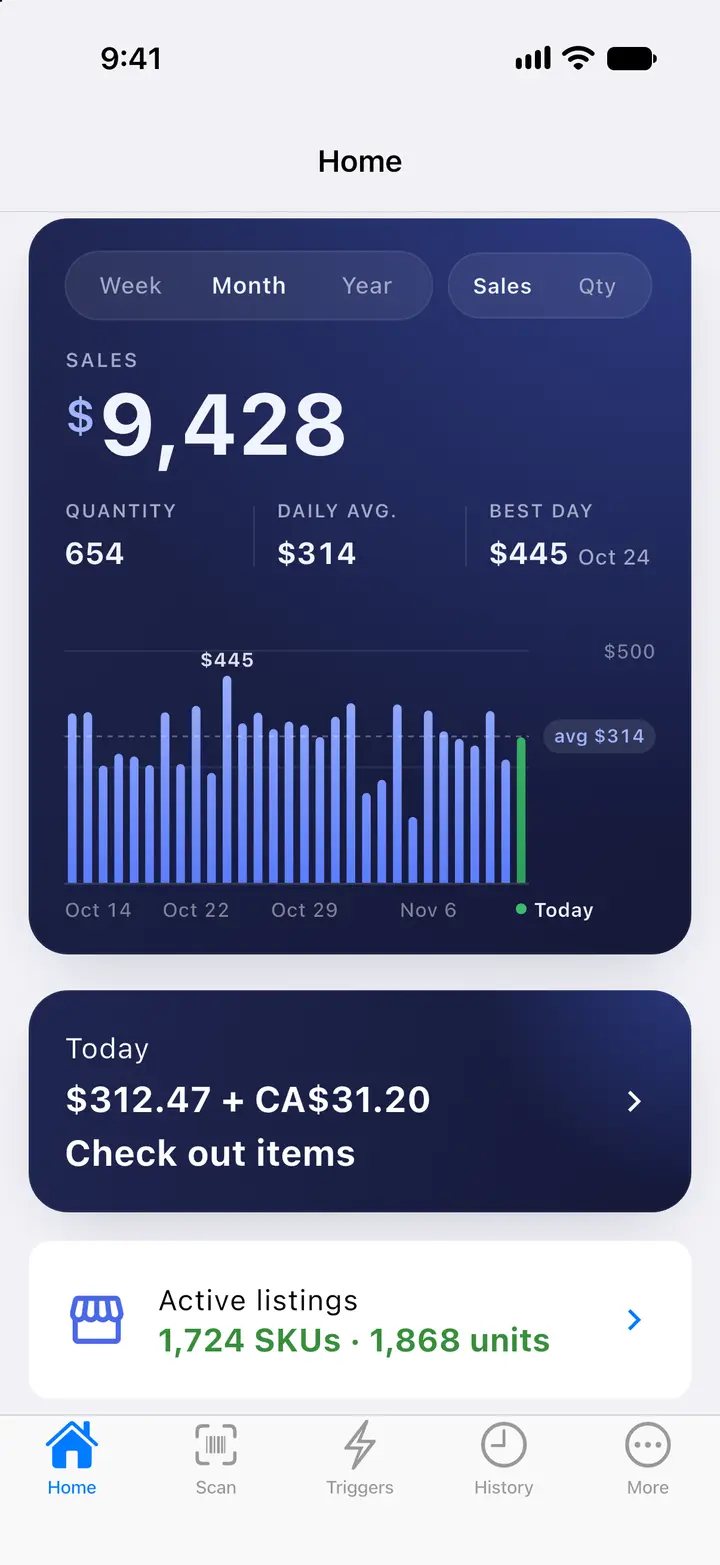
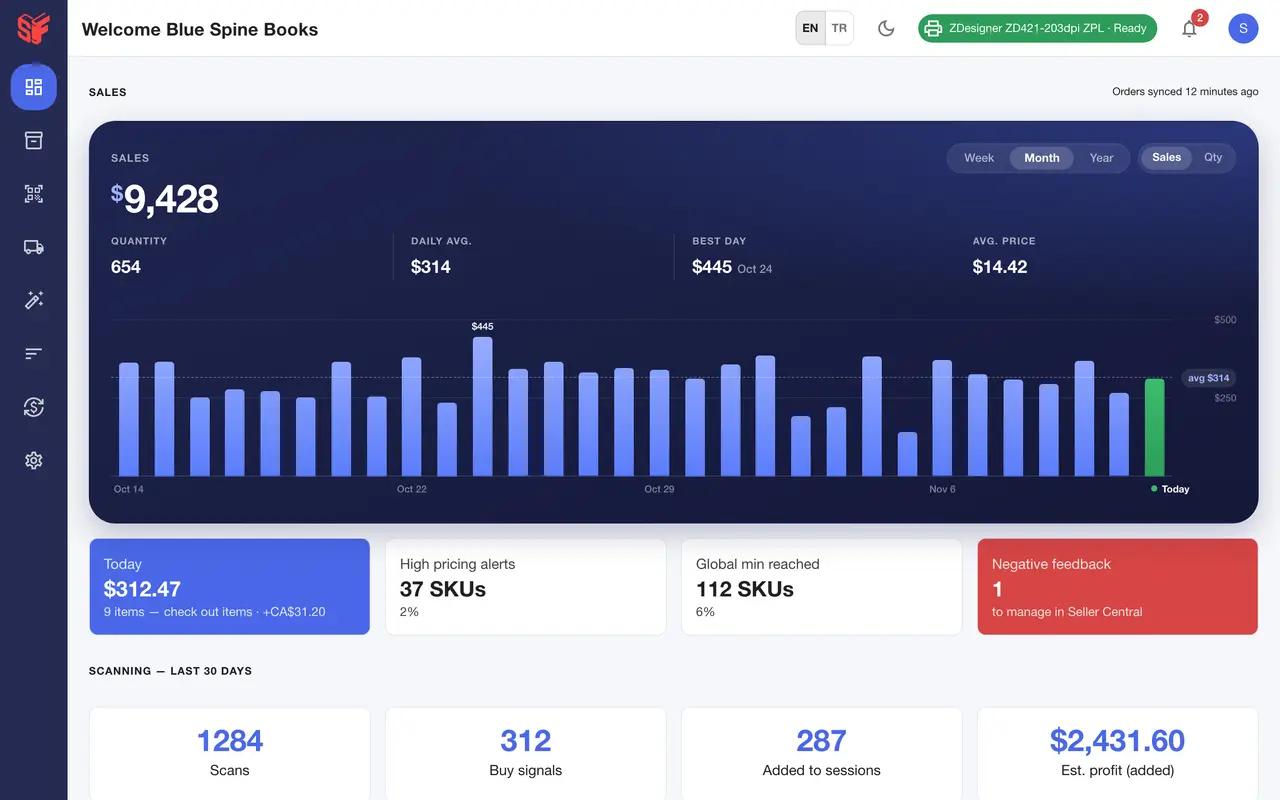
  1. The sales card on Home: week, month or year and sales or quantity, the total with quantity, daily average and best day, a bar for each day with today in green and a dashed line at the average, then the Today card.
    Fig. 4.1Home: sales card — Actual SpineFlip screen. Sample data.
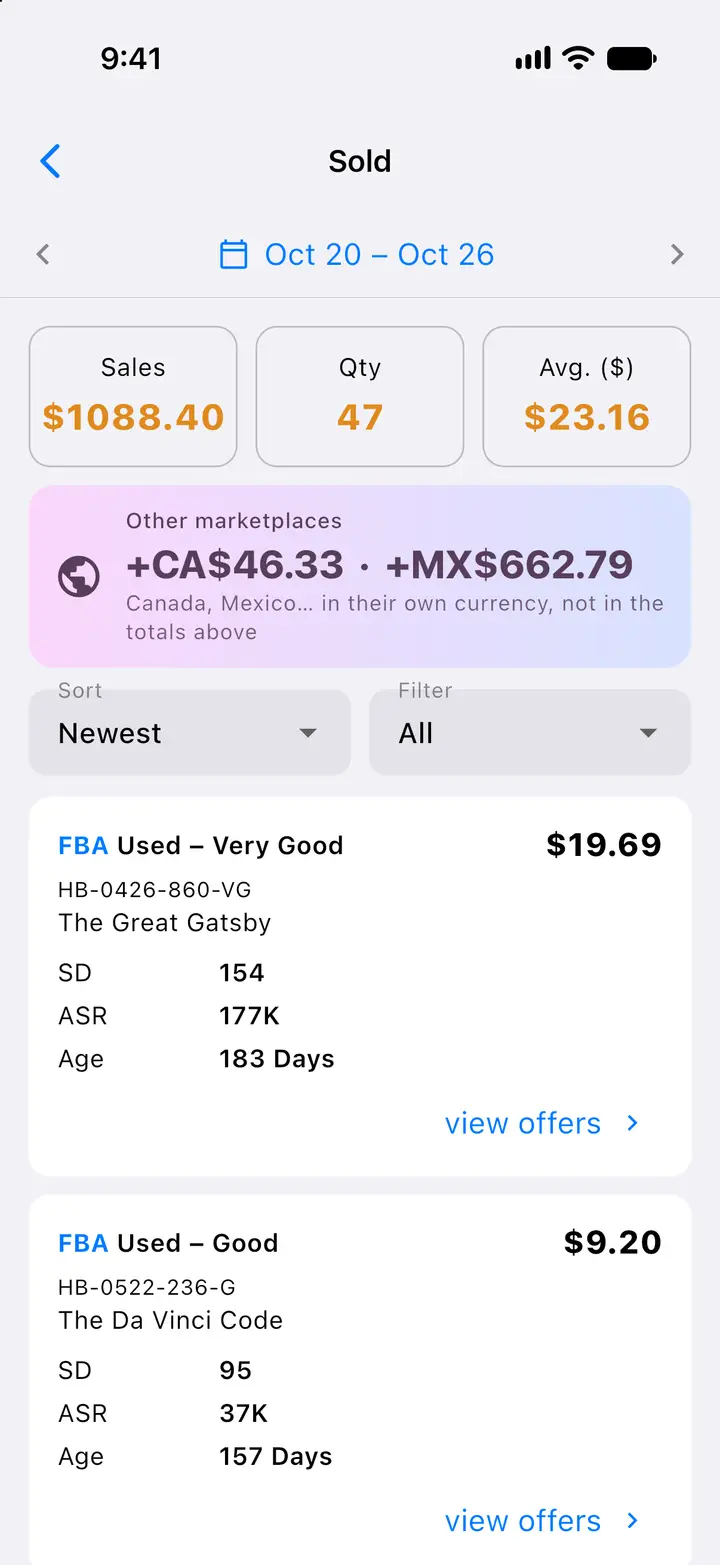
  2. Sold items for any day or date range, with sales from Amazon.ca and Amazon.com.mx shown separately in their own currency.
    Fig. 4.2Sold items for a date range — Actual SpineFlip screen. Sample data.
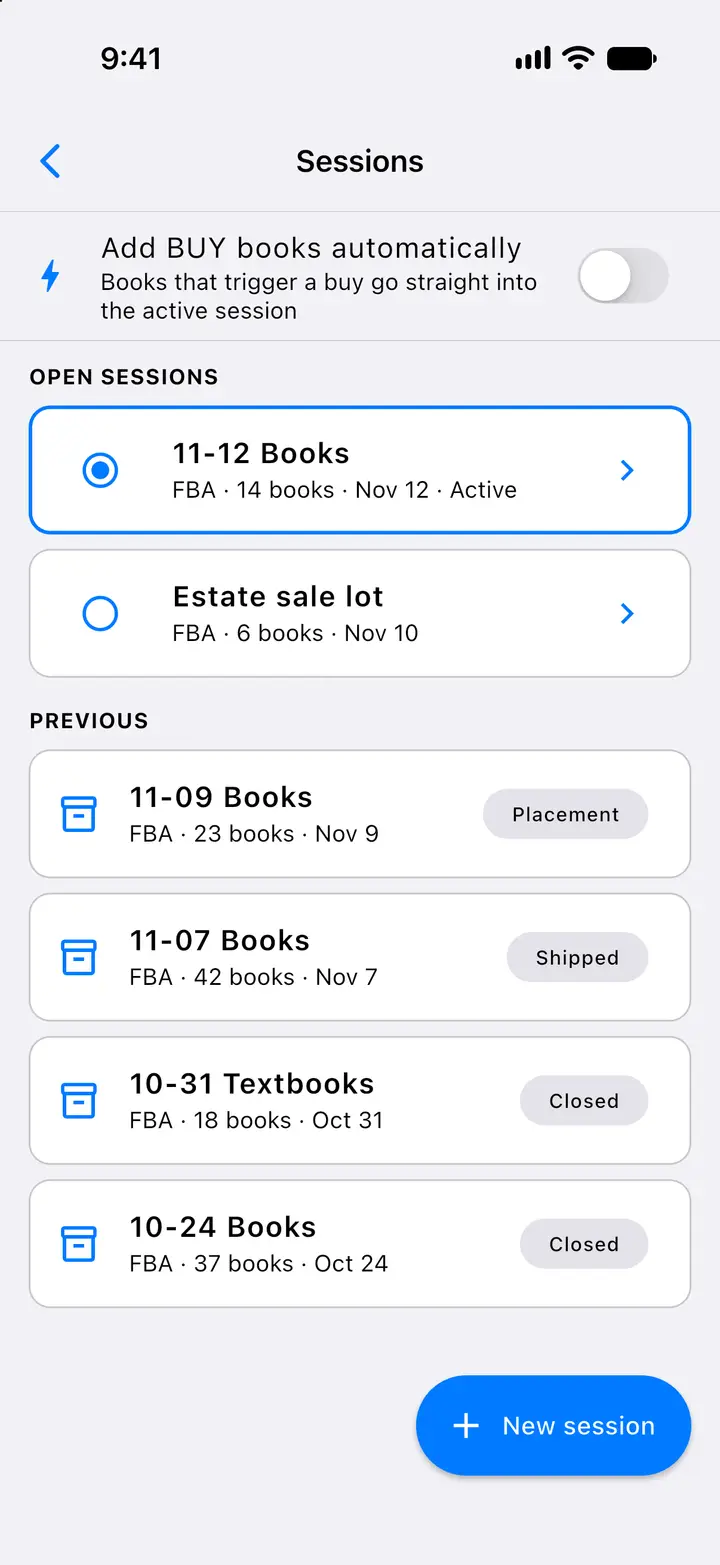
  3. Sessions hold the books you will send to Amazon FBA; BUY books can go straight into the active session.
    Fig. 4.3Sessions — Actual SpineFlip screen. Sample data.
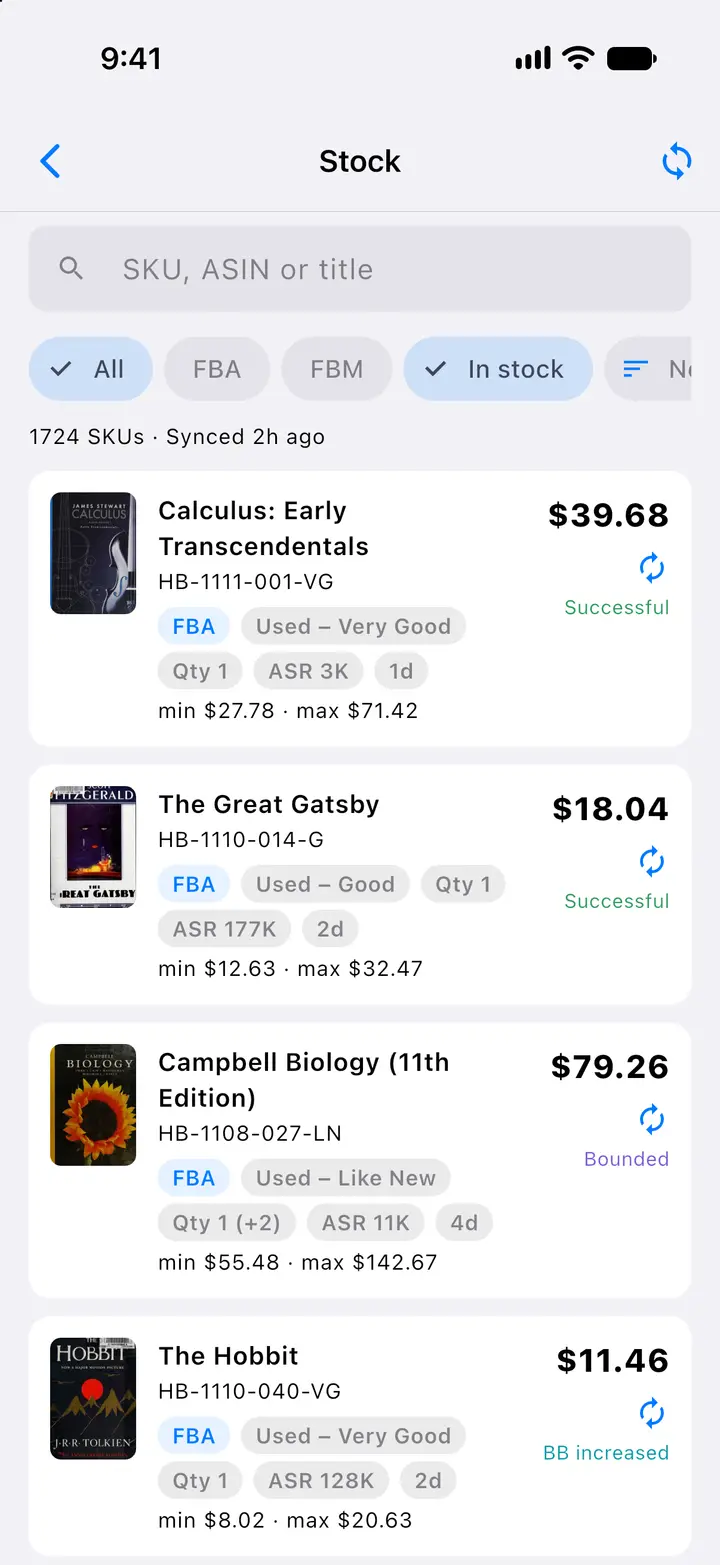
  4. The stock list with price, min and max, condition, sales rank, age and the last repricer result for each SKU.
    Fig. 4.4Stock — Actual SpineFlip screen. Sample data.
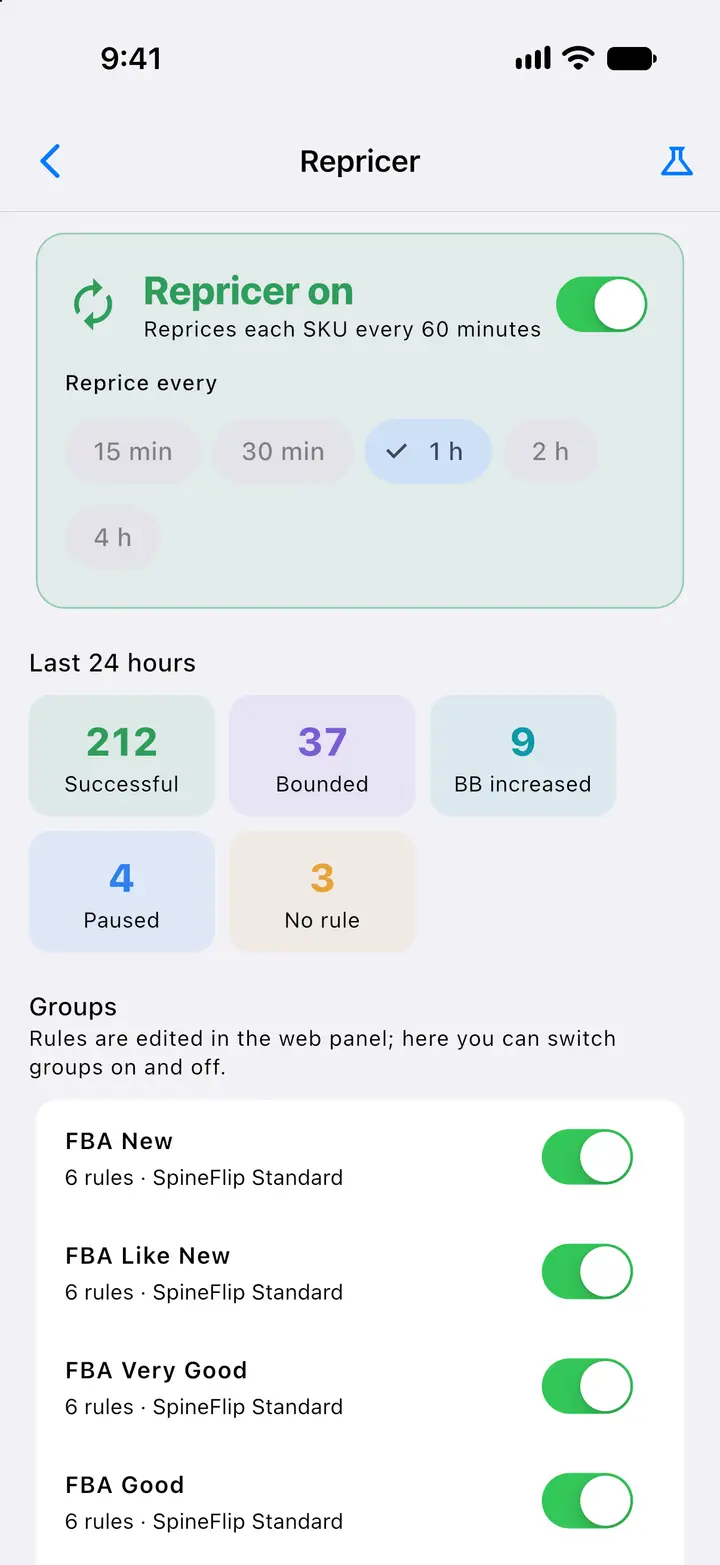
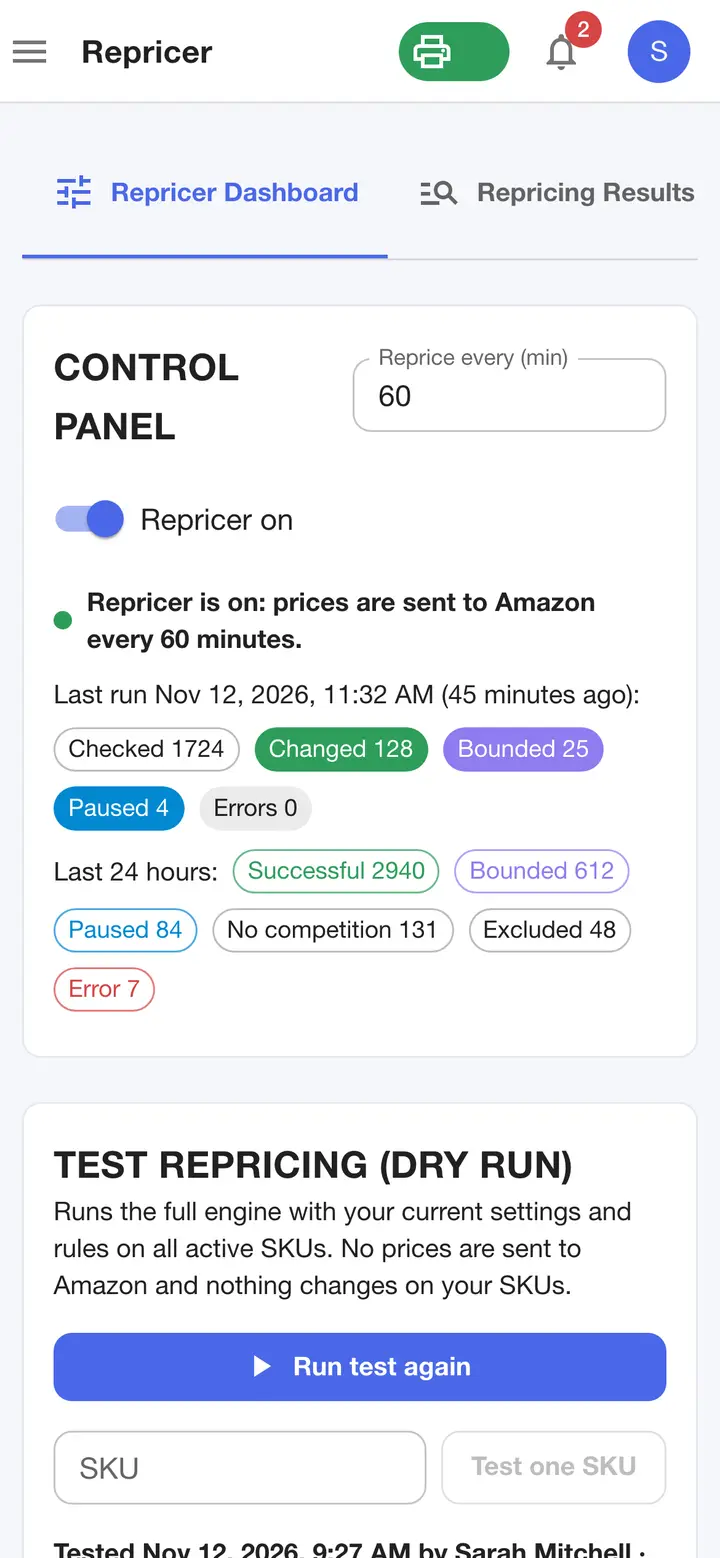
  5. Repricer on or off and its interval, the last 24 hours of results and the ten condition groups.
    Fig. 4.5Repricer — Actual SpineFlip screen. Sample data.
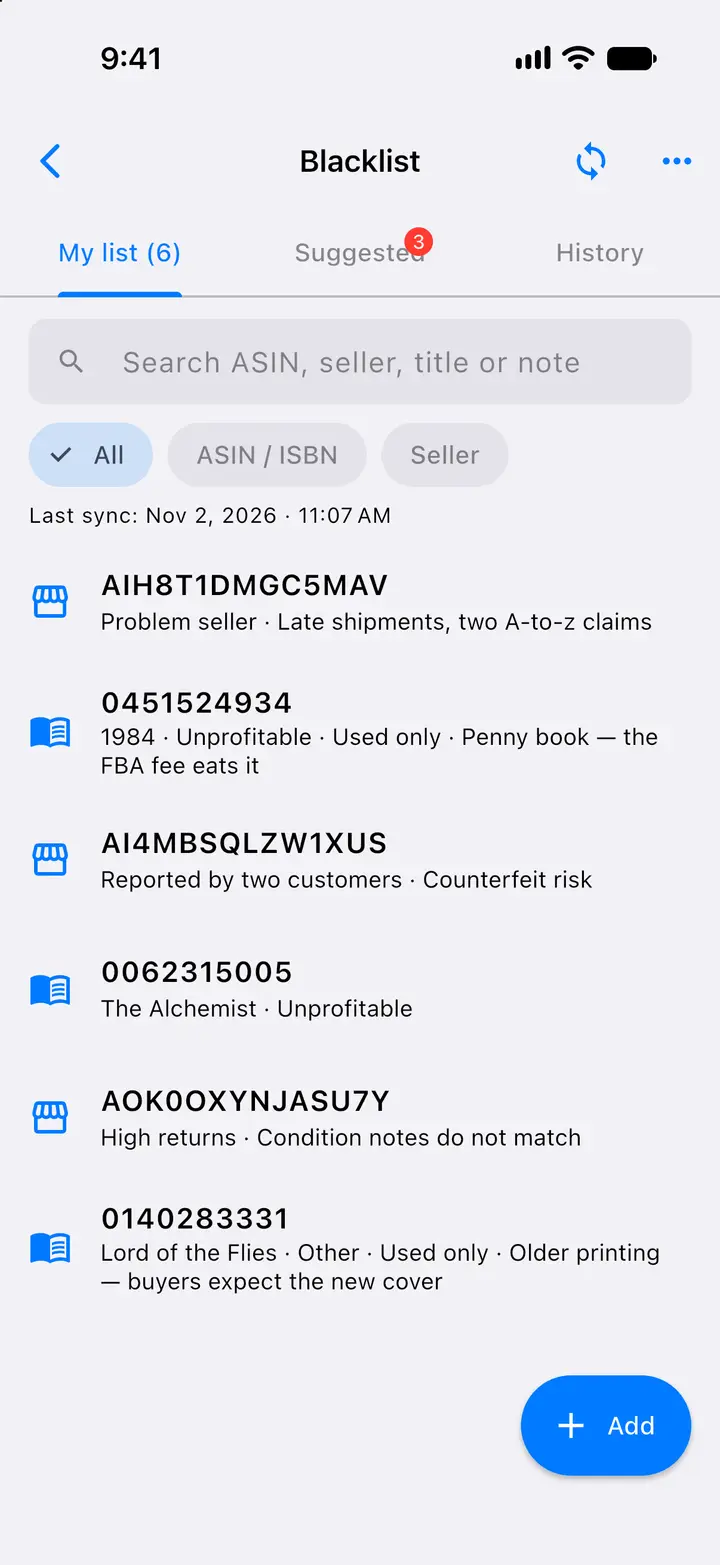
  6. Books and sellers to be warned about, with reason and note, plus a suggested list curated by SpineFlip.
    Fig. 4.6Blacklist — Actual SpineFlip screen. Sample data.
  7. Every scan with its decision, profit and sales rank, including scans made offline from Local data and books found by their cover, marked Cover scan.
    Fig. 4.7Scan history — Actual SpineFlip screen. Sample data.
  8. When a barcode matches several Amazon listings, the best-selling one is picked and the others show their own decision and eligibility.
    Fig. 4.8Several listings on one barcode — Actual SpineFlip screen. Sample data.
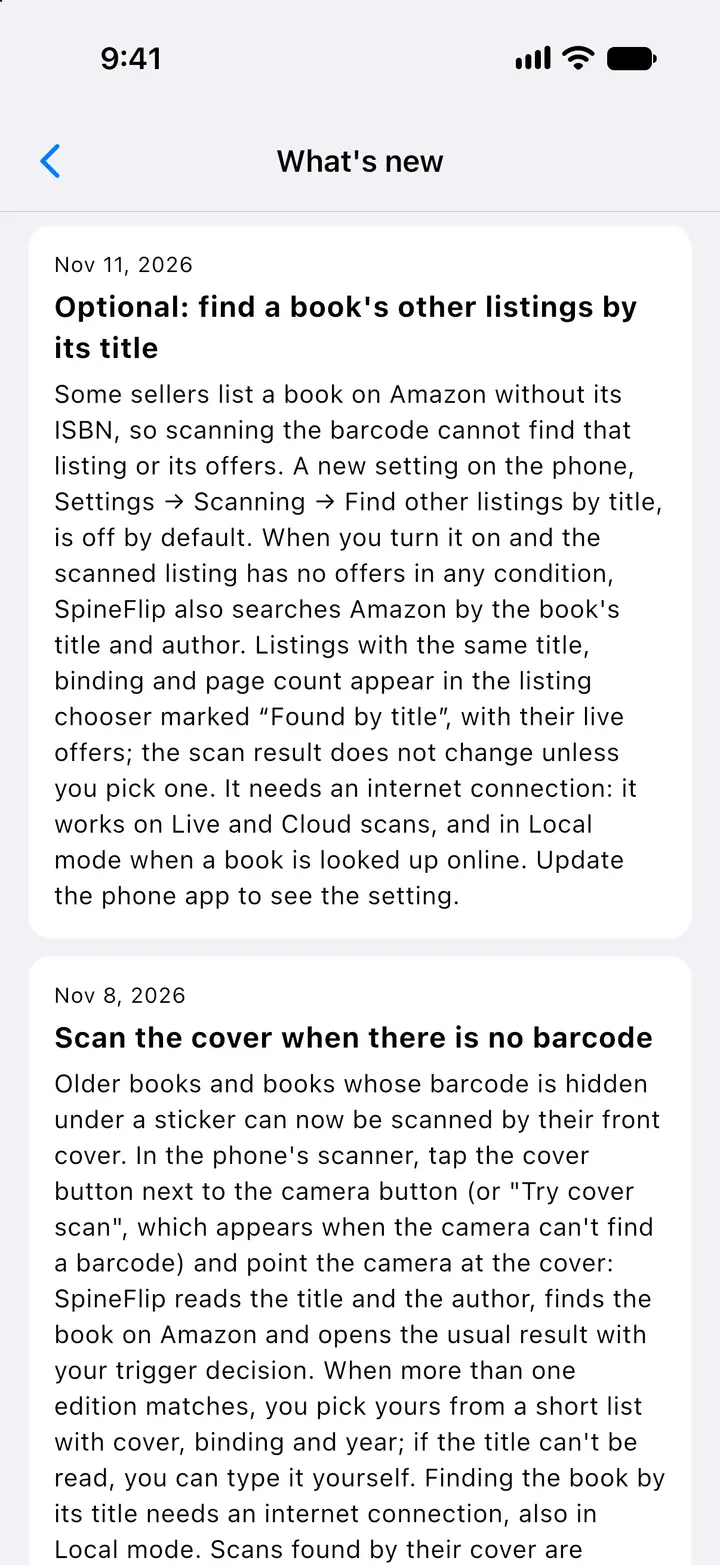
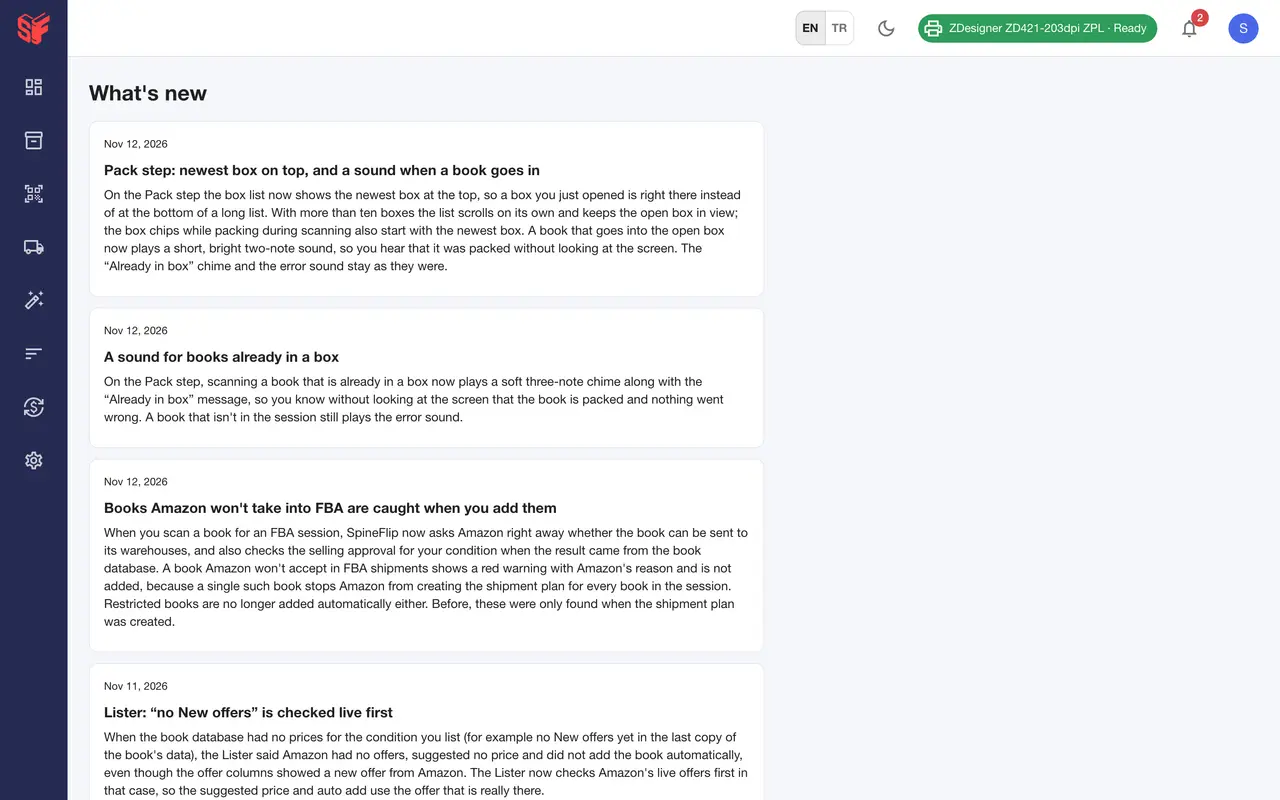
  9. Dated release notes inside the app.
    Fig. 4.9What’s new — Actual SpineFlip screen. Sample data.
  10. The History tab shows the sales rank and price history chart with the 180-day New and Used Buy Box ranges.
    Fig. 4.10Price and rank history — Actual SpineFlip screen. Sample data.
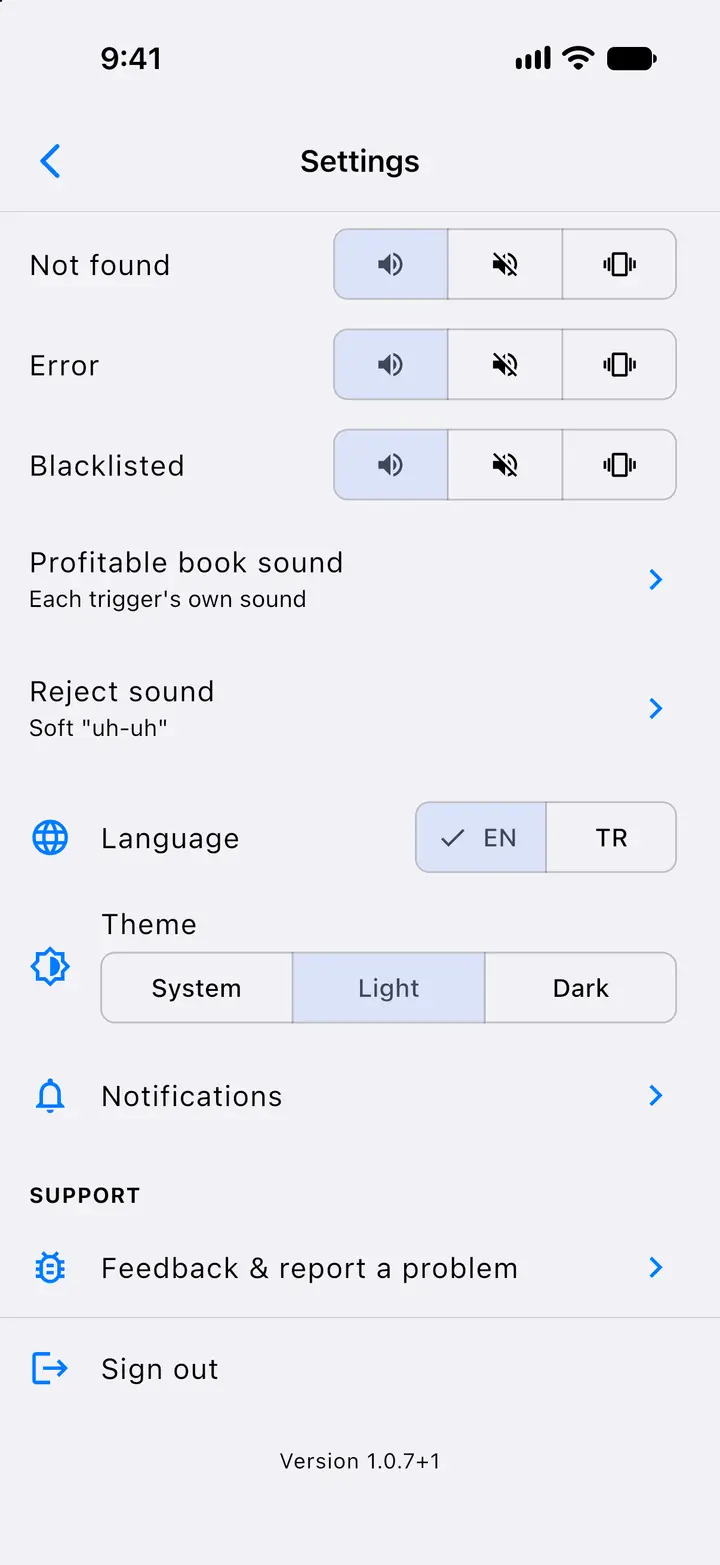
  11. Sound, silent or vibrate per outcome, English or Turkish, a light, dark or system theme, and the notification settings.
    Fig. 4.11Settings: sounds, language and theme — Actual SpineFlip screen. Sample data.
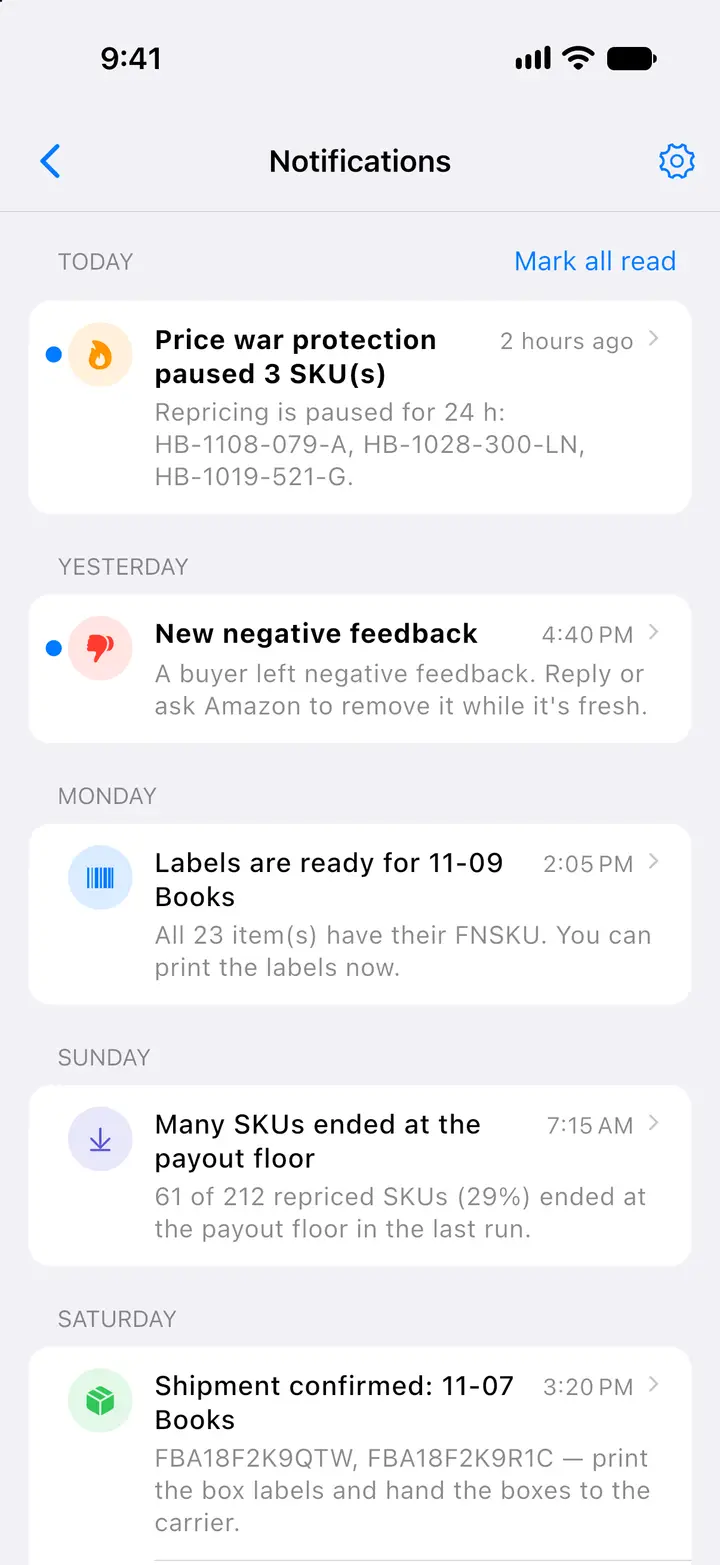
  12. The web panel’s notifications on the phone, newest first: repricer alerts, negative feedback, labels ready and a confirmed shipment; unread ones are marked with a dot.
    Fig. 4.12Notifications — Actual SpineFlip screen. Sample data.

Ship to FBA in five steps

Every session goes from scan to box labels in one wizard. You can leave the page; SpineFlip keeps going in the background and notifies you as the shipment moves.

  1. 1ScanWeb

    Scan or search each book.

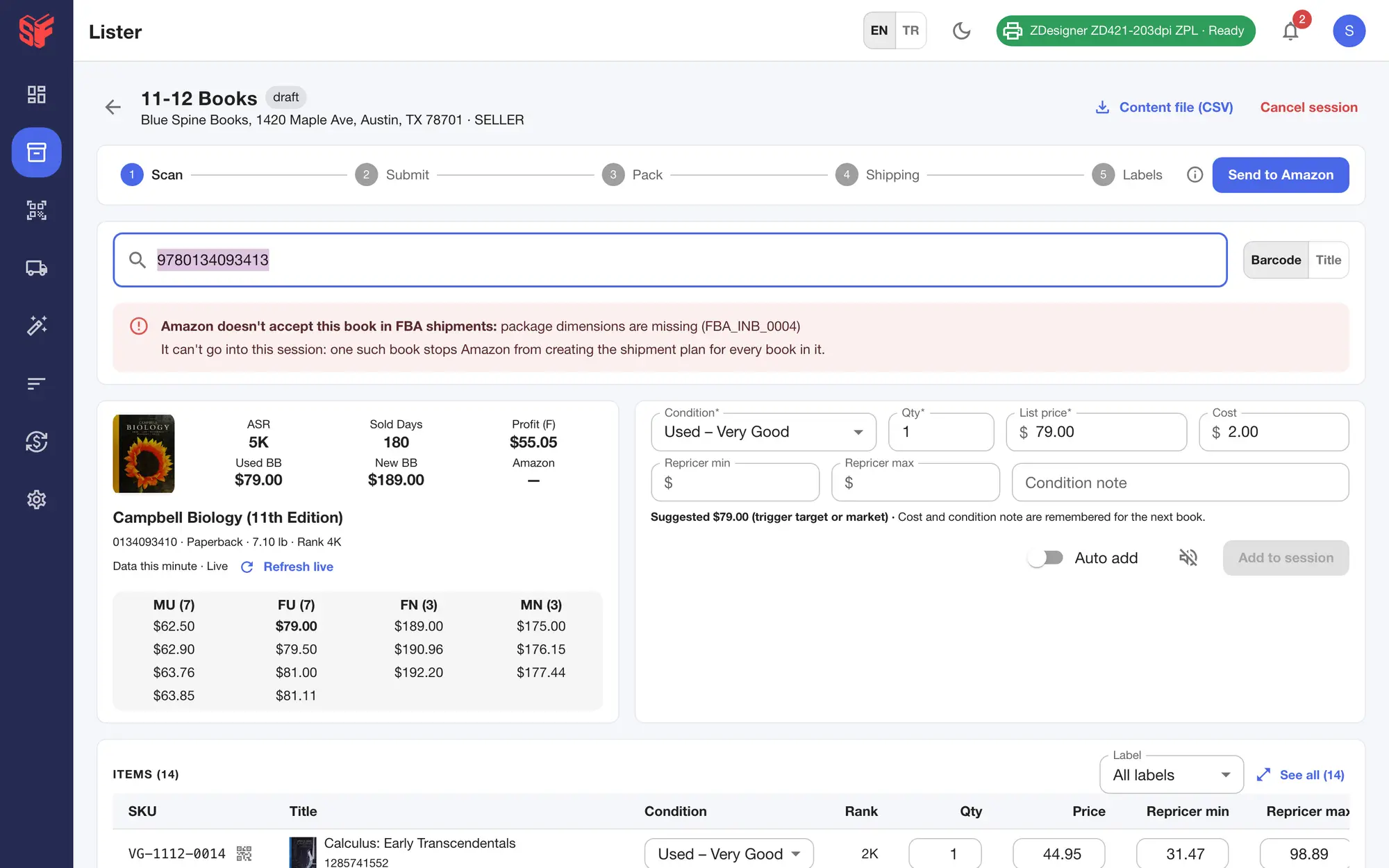
    Type or use a USB or Bluetooth scanner; scans are captured even when the cursor is not in the box. Before a book is added, SpineFlip asks Amazon whether it can go into an FBA shipment; if Amazon says no, you see its reason and the book stays out of the session.

    Before a book is added to an FBA session, SpineFlip asks Amazon whether it can go into an FBA shipment; here Amazon says no, its reason is shown in red and the book is not added.
    Session, book Amazon will not take into FBA — Actual SpineFlip screen. Sample data.
  2. 2SubmitWeb

    SpineFlip lists them on Amazon.

    It lists every book and builds the shipment plan, explains Amazon’s delays and lets you pick among packing options. You can leave the page; it keeps going and notifies you.

    Listings submitted to Amazon: progress of offers created and FNSKUs assigned, with plain-language notes while Amazon works.
    FBA wizard, Submit — Actual SpineFlip screen. Sample data.
  3. 3PackWeb

    Pack by scanning.

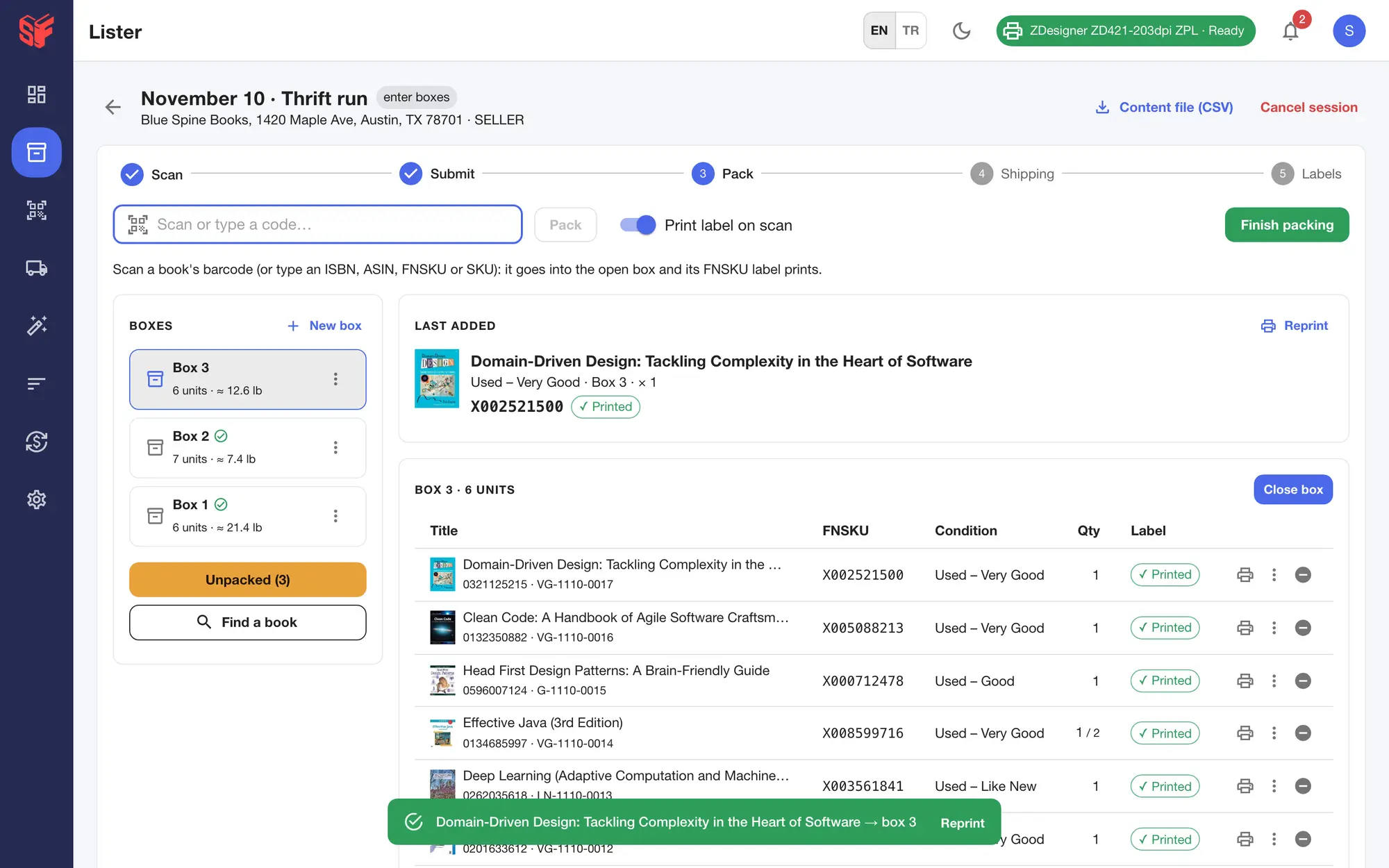
    Scan each book into the open box and its FNSKU label prints, with a short sound for each book and a different chime if it is already boxed. The newest box sits on top. Box weights are estimated from the books’ package weights; when Amazon lists none for a book, closing the box tells you to weigh it. Amazon’s 50 lb and 25 in limits are enforced.

    Scan each book into the open box; its FNSKU label prints silently. The newest box is at the top of the box list, the open box lists its latest books first, and box weights and the unpacked count are tracked.
    FBA wizard, Pack — Actual SpineFlip screen. Sample data.
  4. 4ShippingWeb

    Compare placement options.

    Amazon’s placement options side by side: placement fee, shipments, warehouses, estimated shipping and total, with exact quotes in one tap. Amazon Partnered Carrier, small parcel.

    Amazon's placement options side by side: placement fee, number of shipments, destination warehouses and exact UPS quotes; the cheapest is tagged.
    FBA wizard, Shipping — Actual SpineFlip screen. Sample data.
  5. 5LabelsWeb

    Print the labels and ship.

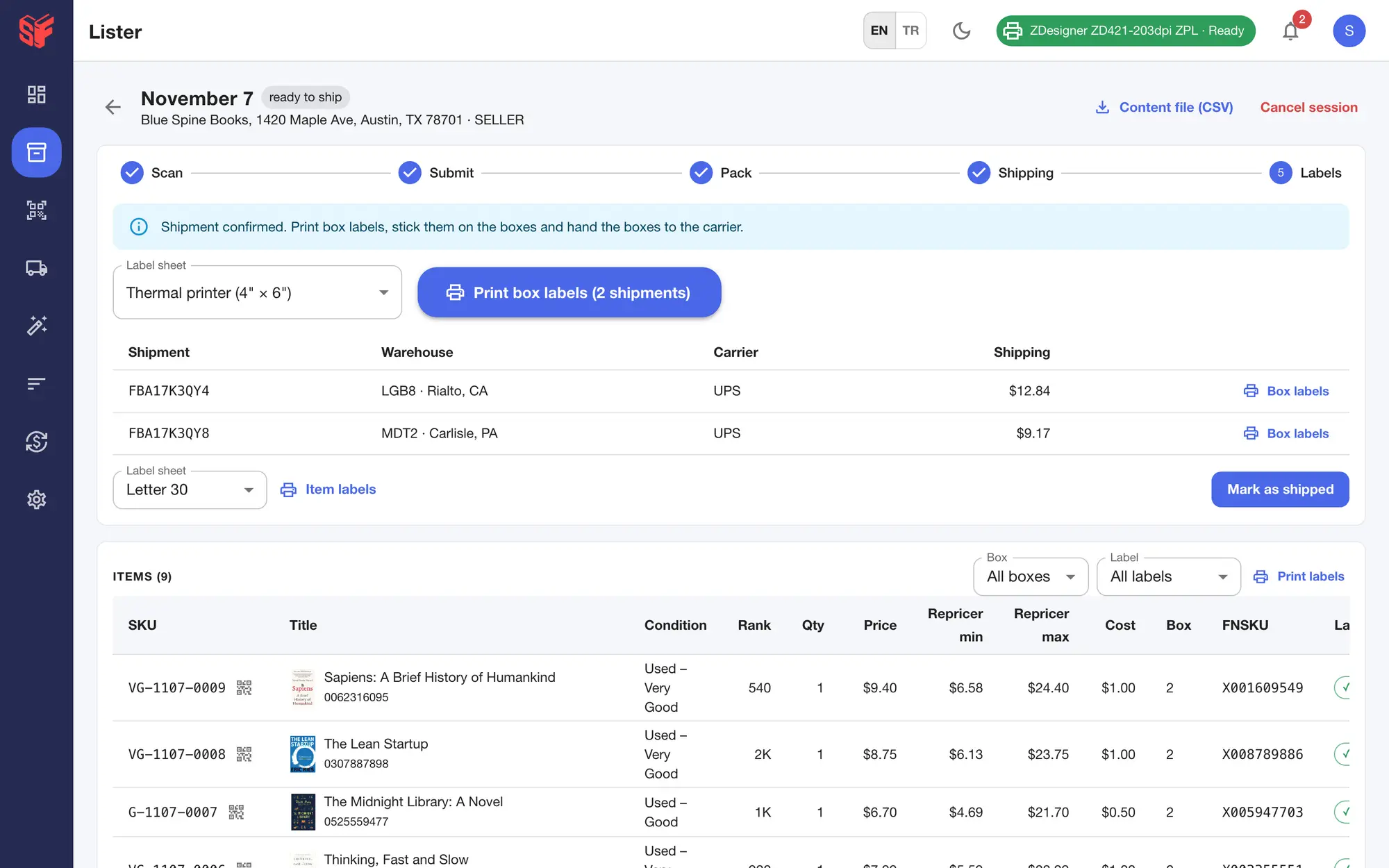
    Box labels on 4×6 thermal, Letter sheets with 2, 4 or 6 labels, or plain paper; item labels as PDF; then Mark as shipped. A confirmed shipment can be cancelled within 24 hours.

    Confirmed shipments with box labels for thermal or Letter sheets, item labels as PDF, and Mark as shipped.
    FBA wizard, Labels — Actual SpineFlip screen. Sample data.

The rest of the desk work

Labels, repricing, stock, reimbursements, review requests and the team, in the same web panel.

Labels & printers

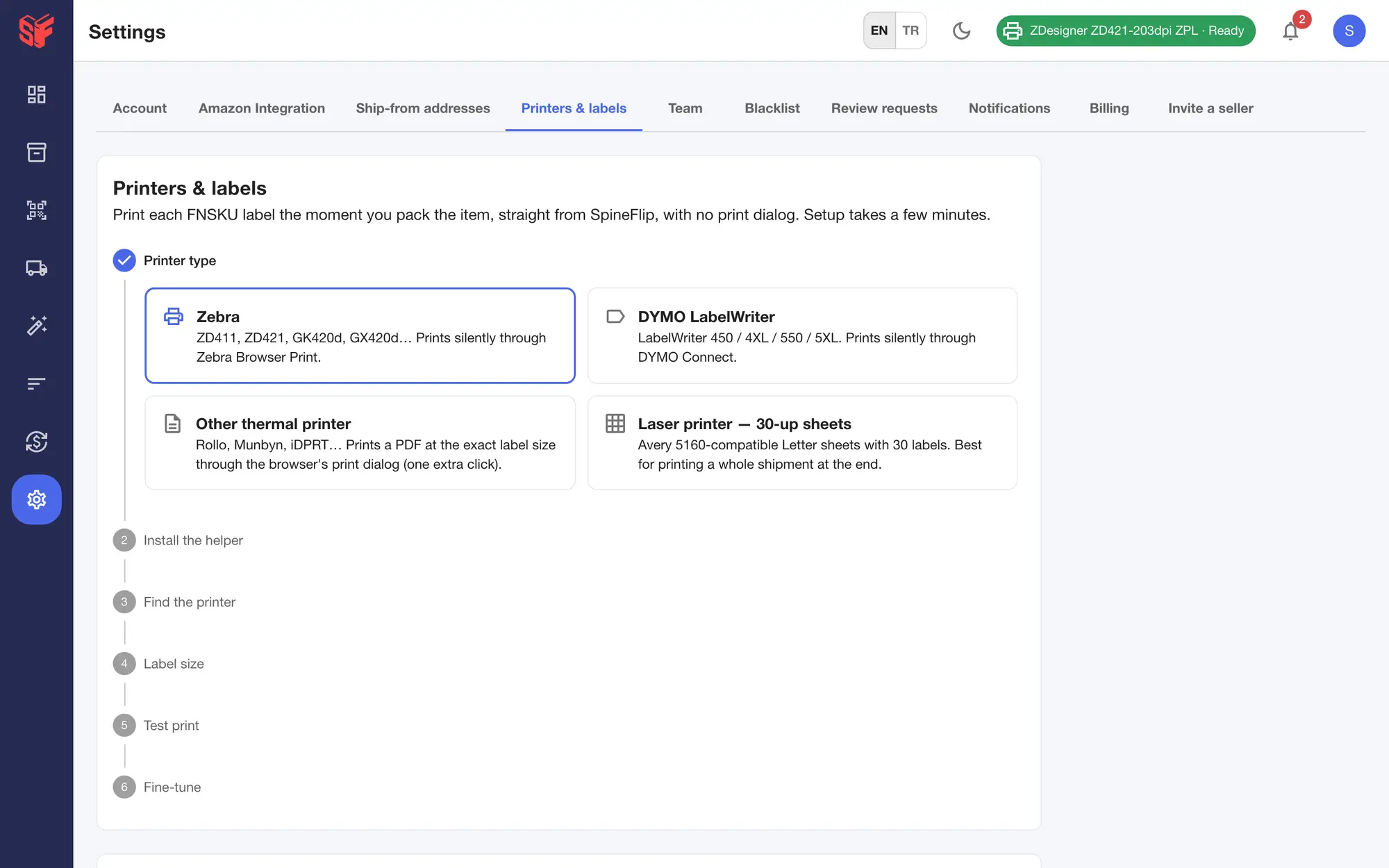
FNSKU labels print silently on Zebra printers through Zebra Browser Print and on DYMO LabelWriters through DYMO Connect. Other thermal printers get an exact-size PDF, and laser or inkjet printers use 30-up Letter sheets.

Labels are 2.25 × 1.25 in, 2 × 1 in or a custom size up to 3 × 2 in, and the guided setup ends with a test print.
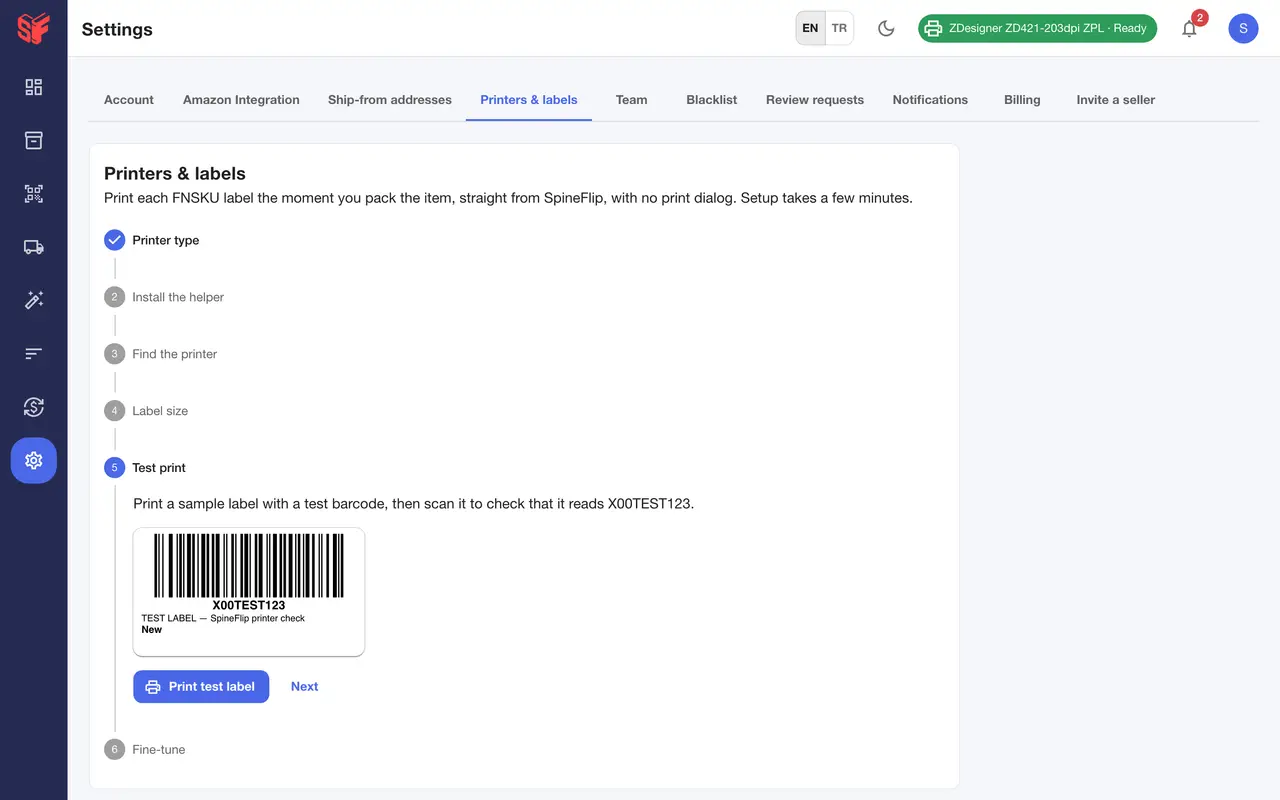
The test-print step of the printer setup: a sample FNSKU label to print and scan back before packing.
Guided printer setup, step one: Zebra or DYMO print silently, other thermal printers get an exact-size PDF, laser printers use 30-up Letter sheets.

Settings, printers & labelsSettings, printer test print — Actual SpineFlip screens. Sample data.Settings, printers & labels — Actual SpineFlip screen. Sample data.
Repricing you can audit

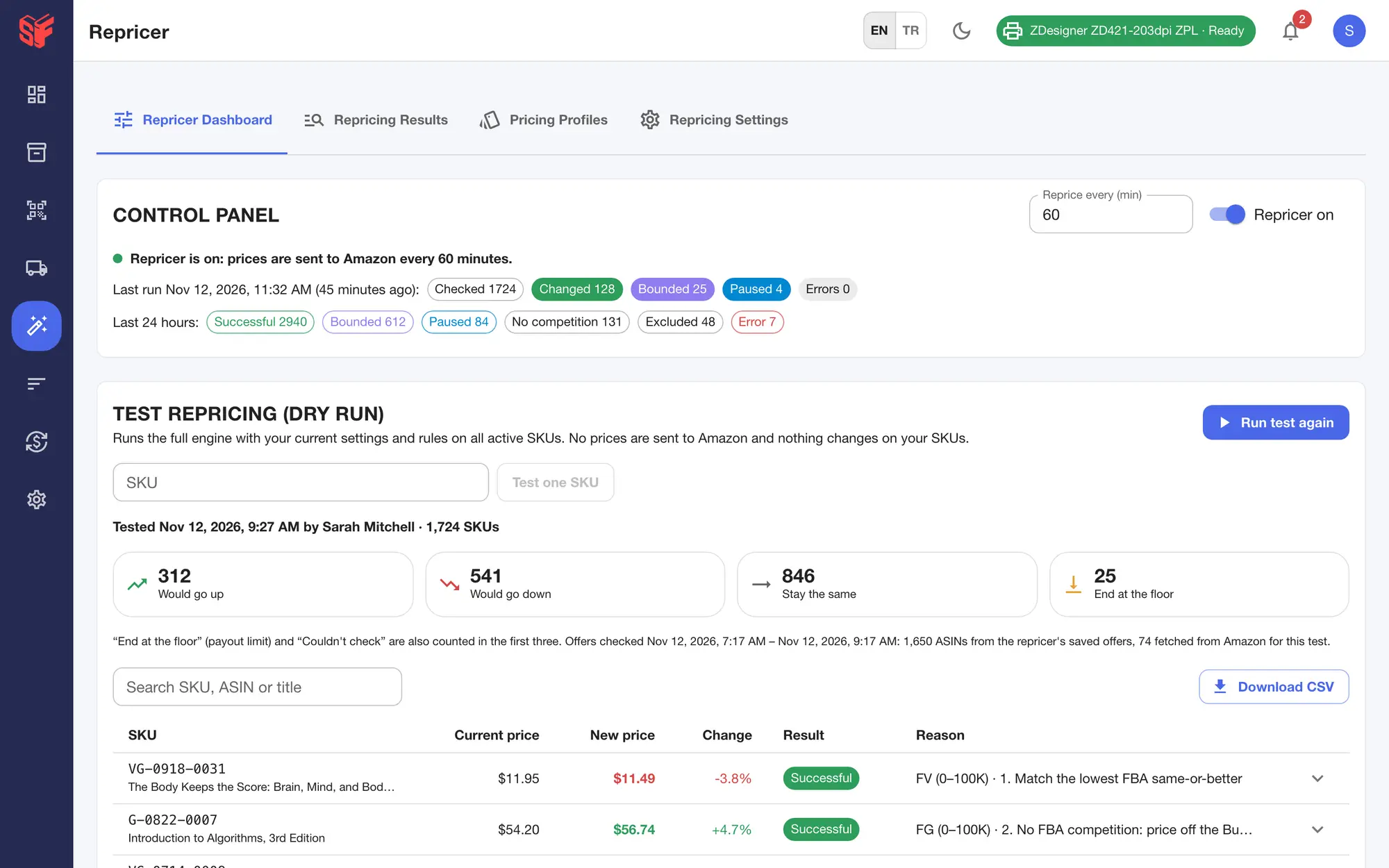
Scheduled repricing from every 15 minutes to every 24 hours, with rules by sales-rank range and payout, profit or ROI floors by inventory age. It is off until you turn it on.

A price-war brake and a daily drop limit hold the floor. “Review impact” runs a dry run before you save, and “Why this price?” traces every price step by step.

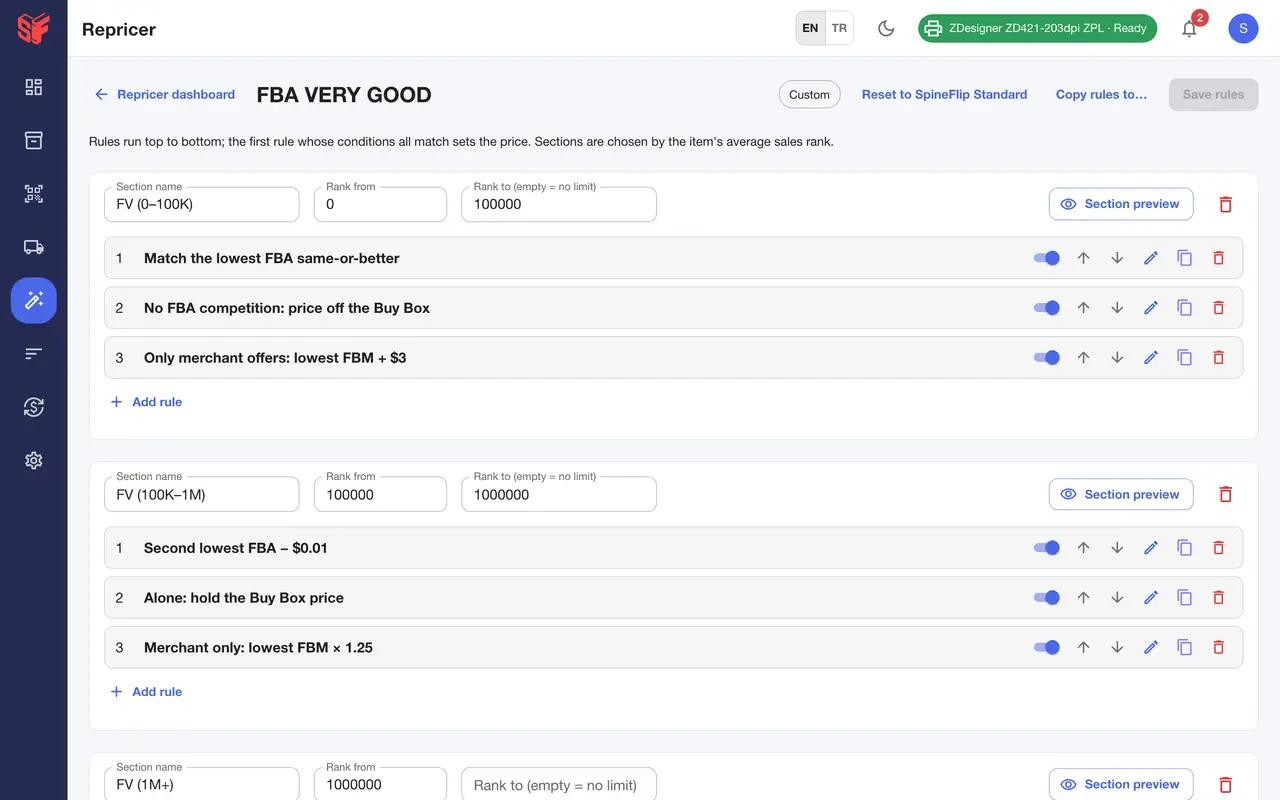
Rules by sales-rank range: compare with the lowest FBA offer, the Buy Box or your own price, in order, with a fallback when nobody competes.
A step-by-step trace for one SKU: ignored outlier offer, rule target, daily-drop, payout-floor and profile-min checks, and the final price.
Control panel with schedule and last run, and a dry run over every SKU that shows what would go up, down or stay before anything is sent.

Repricer, dashboardRepricer, rule editorRepricer, Why this price? — Actual SpineFlip screens. Sample data.Repricer, dashboard — Actual SpineFlip screen. Sample data.
Stock Manager

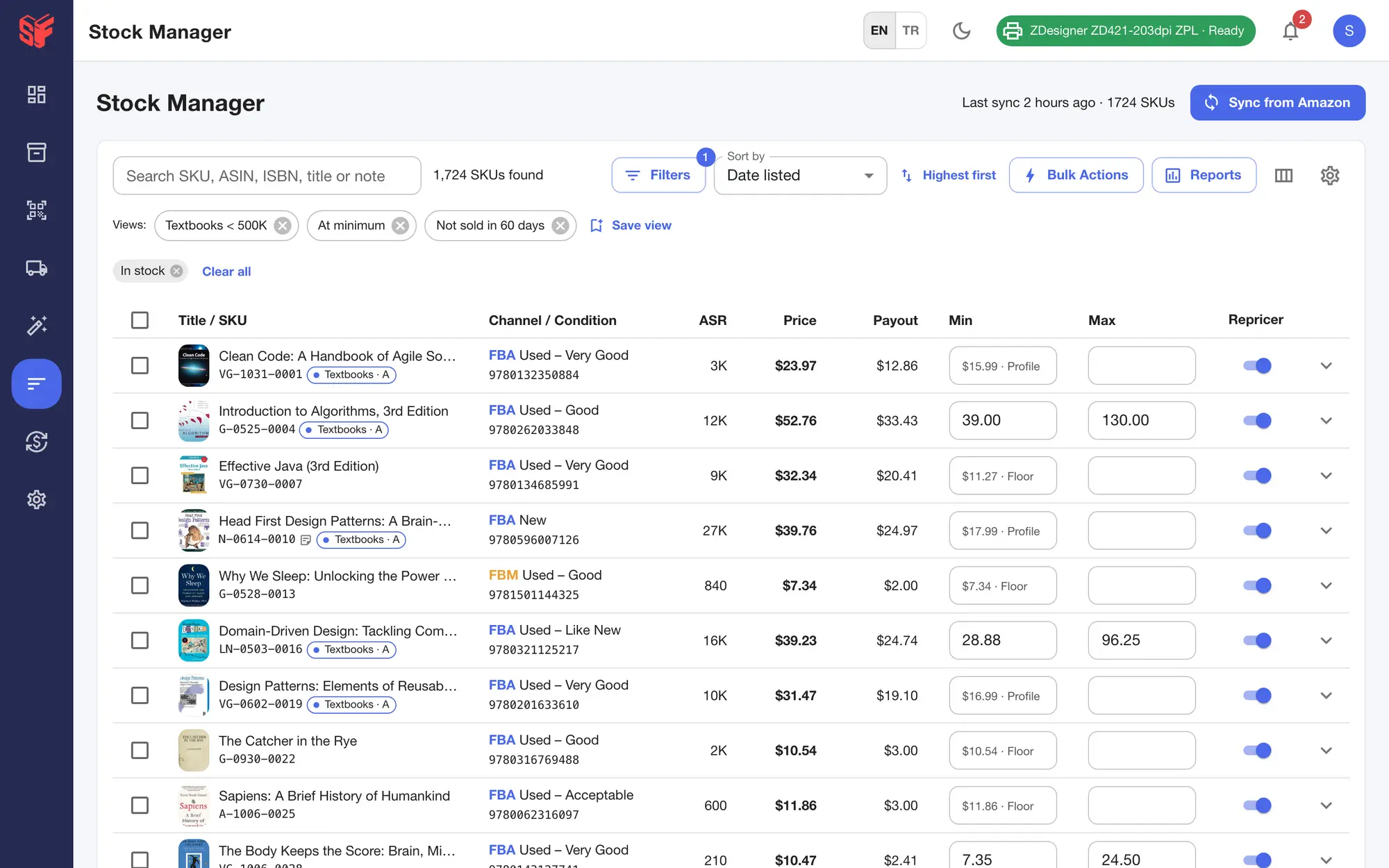
Sync from Amazon, search by SKU, ASIN, ISBN or title, filter with an AND / OR builder and save views for the team.

Bulk actions and price formulas need a preview first, and bulk changes can be undone for 30 days.

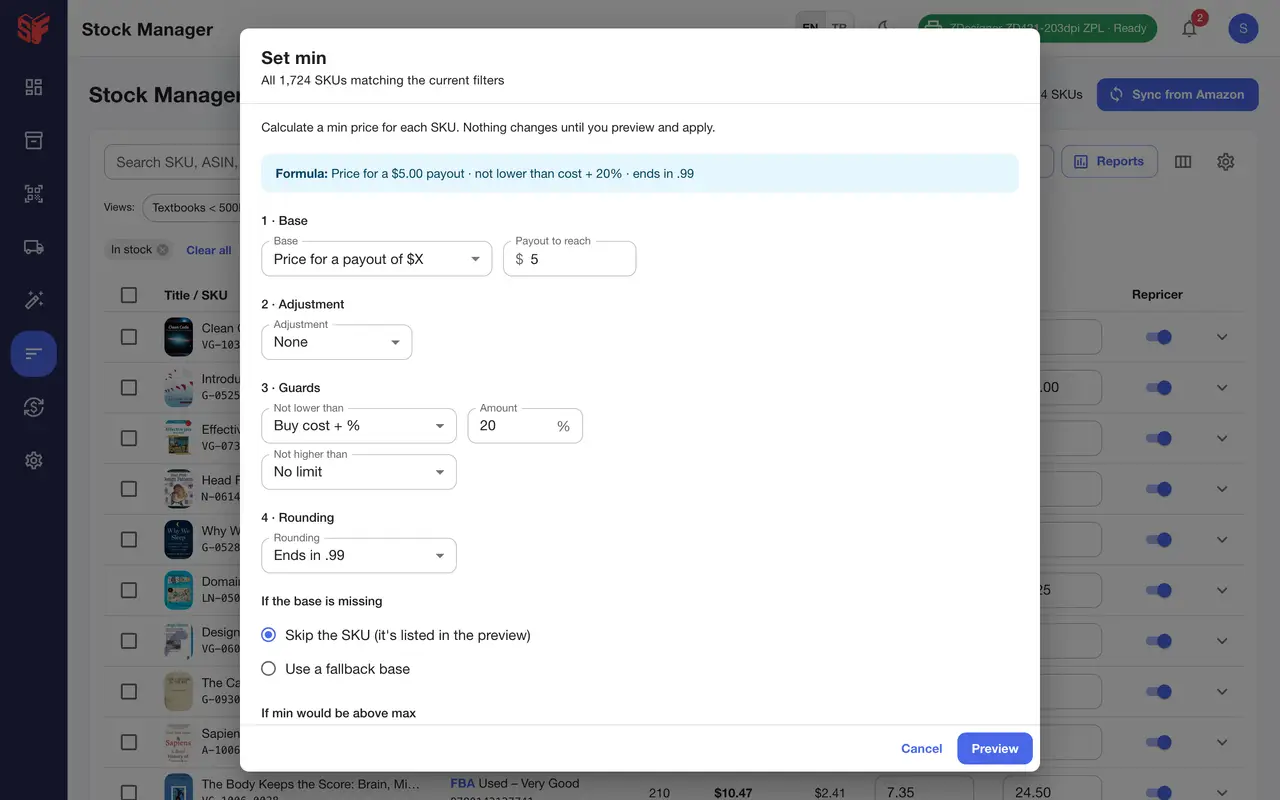
Set minimum prices for 1,724 SKUs with a formula: the price for a $5 payout, never below cost + 20%, rounded to .99; a preview is required before anything changes.
Inventory with search, filters, saved views, inline min / max edits, the effective minimum and where it comes from, and the repricer switch.

Stock ManagerStock Manager, bulk formula — Actual SpineFlip screens. Sample data.Stock Manager — Actual SpineFlip screen. Sample data.
Reimbursements

SpineFlip reads Amazon’s reimbursement report and inventory ledger and finds items lost or damaged in the warehouse, short-received shipments and reimbursements paid below your cost, each with its deadline.

“File claim” gives you copy-ready claim text and the Seller Central steps; you file it in Seller Central.

Copy-ready claim text and evidence plus the Seller Central steps; you file it yourself and record the case ID.
Items lost or damaged in the warehouse, short-received shipments and under-reimbursements, valued at your buy cost, with deadline and days left.

Reimbursements, claimsReimbursements, file a claim — Actual SpineFlip screens. Sample data.Reimbursements, claims — Actual SpineFlip screen. Sample data.
Review requests

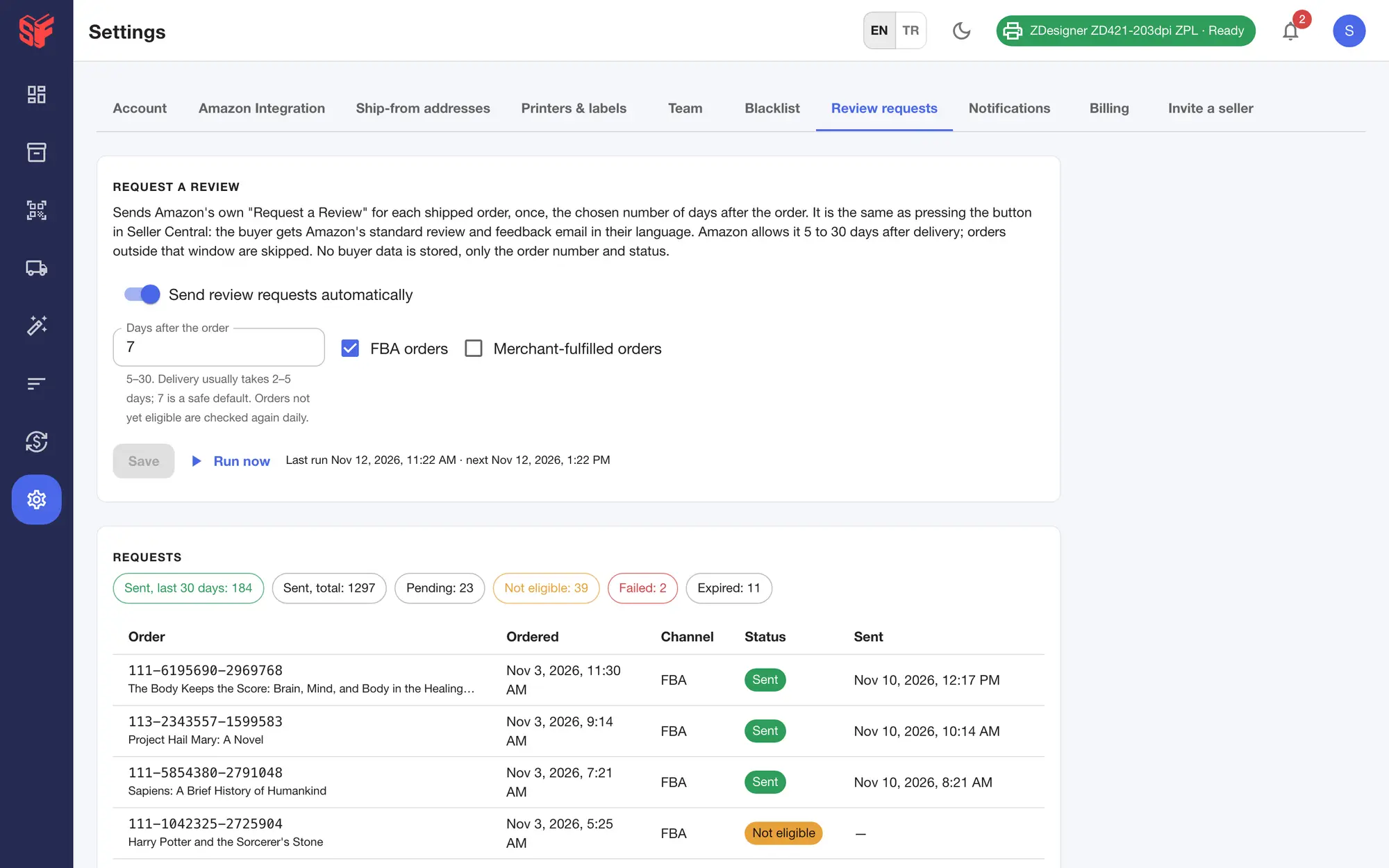
Automatic review requests through Amazon’s own “Request a Review”: once per shipped order, 5 to 30 days after the order, for FBA and / or merchant orders. It is off until you turn it on.

The dashboard lists negative feedback with “Mark as managed” and a link to Seller Central’s Feedback Manager.

The sales card with total, quantity, daily average, best day and average price over a 30-day chart, with a Sales / Qty switch; then today's sales, pricing alerts and negative feedback.
Automatic Request a Review through Amazon's own feature: delay after the order, FBA and / or merchant orders, sent and pending counts.

Settings, review requestsDashboard — Actual SpineFlip screens. Sample data.Settings, review requests — Actual SpineFlip screen. Sample data.
Team

Roles for Owner, Admin, Lister and Scanner. Add members by email; the invite link is valid for 24 hours.

Each phone that scans uses a seat, and owners can deactivate devices. The web panel needs no seat.

Owner, Admin, Lister and Scanner roles, invitations by email, and the phones that use scanner seats.

Settings, team — Actual SpineFlip screen. Sample data.
Also on the web

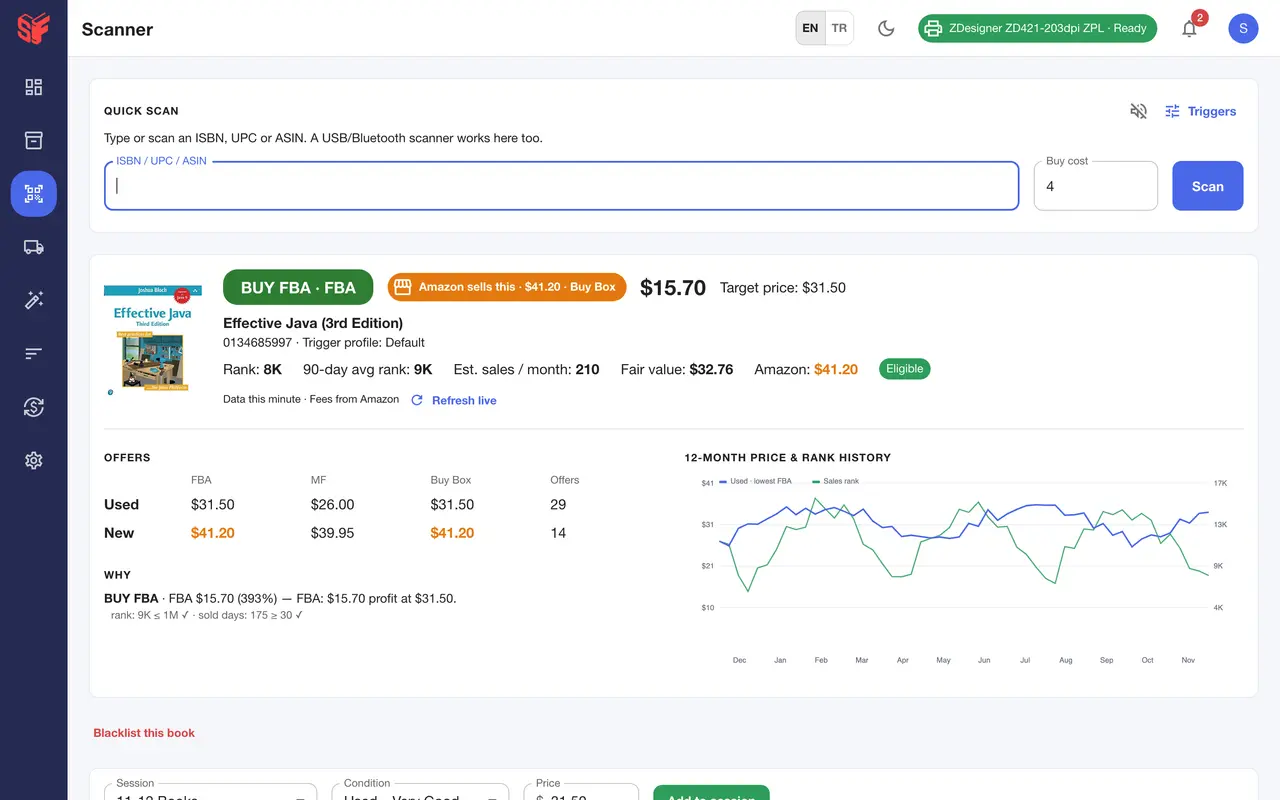
  1. A BUY decision with the matching trigger, expected profit, offers by channel, the Amazon badge, trigger reasons and the 12-month price and rank history.
    Fig. 5.1Scanner, scan result — Actual SpineFlip screen. Sample data.
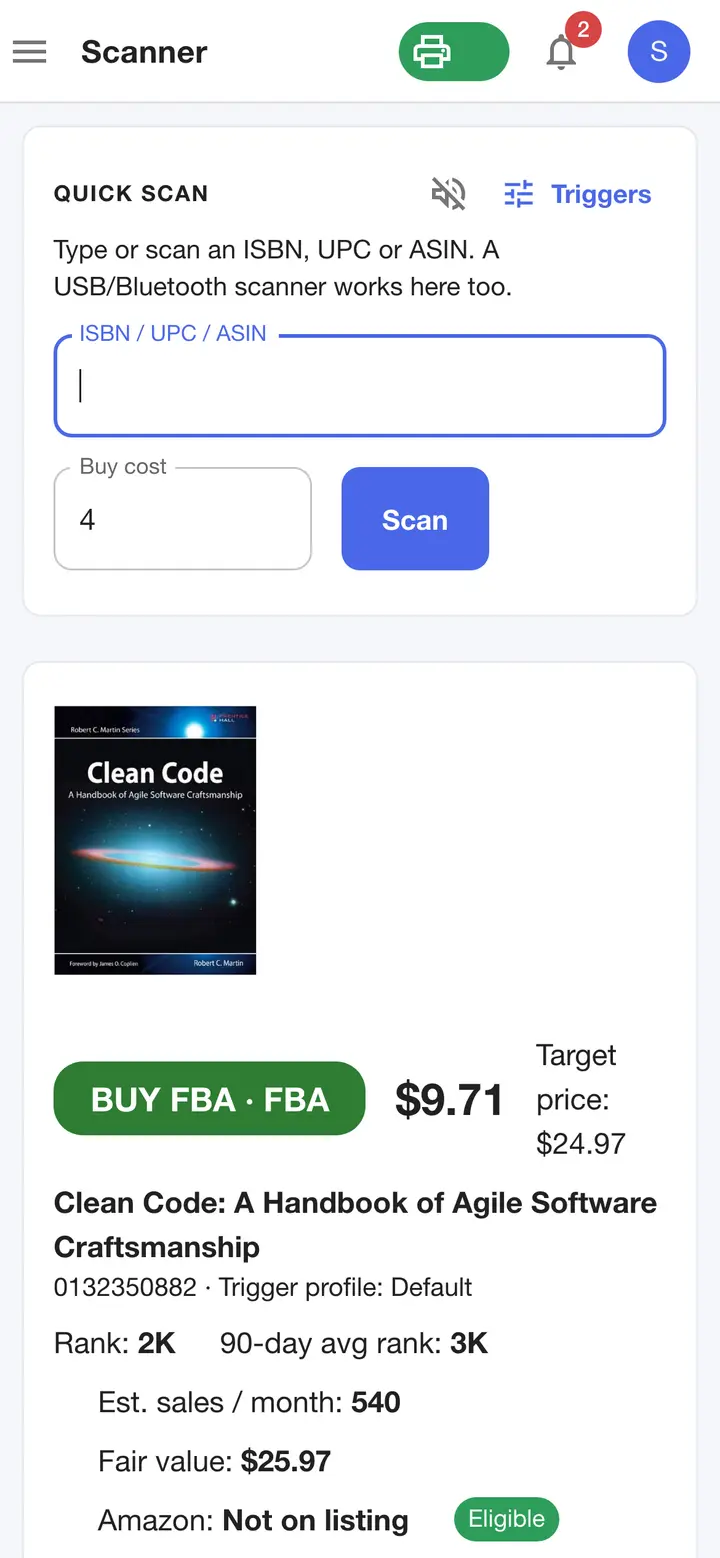
  2. The web scanner in a phone browser: type or use a Bluetooth scanner; decision, profit and offers in one column.
    Fig. 5.2Scanner on a phone browser — Actual SpineFlip screen. Sample data.
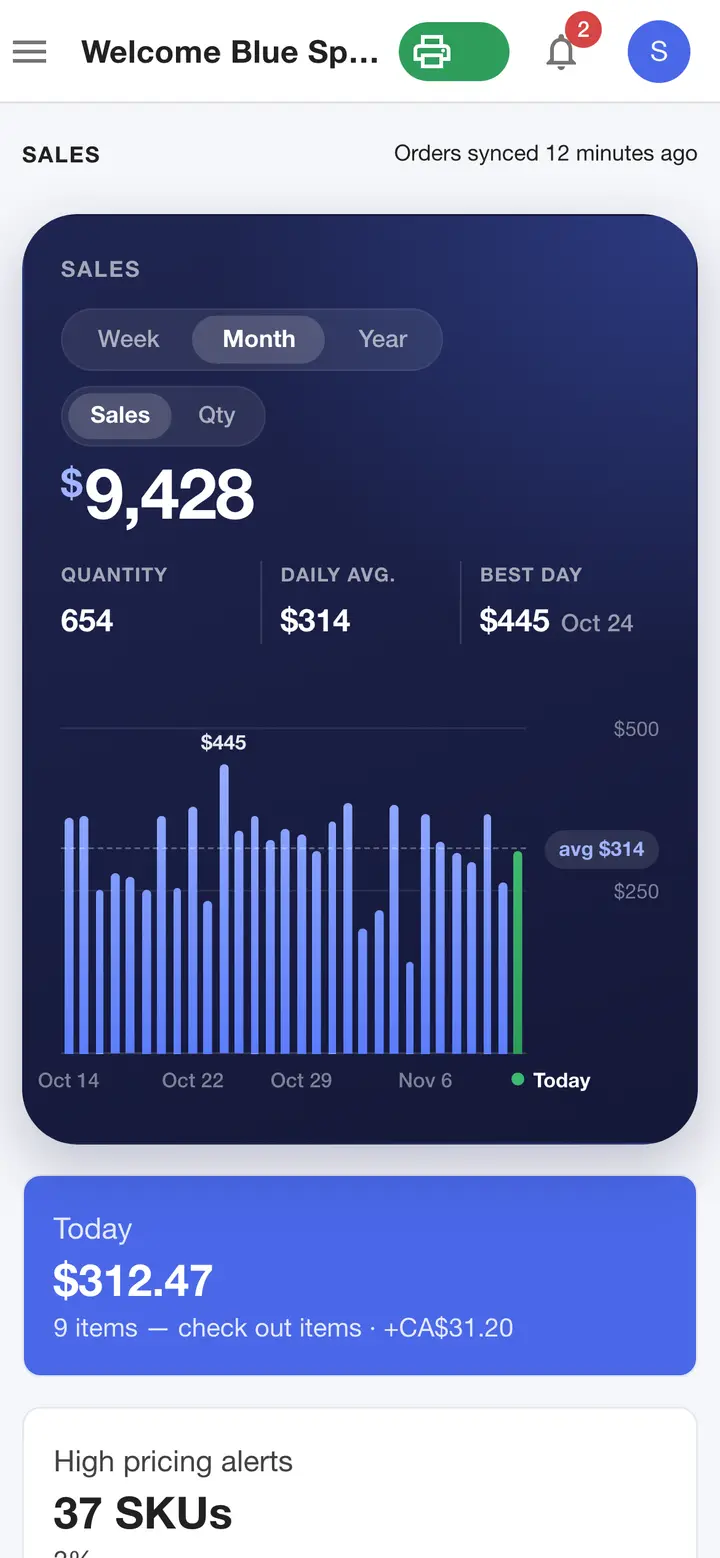
  3. The web panel in a phone browser: the sales card with its Sales / Qty switch, quantity, daily average, best day and the 30-day chart, then today's sales, in one column behind a menu button.
    Fig. 5.3Dashboard on a phone browser — Actual SpineFlip screen. Sample data.
  4. The sales card with total, quantity, daily average, best day and average price over a 30-day chart, with a Sales / Qty switch; then today's sales, pricing alerts and negative feedback.
    Fig. 5.4Dashboard — Actual SpineFlip screen. Sample data.
  5. Buy rules shared with the phone: triggers tried top to bottom with target price, profit and ROI floors, demand-check presets, sound and color.
    Fig. 5.5Triggers — Actual SpineFlip screen. Sample data.
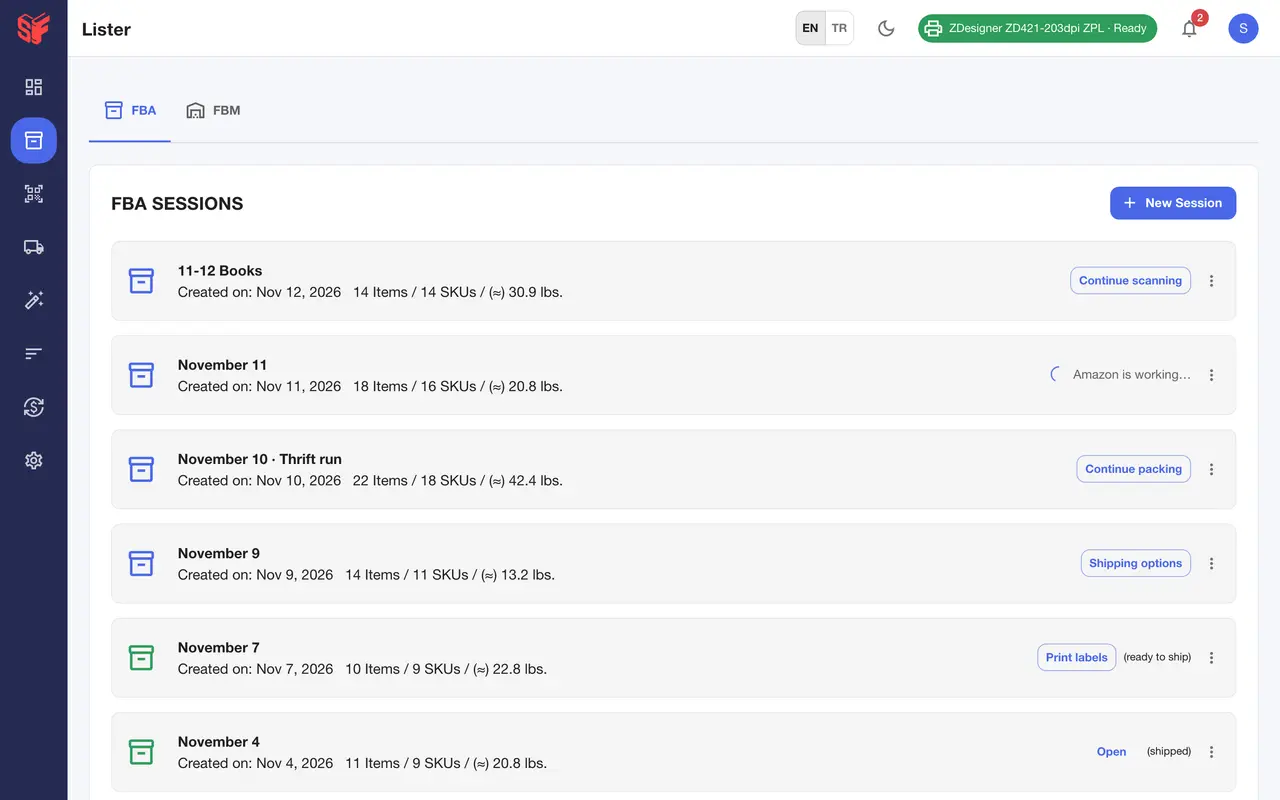
  6. Listing sessions from draft to shipped with item counts, estimated weight and the step each shipment is at.
    Fig. 5.6Lister, sessions — Actual SpineFlip screen. Sample data.
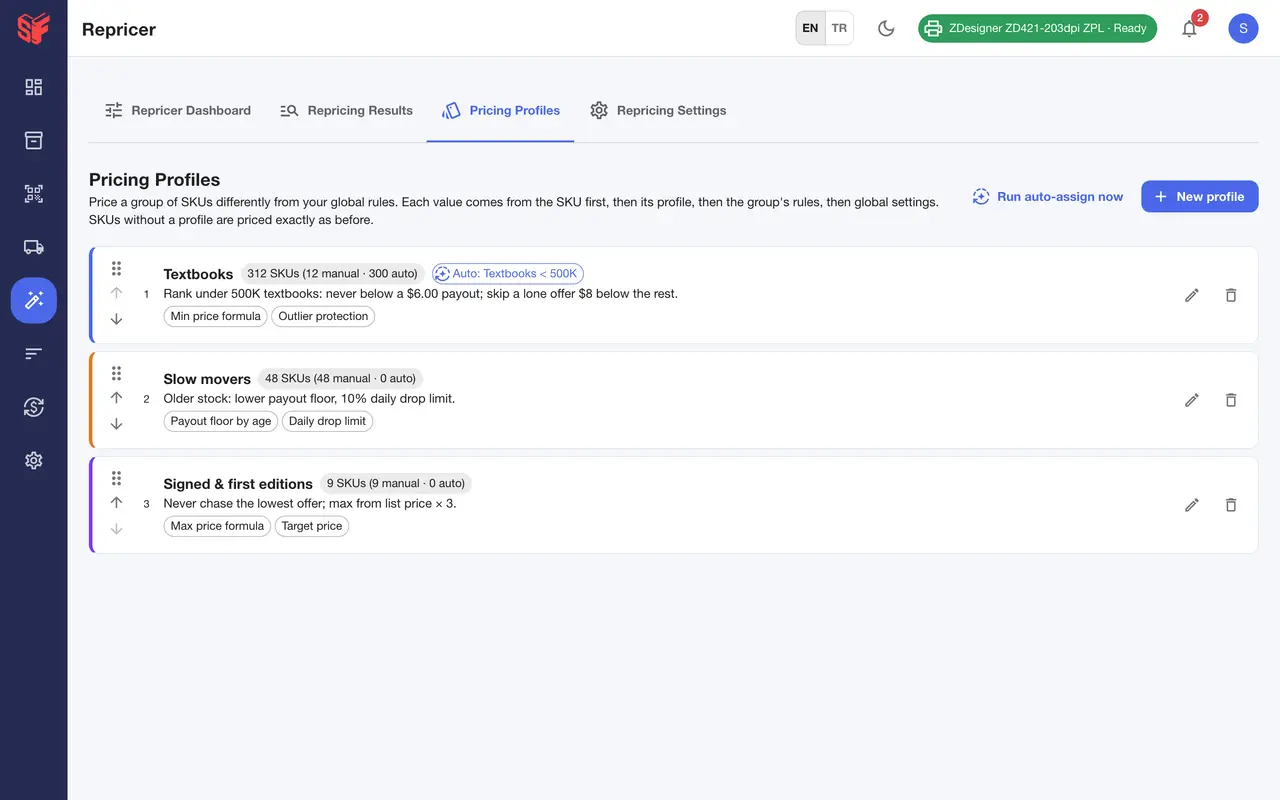
  7. Named rule sets for groups of SKUs, auto-assigned from saved Stock Manager views.
    Fig. 5.7Repricer, pricing profiles — Actual SpineFlip screen. Sample data.
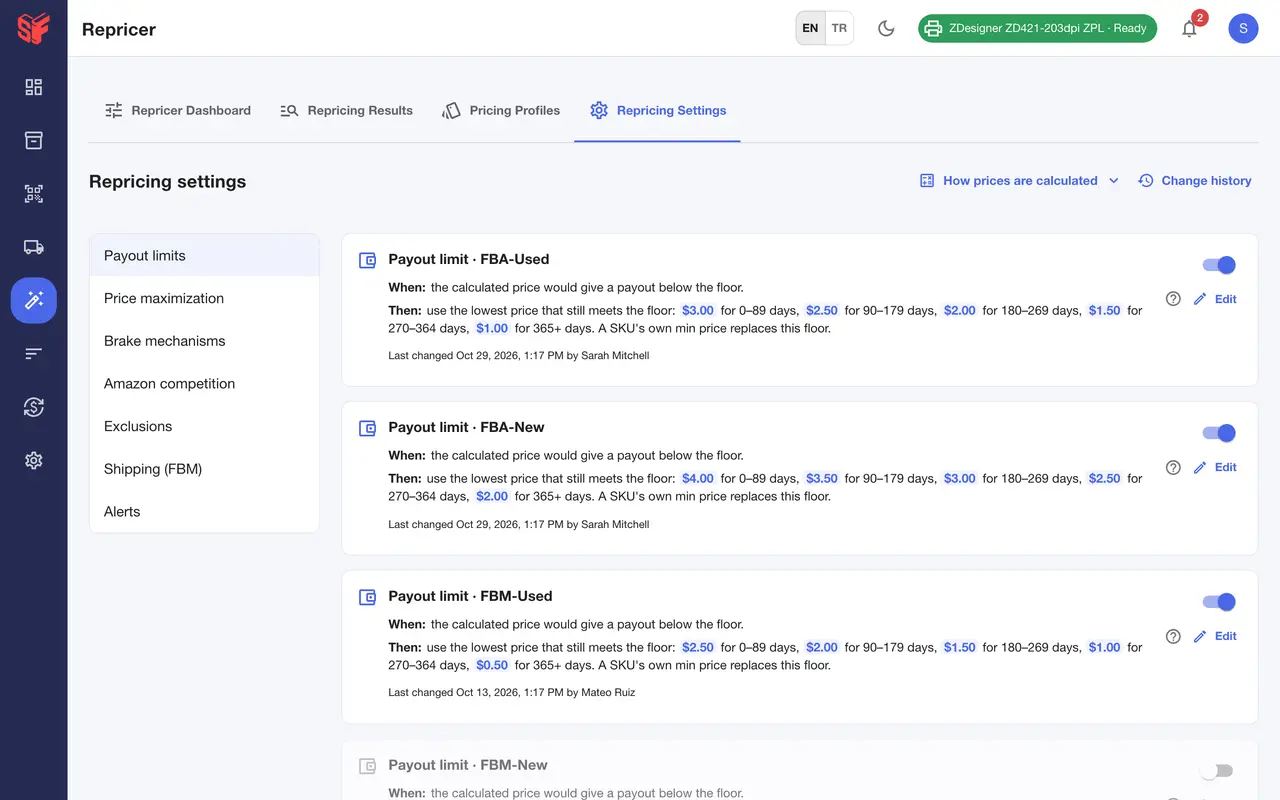
  8. Payout floors by inventory age, Buy Box increase, price-war brake, daily drop limit, outlier protection and more, with change history.
    Fig. 5.8Repricer, settings — Actual SpineFlip screen. Sample data.
  9. The repricer control panel in a phone browser: schedule, last run and the last 24 hours at a glance.
    Fig. 5.9Repricer on a phone browser — Actual SpineFlip screen. Sample data.
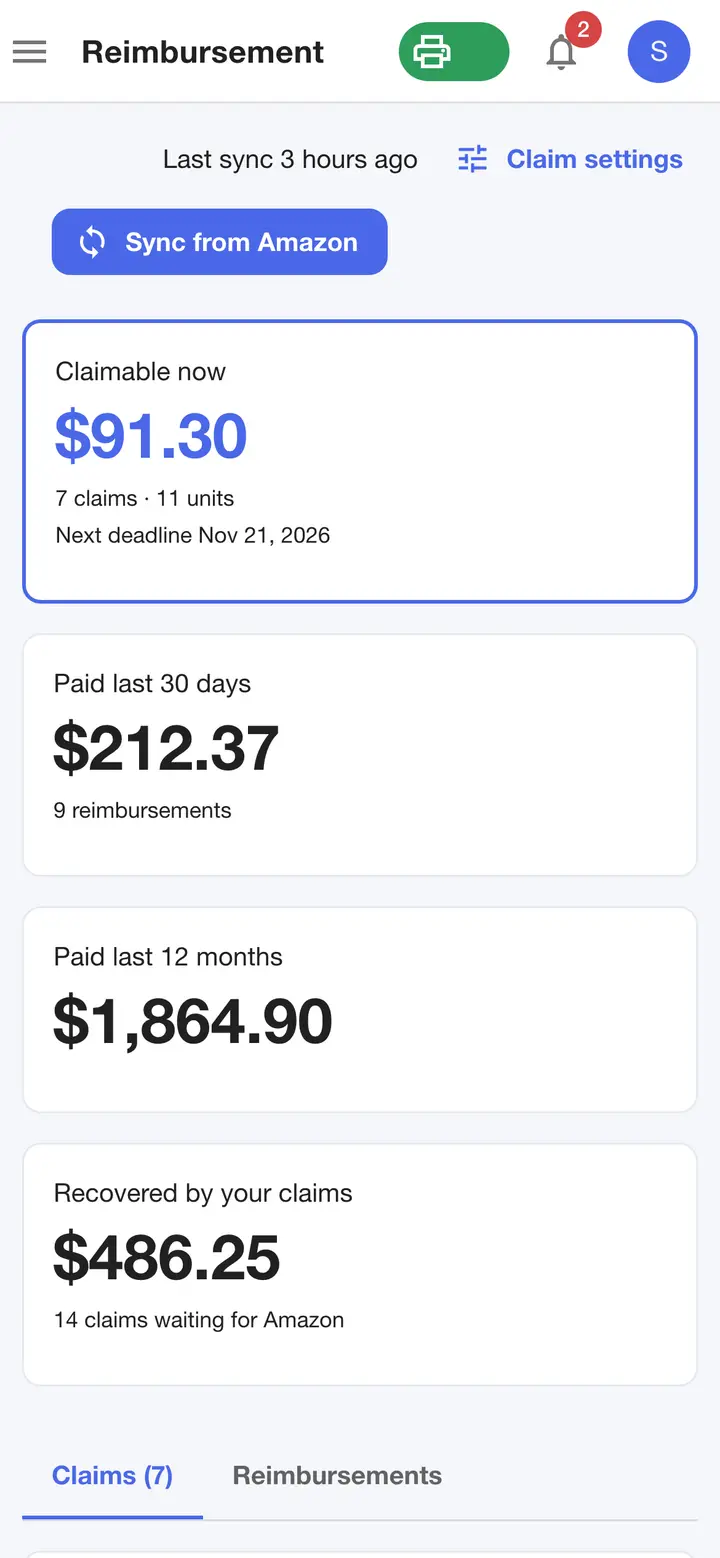
  10. Reimbursements in a phone browser: claimable value, next deadline and what Amazon has paid.
    Fig. 5.10Reimbursements on a phone browser — Actual SpineFlip screen. Sample data.
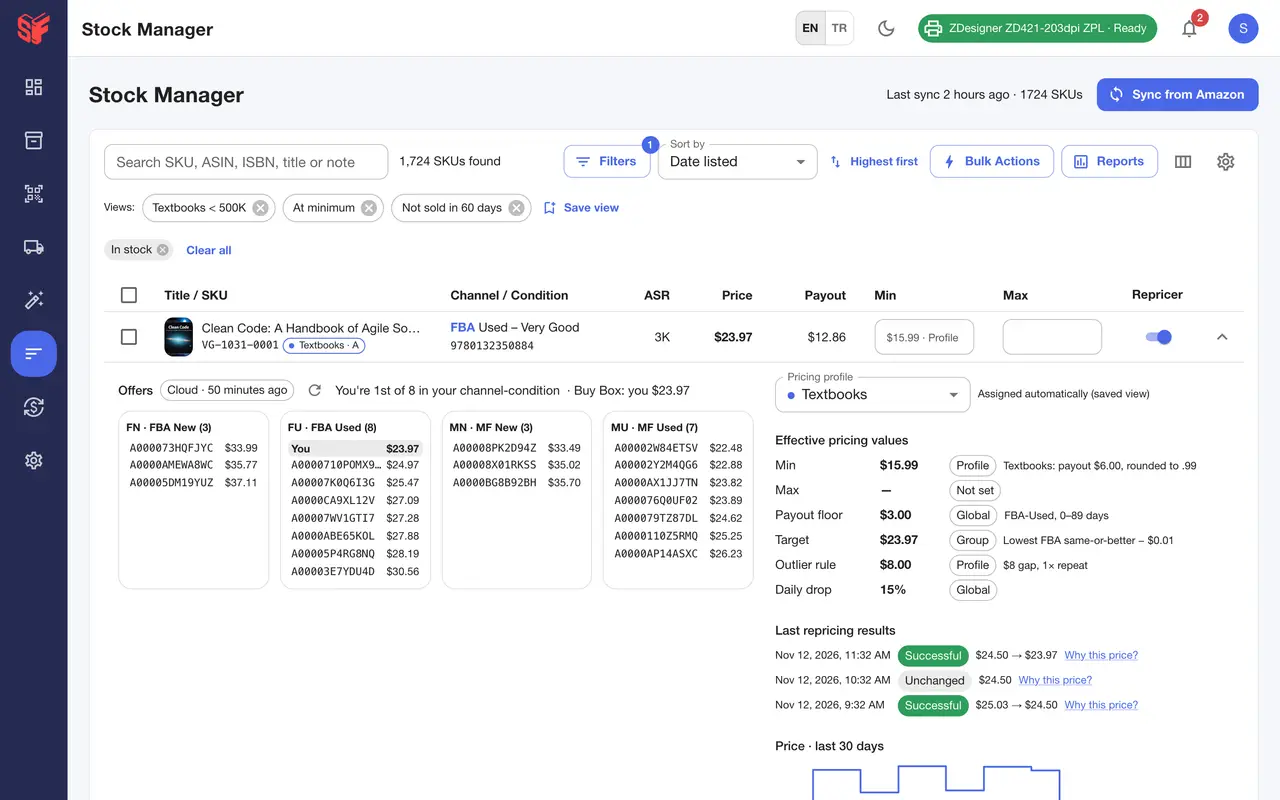
  11. Offers by channel and condition with your position, the effective min / max and where each comes from, last repricer results and a 30-day price history.
    Fig. 5.11Stock Manager, row details — Actual SpineFlip screen. Sample data.
  12. Dated release notes, newest first, in English or Turkish.
    Fig. 5.12What's new — Actual SpineFlip screen. Sample data.
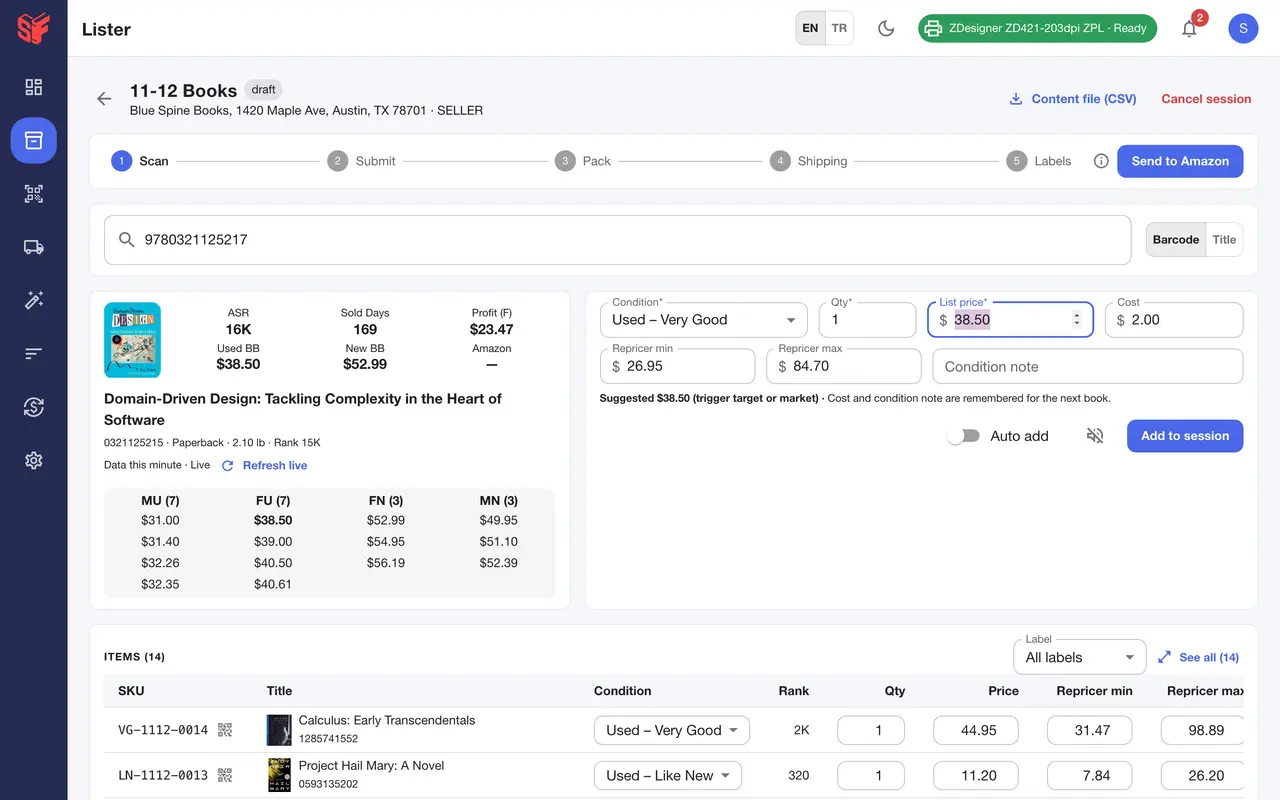
  13. The compact session screen: a slim five-step bar with Send to Amazon above the scan box, then a scanned book with its offers and FBA profit, the suggested list price and the repricer min / max from your default rules.
    Fig. 5.13Session, adding a book — Actual SpineFlip screen. Sample data.
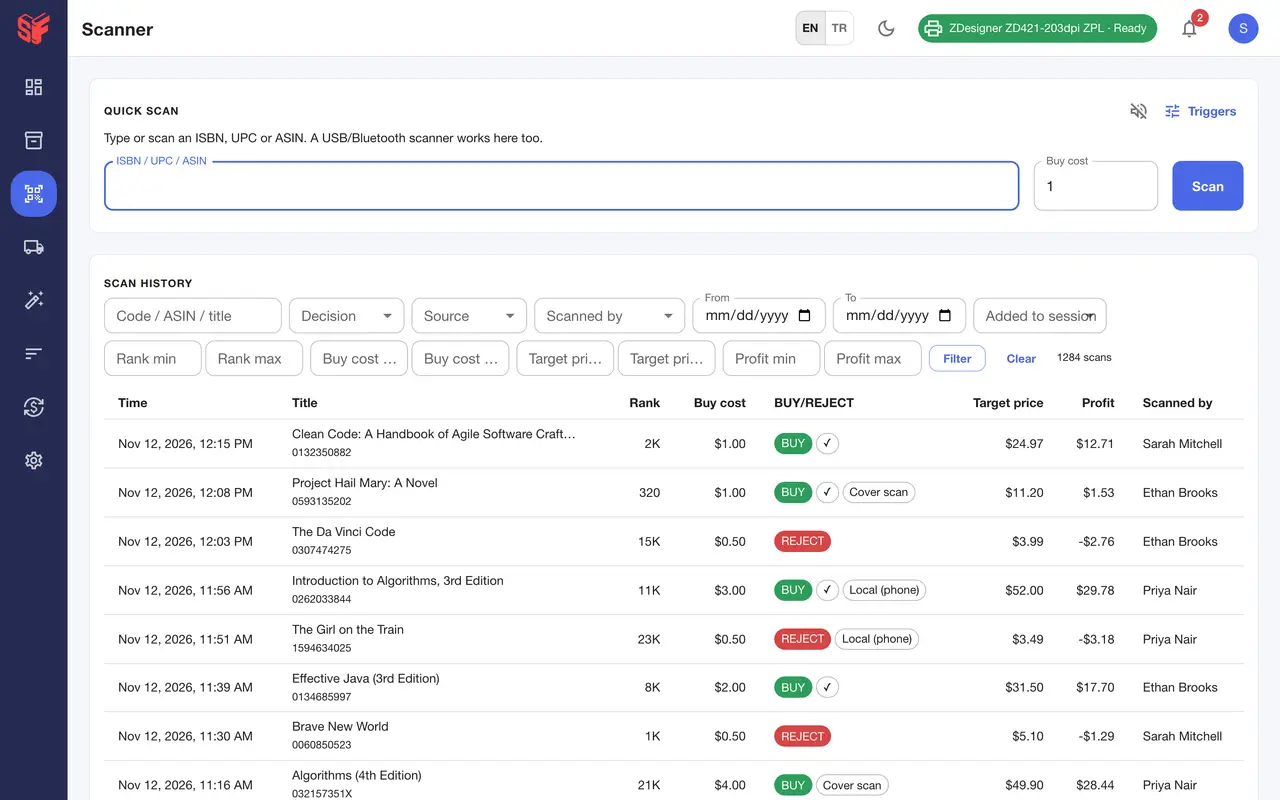
  14. Every scan from the phones and the panel, with filters for decision, source, user, dates, rank, cost and profit; books found by their cover on the phone are marked Cover scan.
    Fig. 5.14Scanner, scan history — Actual SpineFlip screen. Sample data.
The web panel works in a phone browser too.

Built for the whole book business, not one slice of it.

Most tools do one job. SpineFlip does the shelf-to-sale loop in one plan, and shows its work.

SpineFlip compared with three kinds of tools, from their public pages as of November 1, 2026
CapabilitySpineFlipBook scanner appsNote 1Standalone repricersNote 2Reimbursement servicesNote 3
Scan books with camera, ISBN text reading, BluetoothYesYes(common)Not listedNot listed
Offline decisions on the phone (Local mode, data refreshed daily)YesvariesNote 4Not listedNot listed
Your own BUY/REJECT rules with profit, ROI and demand checksYesYes(common)Not listedNot listed
List to Amazon and run the whole FBA shipment: scan-to-pack, placement options with exact quotes, box + FNSKU labelsYesNot listed(ScoutIQ, SellerAmp, Profit Bandit: no listing)Note 5Not listedNot listed
Scheduled repricing with a dry-run preview of every runYesNot listedpreview not listedNote 6Not listed
Daily price-drop limit + price-war brakeYesNot listeddaily cap not listedNote 7Not listed
Bulk price changes with 30-day undoYesNot listednot listedNote 8Not listed
Finds FBA reimbursement claims and drafts the claim textYesNot listedNot listedYes(they also file)
Commission on recovered moneynoneNot listedNot listed15–25 %Note 9
Pricing modelone plan, no revenue tiers, no SKU capsNote 10per apptiers by SKUs/revenueNote 11% of recoveries

Six differences, plainly

  1. One plan, the whole loop.

    Scouting, listing, the full FBA shipment, scheduled repricing, stock, review requests and a reimbursement finder — one subscription for Amazon US booksellers.

  2. Keep 100 % of what Amazon owes you.

    SpineFlip finds lost, damaged and short-received inventory and writes the claim; you file it in Seller Central. No commission; reimbursement services charge 15–25 %.Note 9

  3. See the repricing run before it goes live.

    Test on all SKUs or one, then read “Why this price?” for every decision.

  4. A floor that cannot be walked down.

    Payout or ROI floors by inventory age, a daily drop limit and a price-war brake.

  5. Undo bulk price changes for 30 days.

    Every bulk action needs a preview before it runs.

  6. Decide with no signal.

    Local mode keeps millions of books on the phone, refreshed daily, and decides BUY/REJECT on the device with your rules.

Sources and notes

  1. Book scanner apps checked: ScoutIQ, Scoutly, Bookz Pro (Bookzy), Profit Bandit, SellerAmp SAS, Scoutify — public pages as of 1 Nov 2026.
  2. Standalone repricers checked: Repricer.com, BQool, Aura, Seller Snap, SmartRepricer — public pages as of 1 Nov 2026.
  3. Reimbursement services checked: GETIDA, Seller Investigators, Refunds Manager, Bookz Pro Refund Hunter, Threecolts Seller 365 reimbursements — public pages as of 1 Nov 2026.
  4. Offline databases are common in book scanners (ScoutIQ, Scoutly, Bookz Pro). ScoutIQ’s help center states database results “may be up to 48 hours old” (intercom.help/scoutiq/…/scoutiq-scanning-modes, updated 21 Sep 2026); Scoutify’s FAQ lists no offline mode. SpineFlip’s Local data gets small daily update files.
  5. ScanPower and InventoryLab (listing tools) do scan-to-pack and labels; among the scanner apps listed, none lists FBA shipment creation on its public pages as of 1 Nov 2026.
  6. A dry-run / preview mode is not listed on the public pages of Repricer.com, BQool, Aura, Seller Snap or SmartRepricer as of 1 Nov 2026.
  7. A daily drop cap was not found on competitor pages as of 1 Nov 2026; price-war protection itself is common (Repricer.com, BQool, Seller Snap, Bookz Pro).
  8. Undo or rollback of price changes is not mentioned on any competitor page researched, as of 1 Nov 2026.
  9. GETIDA “starting at 20%” (getida.com/pricing), Seller Investigators 25% (FAQ), Refunds Manager 25% (terms of service), Bookz Pro Refund Hunter 25% (bookzpro.com/pricing), Threecolts Seller 365 15%/5% — all as of 1 Nov 2026.
  10. SpineFlip: one plan with every feature and 3 phones that scan included, no daily scan limits and no SKU limit on the repricer; the plan price does not change with revenue. Web panel users need no seat.
  11. Bookz Pro rises to $220/mo above $18K monthly revenue (bookzpro.com/pricing); Aura and Seller Snap tier by revenue; Repricer.com, BQool and Seller Snap cap SKUs/listings — as of 1 Nov 2026.

Built for how you sell

The same account works for one scout with a phone and for a team that ships every week.

With no internet the answer comes from the book data stored on the phone, marked Local, under an offline banner that offers to switch to Local mode.

Solo book scout

At the shelf, with or without signal.

  • Scan barcodes with the camera or a Bluetooth scanner; when you are online, scan the cover of a book with no barcode.
  • Local mode decides with no internet, for up to 72 hours after the app last connected.
  • Speed mode shows only the decision, profit and rank.
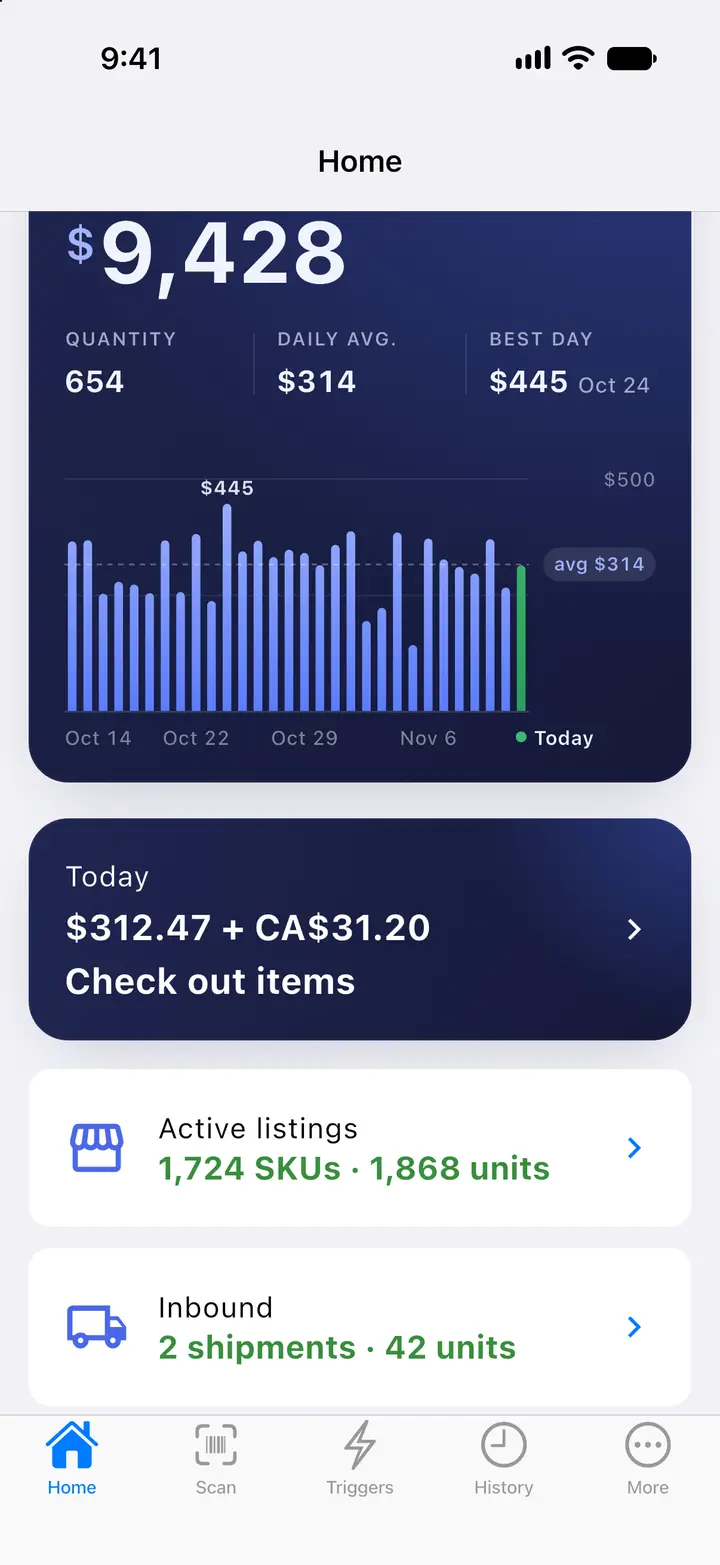
Home scrolled a little: the sales total and chart, the Today card with today’s sales, active listings with SKUs and units, and the units on their way to Amazon in your FBA shipments.Home scrolled a little: the sales total and chart, the Today card with today’s sales, active listings with SKUs and units, and the units on their way to Amazon in your FBA shipments.

Part-time reseller

From a few boxes to a shipment, in one place.

  • Sessions collect what you bought, from the phone or the web.
  • The five-step wizard takes them to an FBA shipment with labels.
  • The repricer runs on your schedule, and your sales show on the phone.
Owner, Admin, Lister and Scanner roles, invitations by email, and the phones that use scanner seats.

FBA team

One account, every role.

  • Owner, Admin, Lister and Scanner roles, with a seat for each phone that scans.
  • Triggers shared across the team’s phones and the web panel.
  • Saved views and bulk stock tools with a preview and 30-day undo.

One plan. Every feature.

SpineFlip Pro comes with every feature and 3 phones that scan. Our launch price is $69 a month instead of $99, or $599 a year, which saves $229 against paying monthly.

  • Every feature included
  • No daily scan limits
  • No SKU limit on the repricer
  • Web panel users need no seat
  • 1 month free with 3 phones, no credit card

SpineFlip Pro

Launch price
Billing

Regular price $99/month

$69/month

Billed every month. Cancel anytime.

Regular price $1,188/year

$599/year

About $49.92 a month, paid once a year.

  • 3 phones that scan, included
  • Every feature, no daily scan limits
  • Web panel for the whole team, no seat needed
  • 1 month free, no credit card

Launch price for our first customers. USD, before tax.

Questions, answered.

All questions
Does SpineFlip work without internet?

Yes, in Local mode on the phone. Book data is stored on the phone, and the BUY or REJECT decision is made on the phone with your default trigger profile. Local data covers millions of books: one download, then small daily update files, and the app updates itself on Wi-Fi when the data is older than 24 hours. Offline scans queue and upload later, and offline scanning keeps working for up to 72 hours after the app last connected. Finding a book by its cover needs an internet connection.

Which Amazon marketplaces does SpineFlip support?

The US marketplace: amazon.com, in US dollars. If you also sell on Amazon.ca, Amazon.com.mx or other marketplaces, those sales show separately in their own currency and are not added to your dollar totals. Listing and selling on other marketplaces is not supported.

How does the free month work?

Your free month starts when you connect your Amazon seller account, and no credit card is needed. For 30 days you get every feature, with 3 phones included. Subscribe anytime in Settings → Billing: the free days you have left carry over, and your card is charged when the free month ends. If you subscribe in the last 2 days of the free month, or with a card already used for free days on another SpineFlip account, the paid subscription starts and your card is charged right away. If you do not subscribe, nothing is charged; when the free month ends, scanning, listing, repricing and shipping stop until you subscribe, and your data is kept. Each Amazon seller account gets one free month, on the first SpineFlip account it is connected to. If the Amazon seller account you connect was connected to another SpineFlip account first, there is no free month: the setup page tells you, and your paid subscription starts when you subscribe. There is no free plan.

Which label printers work?

FNSKU labels print silently on Zebra printers (for example ZD411, ZD421 and GK420d) through Zebra Browser Print, and on DYMO LabelWriter 450, 4XL, 550 and 5XL through DYMO Connect. Other thermal printers, such as Rollo or Munbyn, print an exact-size PDF, and laser or inkjet printers use 30-up Letter sheets (Avery 5160 compatible). Box labels print on 4×6 thermal labels, on Letter sheets with 2, 4 or 6 labels, or on plain paper. A guided setup ends with a test print.

Scan smarter. Ship faster.

Try every feature free for a month, with 3 phones included. No credit card: just connect your Amazon seller account.

  • 1 month free
  • No credit card
  • Just connect your Amazon seller account